












Three settings make a Palworld server a PvP server: bIsPvP, bEnablePlayerToPlayerDamage and bEnableDefenseOtherGuildPlayer. All three are Off by default. Turn all three On and restart. Pocketpair warns that PvP on a dedicated server “is only a trial feature and is not covered by support”.
The three settings
| Panel | Key | Where |
|---|---|---|
| PvP | bIsPvP | Game settings, group Death and PvP |
| Players can hurt each other | bEnablePlayerToPlayerDamage | Game settings, group Death and PvP |
| (named by its key) | bEnableDefenseOtherGuildPlayer | Game settings, under Advanced |
The Config Editor also has Friendly fire (bEnableFriendlyFire). It is not one of Pocketpair’s three. Its help text says: “Attacks can hurt players and Pals on your own side.” Leave it Off unless you want that.
Turn it on in the panel
- Open the Config Editor page.
- Choose the source Game settings.
- In Death and PvP, switch PvP (1) and Players can hurt each other (2) On. Leave Friendly fire (3) Off.
- At the bottom, in the card about more settings, choose Show them. Find
bEnableDefenseOtherGuildPlayerand switch it On. - Choose Save.
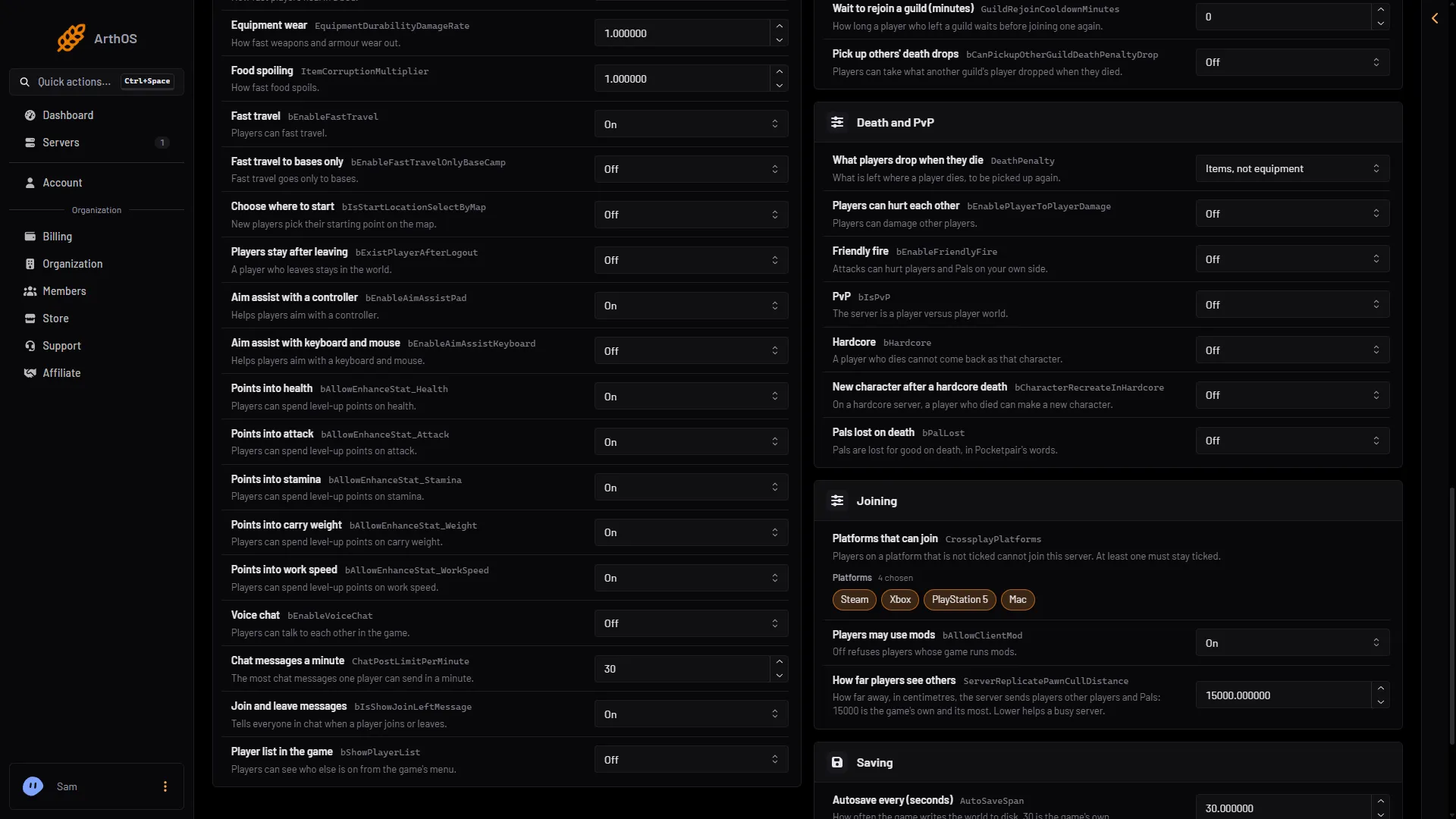
- PvP
- Players can hurt each other
- Friendly fire
If the server is running, the panel says “Saved, waiting for the next restart: (names).” Choose Restart now when players are ready. If it is stopped, the changes apply at the next start. Tell players before you switch on PvP on a world they already play.
What changes with PvP on
Pocketpair lists these changes:
- Players can harm each other.
- Base Pals engage hostile players who enter your base, over a wider area.
- Damage taken by airborne players and ridden Pals goes up. Damage players deal to summoned and base Pals goes down.
- Players can open chests owned by other guilds.
- Melee damage to other players’ structures is reduced.
- The minimum distance between bases grows.
- The distance at which player names and damage values show changes.
- You are told when your base is attacked, and cannot build or repair in it during the fight.
- Some weapons have their range and damage tuned for PvP.
- Missions are disabled.
Pocketpair’s recommended settings
These are optional. Each is in the Config Editor, in Game settings.
- Points into health and Points into attack Off: players cannot raise their HP or Attack.
- Fast travel to bases only On, to stop fast travel as an escape. See fast travel settings.
- Players stay after leaving On: a player who logs out sleeps where they were, so logging out is no escape.
- Choose where to start On.
- What players drop when they die set to Everything, Pals in the party too, and Pick up others’ death drops On. See death penalty.
- No building near fast travel points On, and Hide other guilds’ base borders Off, so base areas show. See building limits.
- Players per guild 4 and Bases per guild 2, and Wait to rejoin a guild (minutes) 60. See guild settings.
- Buildings per player 1000, in Bases and building (its key is
MaxBuildingLimitNum). Pocketpair documents it as the cap on buildings each player can have (0 means no limit) and uses 1000 in its PvP example. - Aim assist with a controller (
bEnableAimAssistPad, Players group). Pocketpair’s PvP page says that when it isFalse, aim assist is off for players with controllers. Its example on that page showsTrue, which does not match its own heading. The default is On. - The respawn settings
BlockRespawnTime(5),RespawnPenaltyDurationThreshold(1800) andRespawnPenaltyTimeScale(2), under Advanced. See respawn penalty. - Banned technologies through
DenyTechnologyList. Pocketpair’s PvP line blocksGrapplingGuntoGrapplingGun5,GuildChestand sevenSkillUnlock_ids. Open its PvP page for the full line. See deny technology list. - PvP rewards. See PvP item drops.
The Map on a PvP server
On a PvP server, the panel’s Map does not show where players are, unless you have the live map’s private permission (live-map.private). The page says: “This is a PvP server: where players are is shown only to those who may see private places.” Bases, guilds and offline players already need that permission. Ask a role owner to give it to your admins. See the live map.
By hand
The settings are in Pal/Saved/Config/LinuxServer/PalWorldSettings.ini. The file has one OptionSettings=(...) line. Inside that line, change these pairs and keep the commas between them:
bIsPvP=True,bEnablePlayerToPlayerDamage=True,bEnableDefenseOtherGuildPlayer=TrueStop the server first: the game writes the file again when it stops. With server mods on, this file is in another folder under Pal/Saved/Config. Open Config in Files and use the folder that holds it. The Config Editor page finds it for you, and Edit the whole file as text there is safer than editing in Files.
If it does not work
- Players still cannot hurt each other. Check all three switches. The one under Advanced is easy to miss.
- Nothing changed. The server has not restarted since you saved.
- The world has its own settings. A
WorldOption.savfile ignores these if that file holds them. See WorldOption.sav.
More about the game: Palworld servers.
Sources: docs.palworldgame.com: Pvp, docs.palworldgame.com: Configuration