












The Discord page does two things for a Palworld server. It keeps a status message up to date in a channel, and it posts events such as players joining, leaving, being kicked or banned, and the server starting, stopping or crashing.
The status message
A bot keeps one message in a channel up to date every minute. For Palworld the message shows:
- the server name, and whether it is up
- Players, as a count out of the most it allows, and the names of who is on
- the in-game day (“Day N”), the server’s FPS, how long it has been up, and the game version
- a note “password protected” when the server has a join password
- when it was last updated
A stopped server shows that it is stopped. The join address is left out unless you switch on Show the join address. Players find a Palworld server by name, so most servers keep it off.
To link a channel:
- Open the Discord page.
- In Status in Discord (1), add the bot to your Discord server with Add the bot (2).
- Choose Link your account. The panel checks that you run that Discord server.
- In Discord, right-click the channel and choose Copy Link.
- Back on the page, choose Link a channel (3) and paste it into Channel link or ID.
- Choose Link channel. The message appears and updates every minute.
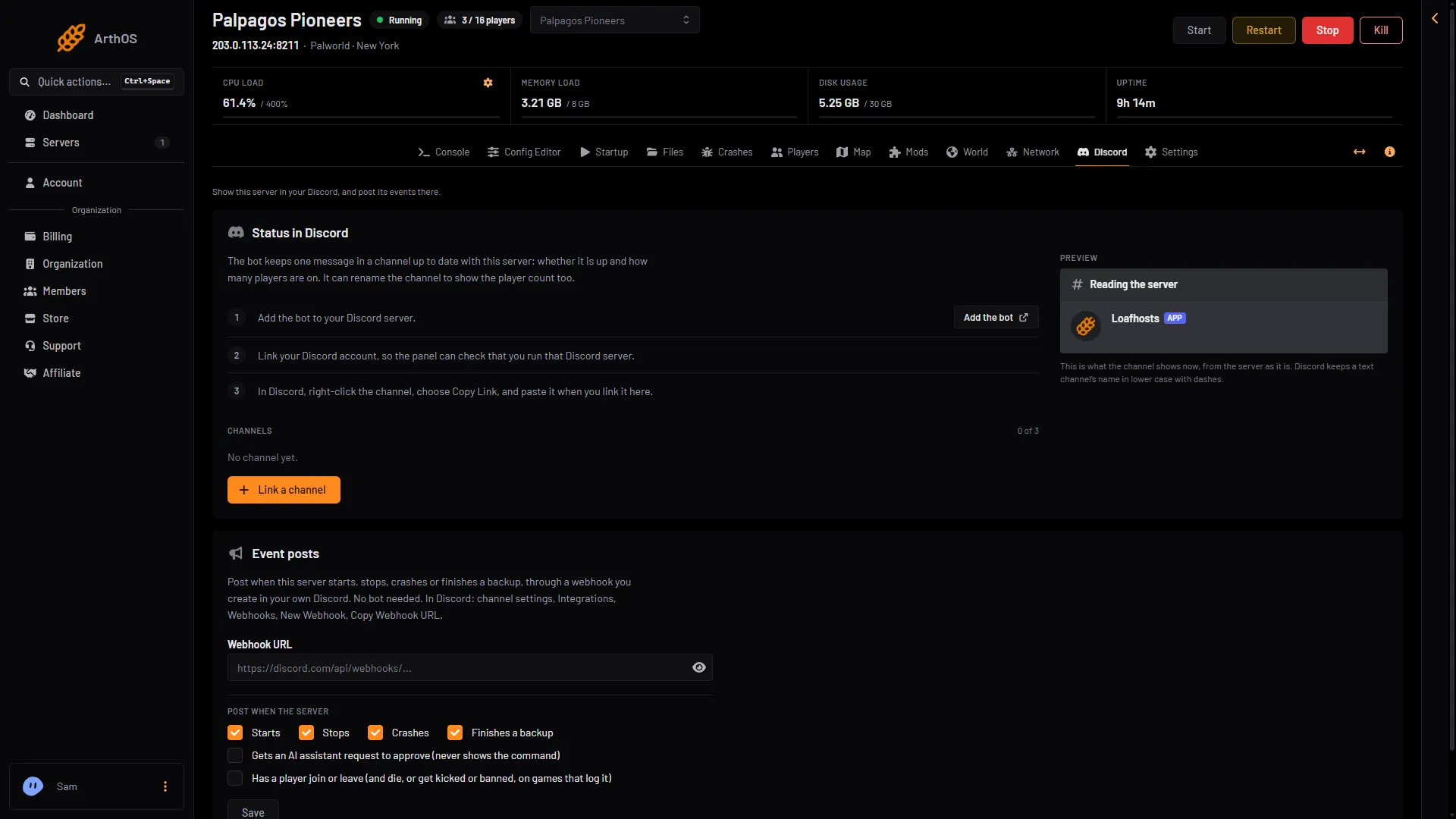
- Status in Discord
- Add the bot
- Link a channel
- Event posts
- Webhook URL
- Player posts
You can also let the bot rename the channel to show the server. Choose Rename the channel to show the server when you link it. Discord limits how often a channel can be renamed, so the name changes only every few minutes.
Update now refreshes the message. Unlink deletes it.
Event posts
Event posts use a webhook, so no bot is needed.
- In Discord, open the channel’s settings. Choose Integrations, Webhooks, New Webhook, then Copy Webhook URL.
- On the Discord page, find Event posts (4 in the picture above) and paste the address into Webhook URL (5 in the picture above).
- Under Post when the server, tick what you want: Starts, Stops, Crashes, Finishes a backup, and the player option, “Has a player join or leave” (6 in the picture above).
- Choose Save. Events are posted within 20 seconds, because the panel checks every 20 seconds.
- Choose Send a test to check the channel.
For Palworld the player option posts:
- Player joined
- Player left
- Player kicked, with the reason and who did it
- Player banned, with the reason and who did it
- Player unbanned
The player posts come from the server’s log. The game’s API is how the panel talks to the game. The panel keeps it on while the Admin password is 16 characters or more (a new server gets a 20-character one). The posts do not depend on it.
Remove stops the posts. The webhook stays in Discord until you delete it there.
A Start server button
If the server goes into standby when nobody plays, the status message can carry a Start server button. Anyone in the channel can press it to wake the server. Switch it on in Settings, Standby, under Wake link, Options: Add a Start server button to Discord status messages. See standby and the wake link.
If it does not work
- No channel can be linked. The panel needs the bot to be on your Discord server, and your Discord account linked.
- No posts arrive. Choose Send a test. A webhook address starts with
https://discord.com/api/webhooks/. If the webhook was deleted in Discord, the page says posting stopped. Save a working address to start again. - The status says the server is not answering. The panel could not reach it for a moment. It tries again within a minute.
More about the game: Palworld servers.