












Four settings control how players move around and where they appear. You change them in the Config Editor, under Game settings, in the group Players. They apply at the next start of the server.
The four settings
| Setting | Key | Default |
|---|---|---|
| Fast travel | bEnableFastTravel | On |
| Fast travel to bases only | bEnableFastTravelOnlyBaseCamp | Off |
| Choose where to start | bIsStartLocationSelectByMap | Off |
| Players stay after leaving | bExistPlayerAfterLogout | Off |
The defaults are the ones a new server starts with on the 1.0.5 server file.
- Fast travel. Pocketpair: “Enable fast travel.” Turn it off and players cannot fast travel at all.
- Fast travel to bases only. Pocketpair: “Restrict fast travel to between bases only.” Fast travel still works, but only between bases.
- Choose where to start. Pocketpair: “Whether to allow players to choose their starting location.” On, a new player picks the starting point on the map.
- Players stay after leaving. Pocketpair: “Whether players enter a sleeping state at their current location when logging out.” The panel’s help says a player who leaves stays in the world.
Why servers use them
Pocketpair’s PvP page uses these settings together. Limiting fast travel “prevents players from using Fast Travel to avoid combat.” When players stay after leaving, “players lie down and sleep where they logged out,” so logging out no longer lets them escape a fight. Pocketpair’s PvP example turns on Fast travel to bases only, Players stay after leaving and Choose where to start. See Palworld PvP server settings.
Players who leave stay in the world at that spot. Turn Players stay after leaving on only if you want that.
In the panel
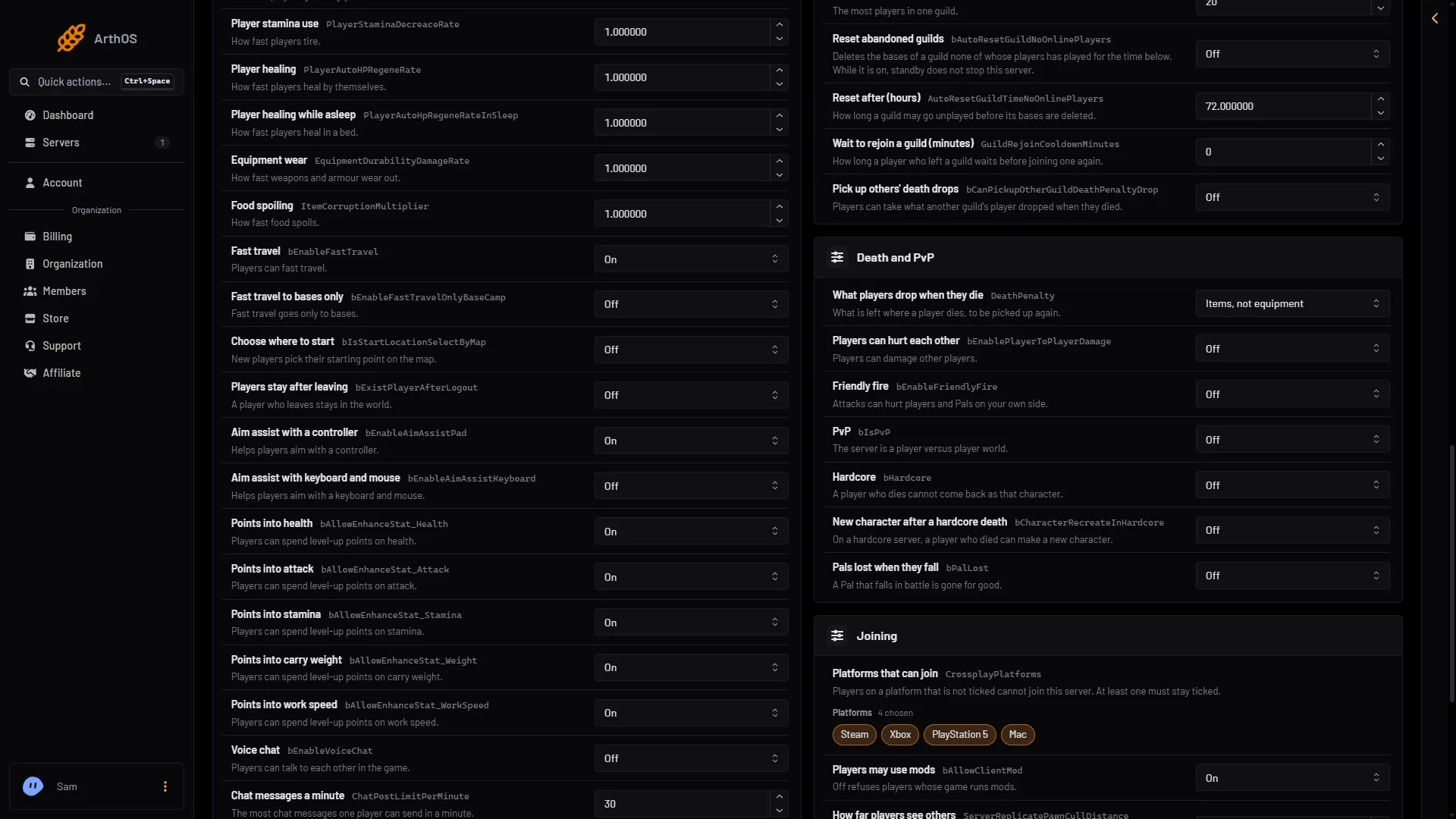
- Fast travel
- Bases only
- Choose start
- Stay after leaving
- Open the Config Editor page.
- Choose the source Game settings.
- Open the group Players.
- Change the rows you want. They are Fast travel (1 in the picture), Fast travel to bases only (2), Choose where to start (3) and Players stay after leaving (4). Each one is On or Off.
- Save.
If the server is running, the panel shows “Saved, waiting for the next restart: (names).” Choose Restart now to apply the change. A restart disconnects everyone, so warn players first, for example with Restart with a warning on the Players page. If the server is stopped, the change is written at once.
By hand
The file is Pal/Saved/Config/LinuxServer/PalWorldSettings.ini. With server mods on, these two files are in another folder under Pal/Saved/Config. Open Config in Files and use the folder that holds them, or use the Config Editor, which always finds them. Edit the file only while the server is stopped. Inside the one OptionSettings=(...) line, change these pairs and keep the commas between them:
bEnableFastTravel=True,bEnableFastTravelOnlyBaseCamp=True,bIsStartLocationSelectByMap=True,bExistPlayerAfterLogout=TrueIf it does not work
- Fast travel still works. The server has not restarted since you saved.
- The settings are ignored. A world with its own
WorldOption.savignores the Config Editor’s settings for the settings that file holds. See the WorldOption.sav guide.
More about the game: Palworld servers.
Sources: docs.palworldgame.com: Configuration, docs.palworldgame.com: Pvp