












A Palworld server runs out of memory when the game wants more than the server has. The game then stops, often with no warning. The Crashes page tells you if that was the cause. The fix is to use less memory or to give the server more.
Check that it was memory
The first picture shows a start that ended for lack of memory.
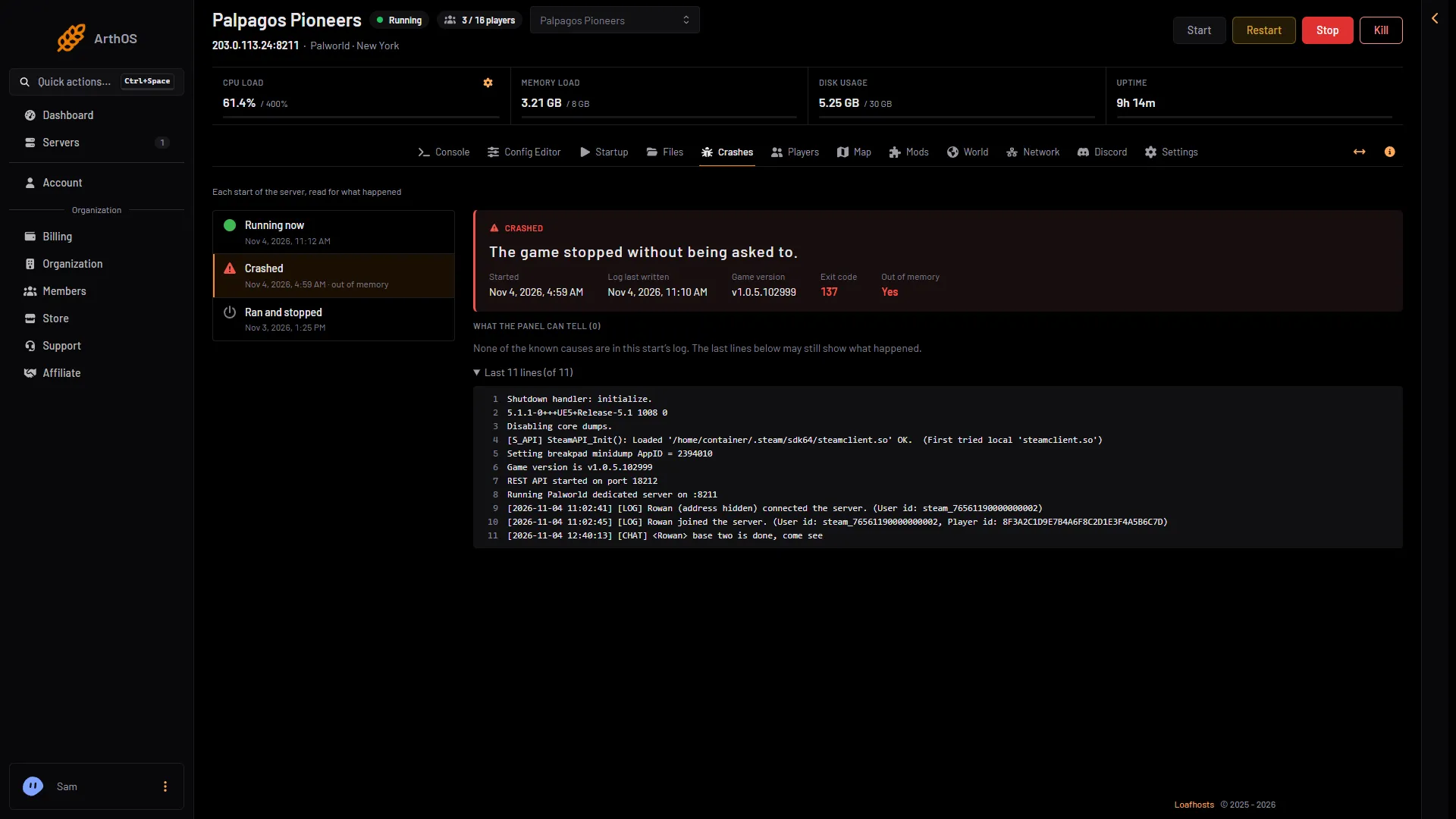
- The crashed start
- Out of memory: Yes
- Open the Crashes page.
- Pick the start that ended badly (1). Each start of the server is listed, with how it ended: Crashed, Ran and stopped and so on. A start the machine ended for lack of memory shows Crashed with “out of memory” under it.
- In its details, look at Out of memory (2). It says Yes when the server ended for lack of memory. The page also says “The game stopped without being asked to.” and shows Exit code 137.
- Under What the panel can tell, the count is usually (0) for this kind of crash. That is normal. The machine ended the game, so it could not write a line about it. The finding The server ran out of memory appears only when the game did write one, such as “out of memory” or “failed to allocate”.
When that finding does show, the panel’s advice under it reads: “Palworld needs about 8 GB with a few players and more as bases and Pals grow. Raise the server’s memory, or restart it daily to clear what builds up.”
How much memory Palworld needs
Pocketpair’s own guide recommends 16 GB of memory, and 32 GB for larger servers. It says 8 GB “is also bootable, but increases the possibility of server crashes due to out of memory”. Pocketpair recommends more than the 8 GB the panel’s finding names.
A new or quiet Loafhosts server uses about 1.2 to 2.2 GB. That number grows as players build bases, work more Pals and join. The Small plan has 6 GB, Standard has 8 GB and Large has 12 GB, so all three sit under Pocketpair’s recommendation. A busy server with a big world can reach the limit. Small also has 2 cores, below Pocketpair’s 4.
What makes memory grow
The Config Editor names these in its help lines:
- Wild Pals. “Higher costs the server more memory and CPU.”
- Pals working at a base. “More costs the server more.”
- Bases, Pals and players, as they are added to the world.
More bases per guild raises the server’s processing load, not its memory. For that, see server lag.
Fixes
- Restart every day. A daily restart frees the memory the game has used. Use a schedule, with a warning to players first: see scheduled restarts.
- Use fewer Pals at bases. Open the Config Editor page, choose Game settings, and lower Pals working at a base.
- Use fewer wild Pals. In the same place, lower Wild Pals.
- Choose a bigger size. Open Billing, the service, then Customize, then Choose a new size, and pick one with more memory. If a renewal invoice is waiting, a bigger size needs it paid first.
Changes in Game settings are written before the next start. Choose Restart now to apply them. A restart disconnects everyone, so warn players first.
If it does not work
- Out of memory says No but the server crashed. The cause is something else. Read the last lines and any findings on the Crashes page and see Palworld server crash.
- It runs out again soon after a restart. The world needs more memory than the plan has. Lower the settings above, or choose a bigger size.
- The finding is missing. The panel reads the last ten starts only. An older start is no longer listed.
More about the game: Palworld servers.
Sources: docs.palworldgame.com: Requirements, docs.palworldgame.com: Configuration