












When a Palworld server crashes, open the Crashes page. It lists every start of the server, says how each one ended, and gives a fix when it recognises the cause. With the default autosave (every 30 seconds), a crash normally loses about the last 30 seconds. If the world could not be saved, more can be lost.
Read the Crashes page
The page keeps the newest ten starts, one log for each start. Pick a start in the list Starts. The outcome tells you what happened:
- Running now: the server is up and players can join.
- Starting: the server is still starting.
- Ran and stopped: the server started, ran and stopped normally.
- Crashed: the game stopped without being asked to.
- Failed to start: the server never got as far as letting players in.
- Ended early: the log ends without saying how the server stopped.
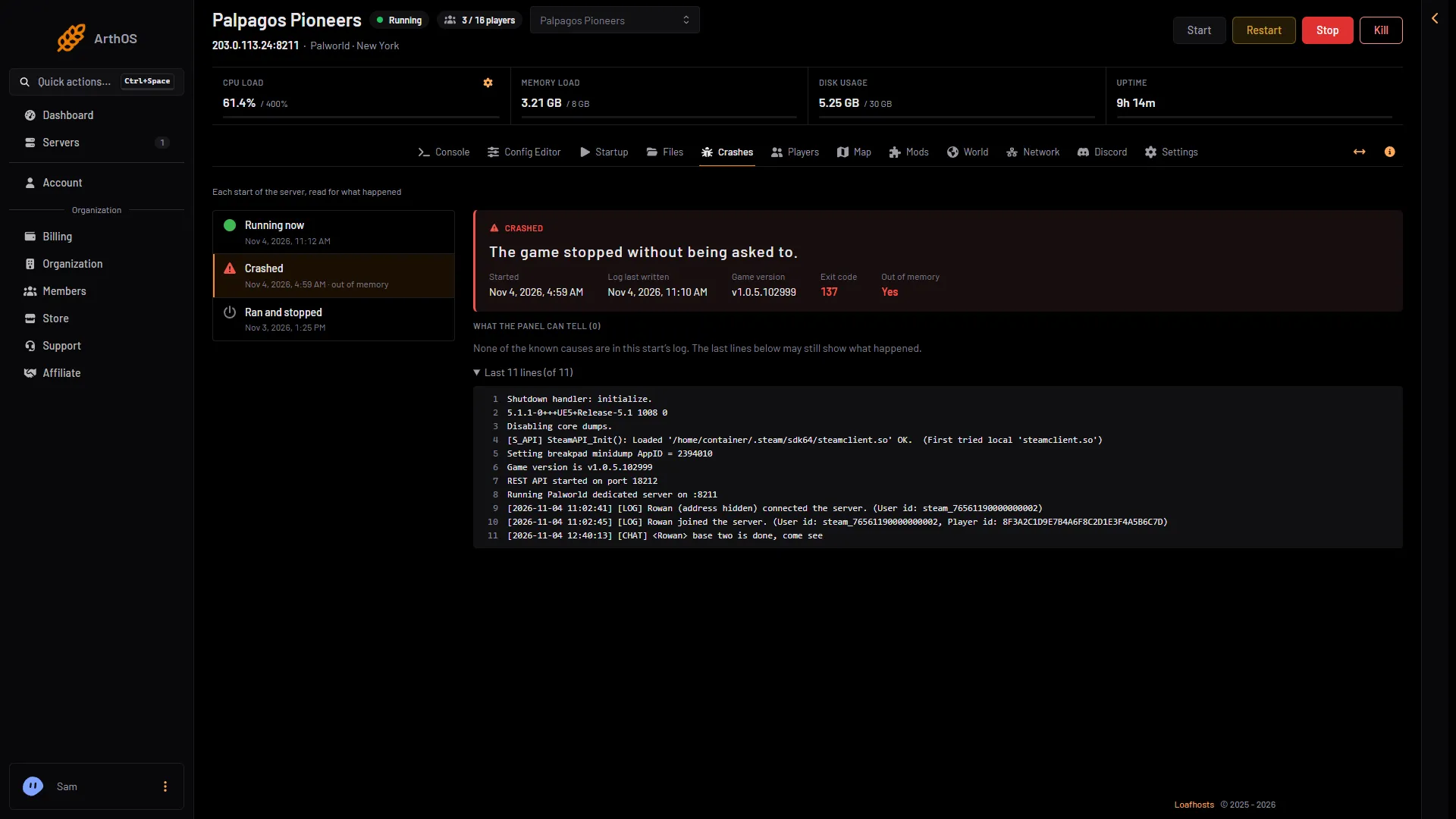
For the start you picked, the page also shows Started, Log last written, Game version, Exit code and Out of memory. Below that is What the panel can tell, then the last lines of the log.
- A crash
- Game version
- Out of memory
Pick the crashed start (1) in the list. Its Game version (2) and Out of memory (3) are on the right.
When the machine ended a start because it ran out of memory, the start shows Crashed with “out of memory”, “The game stopped without being asked to.”, Exit code 137 and Out of memory Yes. Its log usually has no line about it, because nothing could be written. What the panel can tell (0) is normal there.
What the panel can tell
When the log shows a known cause, the panel names it and gives a fix.
- The game crashed. Start it again. If it crashes at the same moment again, an update may fix it. Check the World page for a newer game version. See version mismatch for how to update.
- The server ran out of memory. The panel says: “Palworld needs about 8 GB with a few players and more as bases and Pals grow.” Pocketpair recommends 16 GB and says 8 GB “is also bootable, but increases the possibility of server crashes due to out of memory”. A new or quiet Loafhosts server uses about 1.2 to 2.2 GB (measured), and use grows with bases, Pals and players. Raise the server’s memory, or restart it every day to clear what builds up. To raise it, open Billing, the service, Customize, then Choose a new size. If a renewal invoice is waiting, a bigger size needs it paid first. The line Out of memory says Yes for that start. See Palworld out of memory.
- A port the game needs was in use. Restart the server. If it happens again, ask support to check its ports.
- The world could not be loaded. Put back one of the game’s own backups on the World page. See world backups.
- The world could not be saved. This is usually a full disk. Free some space (old world copies count) and save again.
- The game was stopped without saving. It was stopped by a signal, not asked to shut down, so anything since its last autosave is lost. Stop the server from the panel, which asks it to save first.
If none of these appear, the page says none of the known causes are in the log. That is also what you see for Failed to start and Ended early: the panel gives no fix for them. Read the last lines, which can still show what happened.
How much a crash loses
The game autosaves every 30 seconds by default, so a crash normally loses about the last 30 seconds. If the world could not be saved, more can be lost. With the game’s backups on, the World page also keeps copies of the world to go back to.
When you stop or restart the server from the panel, it saves the world first while the game’s API is on. The game’s API is how the panel talks to the game. The panel keeps it on while the Admin password is 16 characters or more (a new server gets a 20-character one). With the API off, Save now does not work either: wait for the next autosave, then restart, or set an admin password of 16 or more first. Kill never saves.
What to do
- Open the Crashes page and read the newest start that Crashed or Failed to start.
- Do what the finding says.
- Start the server and watch the Console.
- If it crashes again at the same place, check for a newer Game version on the World page.
- If a mod is on the server, open the Mods page. A mod row can say “The game did not set it up at its last start.” with “Its log from that start says why.” Turn the mod off to test: see remove a mod and mods not loading.
If you need more help
Open a ticket and give the time of the crash and the lines from the end of the log.
More about the game: Palworld servers.
Sources: docs.palworldgame.com: Requirements