












A Palworld server lags when it has too much to work out each moment. The game gives you one number for this, Server FPS. Look at it first, then lower the things that cost the most.
See how hard the server is working
- Open the Players page.
- Find Server FPS (1) in the stats at the top. Next to it, the panel shows how long each frame takes, for example
16 ms a frame.
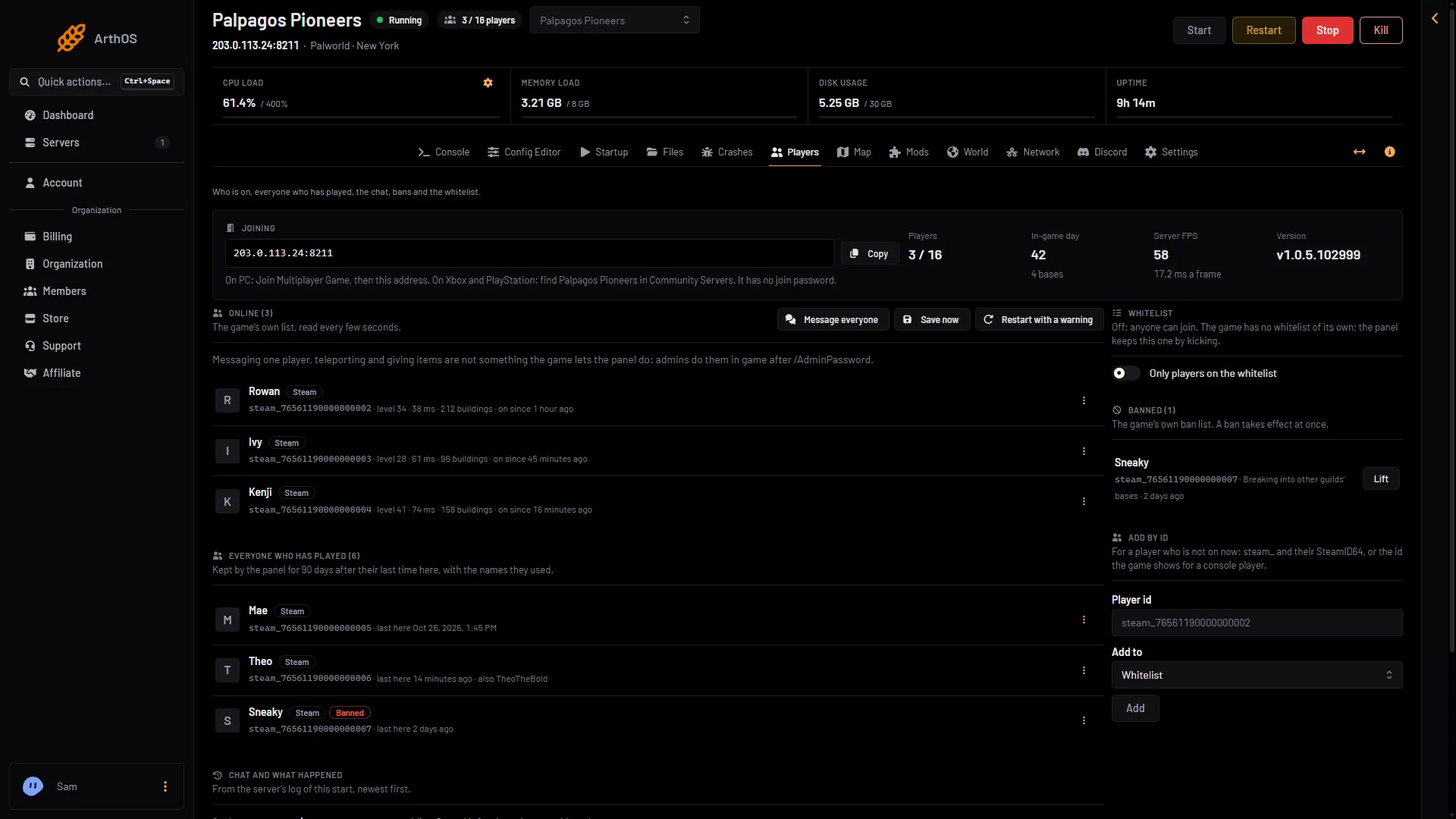
- Server FPS
A frame is one round of the server’s work. A lower FPS, and more milliseconds a frame, mean the server is struggling. Note the number when the server feels fine, and again when it lags. Not checked on 1.0.5 as of 4 November 2026: what Server FPS a healthy server should show.
The game’s API is how the panel talks to the game. The panel keeps it on while the Admin password is 16 characters or more (a new server gets a 20-character one). Server FPS needs it. If the page says the API is off, see the API is off.
What makes a server work harder
Pocketpair names these in its own notes and settings help:
- Pals working at bases. Pocketpair says a higher number of Pals per base “raises processing load”. A base full of workers costs more than an empty one.
- Many bases. Pocketpair says the same of more bases per guild. Every base is more to look after.
- Wild Pals. The Config Editor says a higher wild Pal rate “costs the server more memory and CPU”. Pocketpair marks the setting as one that impacts performance.
- Dropped items. A lot of items lying in the world cost the server work. The Config Editor says fewer “helps a busy server”.
- Distance. The server sends each player the other players and Pals around them. A shorter distance means less to send.
Memory also matters. Pocketpair says a server with too little memory is more likely to crash. A new or quiet Loafhosts server uses about 1.2 to 2.2 GB. It grows with bases, Pals and players. See out of memory.
Lower the load
Open the Config Editor page, choose Game settings, and change these. The performance ones are explained in Palworld performance settings.
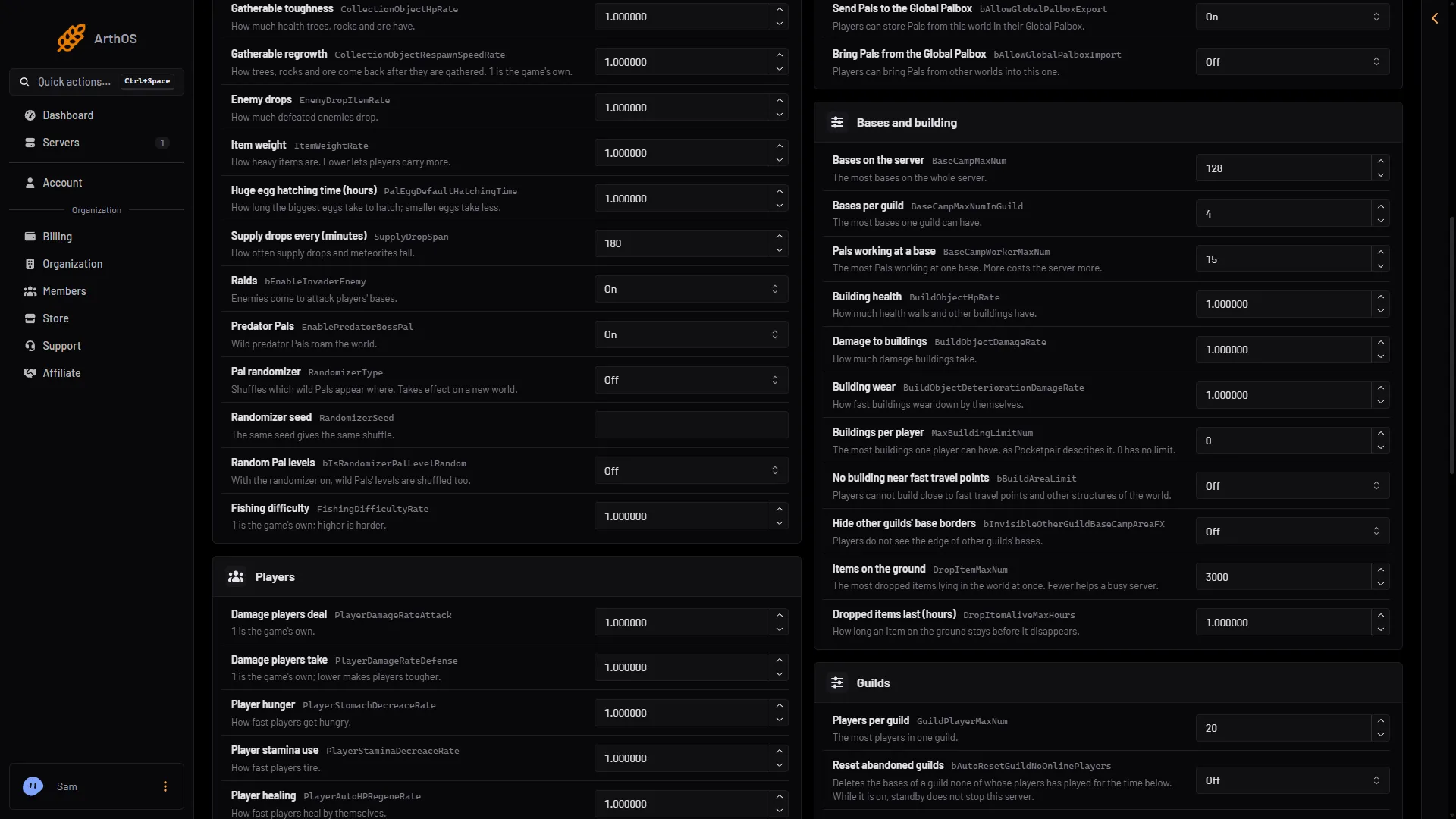
- Pals working at a base
- Bases per guild
- Items on the ground
- Pals working at a base (1): the game’s default is 15. Lower it a little.
- Bases per guild (2): the default is 4. Lower it if guilds build many bases.
- Wild Pals: the default is 1. A lower value means fewer wild Pals.
- Items on the ground (3): the default is 3000. A lower value means fewer dropped items.
- How far players see others: 15000 is the game’s own value and its most. The lowest is 5000. The unit is centimetres.
Choose Save. If the server is running, the change waits and is written just before the next start. Choose Restart now to apply it. A restart disconnects everyone, so warn players first. Not checked on 1.0.5 as of 4 November 2026: what the game does with bases or Pals that are already above a new, lower limit.
Restart every day
A long-running server can use more and more memory. A daily restart frees the memory the game has used. Set one with a schedule, and warn players first. See scheduled restarts. When you restart from the panel, the server saves the world first while the game’s API is on.
A bigger plan
If the FPS is low with settings already lowered, the server needs more room. The plan sizes are Small (2 cores, 6 GB memory), Standard (4 cores, 8 GB) and Large (6 cores, 12 GB). Pocketpair recommends 4 cores or more and 16 GB of memory, so Small has fewer cores than that. It says 8 GB is bootable but raises the chance of crashes from lack of memory. A fast SSD is also recommended.
To change the size, open Billing, the service, then Customize, then Choose a new size. If a renewal invoice is waiting, a bigger size needs it paid first.
If it does not work
- The FPS is high but players still lag. The server is not the one working hard. The cause may be on the player’s side.
- Lag only after many hours. Restart the server and see if it clears. If it does, add a daily restart.
- The server crashes. See the Crashes page and Palworld server crash.
More about the game: Palworld servers.
Sources: docs.palworldgame.com: Configuration, docs.palworldgame.com: Requirements, docs.palworldgame.com: Rest api