












The Pal randomizer shuffles which wild Pals spawn in which places. It has three settings: a mode, a seed and random levels. The panel’s help says it “takes effect on a new world”. So set it first, then start a new world.
The three settings
The settings live in the Config Editor, in Game settings, group World.
- Pal randomizer (
RandomizerType). Pocketpair describes the modes as: None, no randomization; Region, randomize per region; All, fully randomized. The panel shows them as Off, By region and Everywhere. The default is Off. - Randomizer seed (
RandomizerSeed). The seed Pocketpair says is used “when Pal spawn randomization mode is enabled”. The panel’s help says the same seed gives the same shuffle. It is empty by default. - Random Pal levels (
bIsRandomizerPalLevelRandom). Pocketpair: “If true, wild Pal levels are fully random. If false, levels are randomized within each area’s intended range.” The default is off.
In the panel
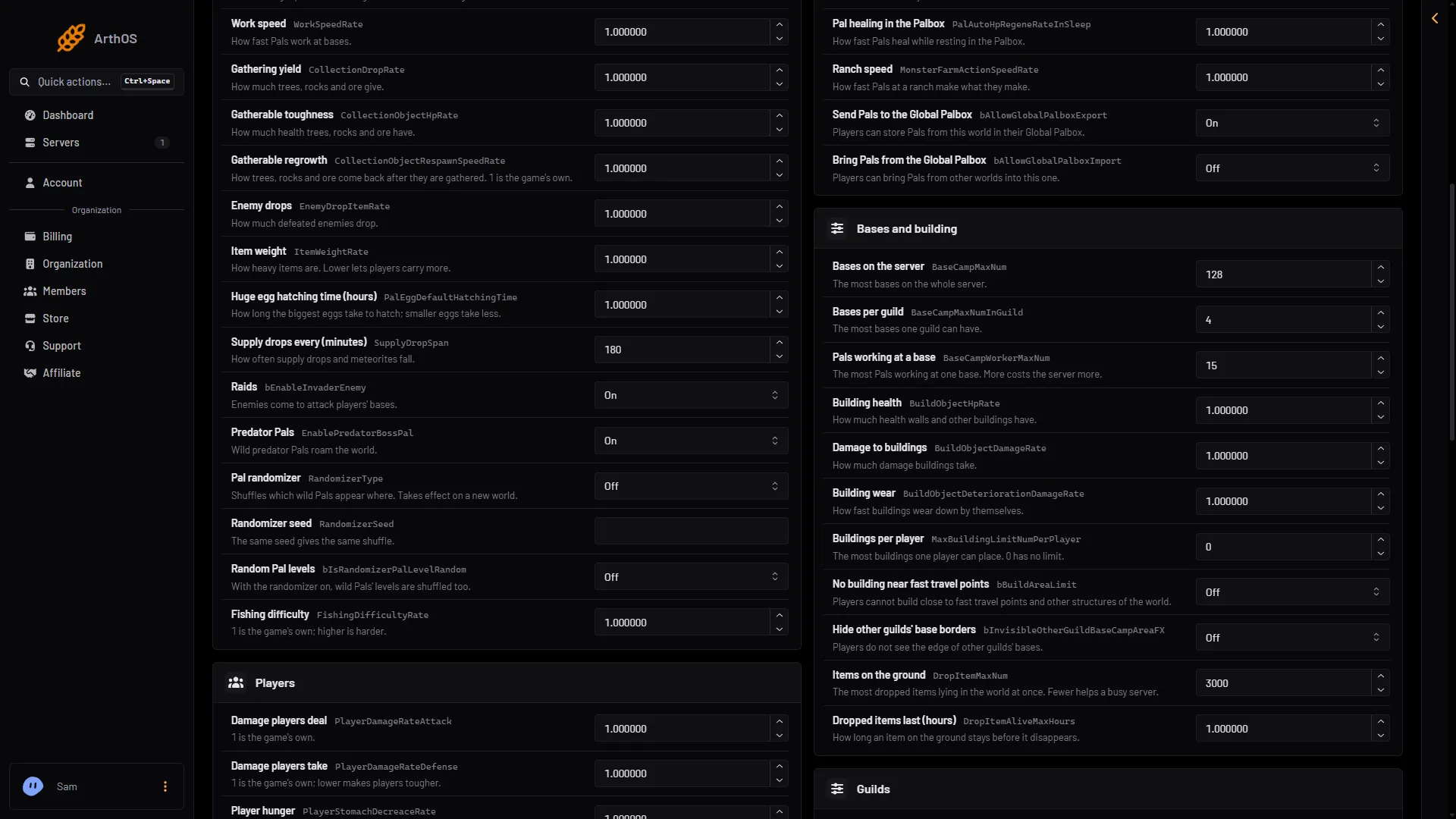
- Choose the mode
- Type a seed
- Random levels on or off
- Stop the server if it is running. Start a new world on the World page is greyed out while the server runs. Stop it first.
- Open the Config Editor page and choose the source Game settings.
- In the group World, set Pal randomizer (1 in the picture) to By region or Everywhere.
- Type a Randomizer seed (2) if you want a shuffle you can repeat. Switch Random Pal levels (3) on if you want levels shuffled too.
- Save.
- Open the World page and choose Start a new world. See start a new world.
- Start the server.
The settings are written at the next start, and a new world is made at the game’s first save, about a minute after the start.
Why a new world
The panel’s help line for the randomizer says it takes effect on a new world. Pocketpair gives no other detail. Do not expect an existing world to change. Not checked on 1.0.5 as of 4 November 2026: what happens to Pals already spawned in an old world.
Starting a new world does not delete the old one. It stays on the World page, and you can play it again later. Characters are kept per world, so players start new characters in the new world.
By hand
The file is Pal/Saved/Config/LinuxServer/PalWorldSettings.ini. With server mods on, these two files are in another folder under Pal/Saved/Config. Open Config in Files and use the folder that holds them, or use the Config Editor, which always finds them. Edit the file only while the server is stopped. Inside the one OptionSettings=(...) line, change these pairs and keep the commas between them:
RandomizerType=Region,RandomizerSeed="loaf",bIsRandomizerPalLevelRandom=FalseRandomizerType takes None, Region or All. The default seed is RandomizerSeed="".
If it does not work
- Pals did not change. You are on an old world. Start a new world.
- You cannot find the settings. Make sure the source is Game settings, not Server settings.
- A world you uploaded ignores the settings. A world with its own
WorldOption.savignores the Config Editor’s settings for the settings that file holds. See the WorldOption.sav guide.
More about the game: Palworld servers.
Sources: docs.palworldgame.com: Configuration