












A Palworld server can drop a special item when one player kills another in PvP. Players can then race to collect the most of it. Five settings control this. They only work when PvP is on, and they apply at the next start.
Pocketpair calls PvP “a trial feature” that its support does not cover. Keep that in mind before you build an event on it.
What the five settings do
All five are under Advanced in Game settings. The panel names those rows from their keys, so look for the keys:
| Key | What it does | Default |
|---|---|---|
bAdditionalDropItemWhenPlayerKillingInPvPMode | Whether a kill drops the special item. | False |
AdditionalDropItemWhenPlayerKillingInPvPMode | The ID of the item that drops. | "PlayerDropItem" |
AdditionalDropItemNumWhenPlayerKillingInPvPMode | How many of the item drop. | 1 |
bDisplayPvPItemNumOnWorldMap_BaseCamp | Shows on the game’s map how many PvP items each base holds. | False |
bDisplayPvPItemNumOnWorldMap_Player | Shows on the game’s map where players are and how many PvP items they hold. | False |
Pocketpair says the default item is a special item called the Champion’s Emblem. Leaving the item ID at its default drops that item.
With the first, fourth and fifth switched on, Pocketpair says the number of Champion’s Emblems in every base and held by each player appears on the map.
Turn PvP on first
The drop only happens while PvP is active. Pocketpair’s PvP page asks for three settings to be on:
- PvP (
bIsPvP), in the Death and PvP group. - Players can hurt each other (
bEnablePlayerToPlayerDamage), in the same group. bEnableDefenseOtherGuildPlayer, under Advanced.
See the PvP server guide for the rest.
Turn the reward on
-
Open the Config Editor page and pick Game settings.
-
Scroll to the card that says more settings are in this file. Choose Show them. The five PvP item rows are at the foot of the Advanced list, named by their keys.
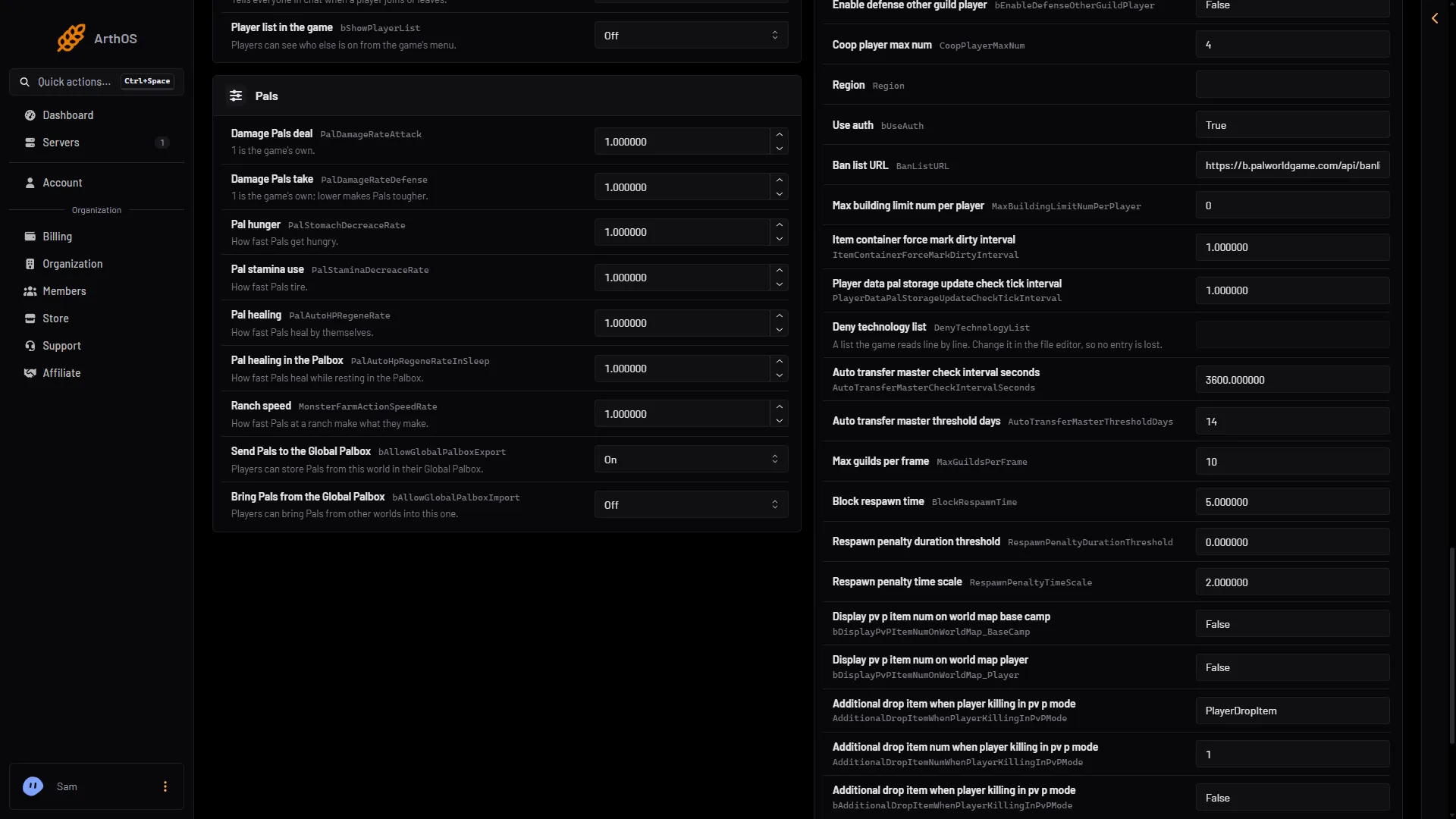
-
Switch
bAdditionalDropItemWhenPlayerKillingInPvPModeon. -
Leave
AdditionalDropItemWhenPlayerKillingInPvPModeat its default to drop the Champion’s Emblem. -
Set
AdditionalDropItemNumWhenPlayerKillingInPvPModeto the number you want, for example1. -
To show counts on the map, switch on
bDisplayPvPItemNumOnWorldMap_BaseCampandbDisplayPvPItemNumOnWorldMap_Player. Pocketpair describes the second one as showing player locations as well as item counts, so every player can see where everyone is. Leave it off if positions should stay hidden. -
Choose Save, then restart the server. If it is running, choose Restart now. A restart disconnects everyone.
By hand
The file is Pal/Saved/Config/LinuxServer/PalWorldSettings.ini on the server. With server mods on, these two files are in another folder under Pal/Saved/Config. Open Config in Files and use the folder that holds them, or use the Config Editor page, which always finds them. Edit the file only while the server is stopped. Prefer Edit the whole file as text in the Config Editor page to editing the file in Files.
Inside the one OptionSettings=(...) line, change these pairs and keep the commas between them:
bAdditionalDropItemWhenPlayerKillingInPvPMode=True,AdditionalDropItemWhenPlayerKillingInPvPMode="PlayerDropItem",AdditionalDropItemNumWhenPlayerKillingInPvPMode=1,bDisplayPvPItemNumOnWorldMap_BaseCamp=True,bDisplayPvPItemNumOnWorldMap_Player=TruePocketpair’s PvP page writes the item as PlayerDropItem("Champion's Emblem") and the number as 1.0. The 1.0.5 default file uses "PlayerDropItem" and 1, as above. Not checked on 1.0.5 as of 4 November 2026: whether Pocketpair’s form is also accepted.
When it applies
The game reads settings at start. When the server is running, the editor says “Saved, waiting for the next restart” and writes the change just before the next start. When it is stopped, it writes at once. A change still waiting is written over the same setting in a hand edit.
If it does not work
- Nothing drops. Check that PvP is on and the first reward setting is
True. Check that you restarted. - No counts on the map. The two
bDisplayPvPItemNumOnWorldMapsettings are separate and both default toFalse. - A different item. Pocketpair does not list which item IDs work in
AdditionalDropItemWhenPlayerKillingInPvPMode. Using an ID other than the default is not checked on 1.0.5 as of 4 November 2026.
More about the game: Palworld servers.
Sources: docs.palworldgame.com: Pvp, docs.palworldgame.com: Configuration