












Most Palworld server mods need a helper mod called UE4SS Experimental (Palworld). Mods that change game data through PalSchema also need PalSchema. Add the helper from the Workshop tab, like any other mod, then apply once.
What the two helpers are
Both are Steam Workshop items for Palworld, and both are mods themselves. Other mods rely on them, the way a plug-in relies on the program it plugs into.
- UE4SS Experimental (Palworld) (Workshop item 3625223587) is the one most server mods need.
- PalSchema (Workshop item 3625280368) is needed by mods built on PalSchema.
A mod lists what it needs inside its own files. Pocketpair’s guide says: “Some mods require other mods as dependencies.” If a mod needs a helper that is not on your list, the Mods page tells you.
Before you start
Server mods must be on. If the Mods page says Server mods are off, see install Palworld server mods first.
Add the helpers
- Open the Mods page and the Workshop tab.
- In Search the Workshop (1), type
UE4SS. Find UE4SS Experimental (Palworld) in the results and choose Add on its card (2). In the picture the two helpers already show On the list, so the boxed Add is on another mod’s card. - If a mod you want is built on PalSchema, search
PalSchemaand choose Add on it too. - Add the mod you actually want.
- The bar Changes not applied yet appears. Choose Apply (or Apply and restart if the server is running).
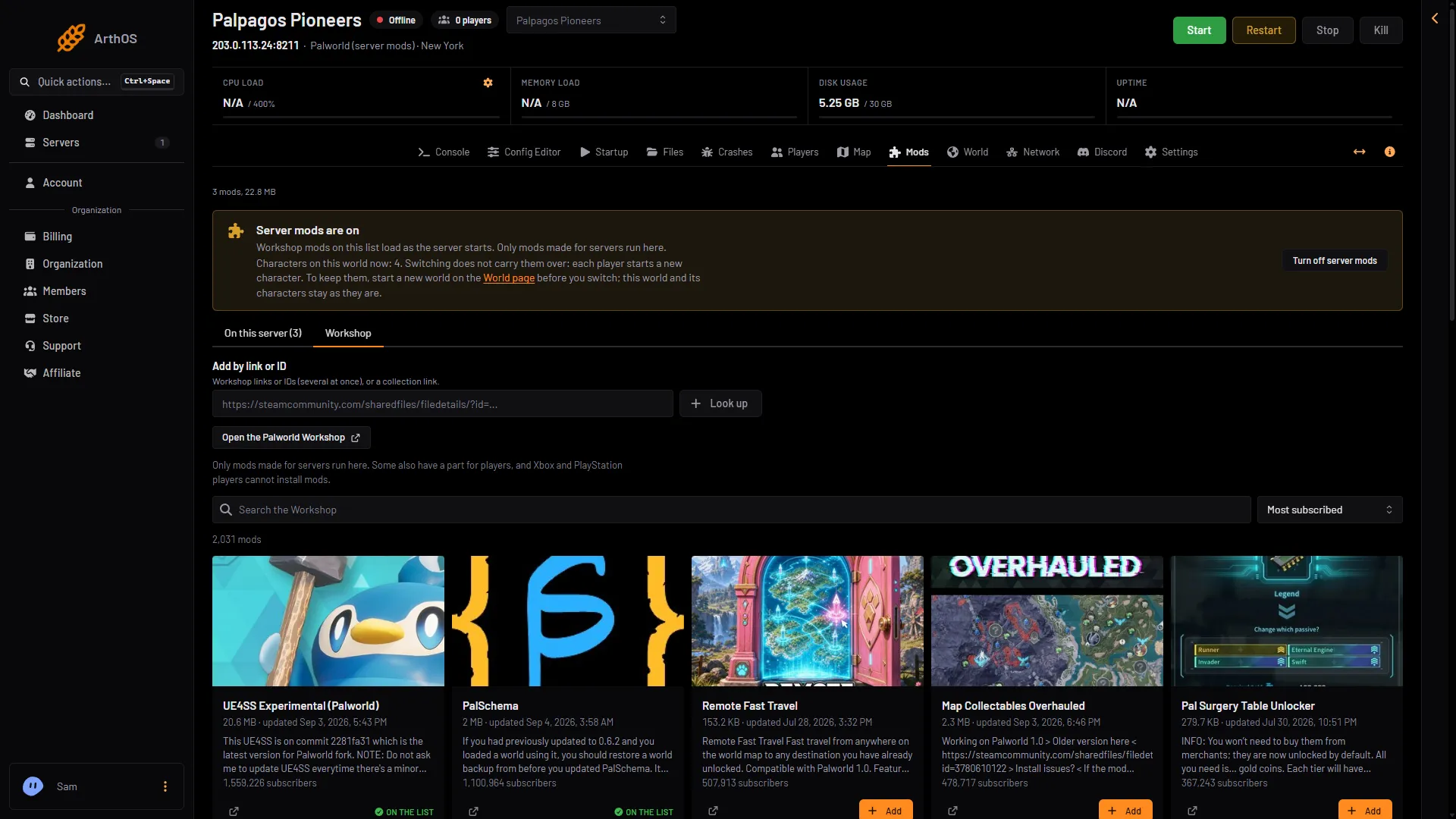
- Type the mod name
- Add on a mod card
- Or paste a link or ID
You can also paste the Workshop link or the number in Add by link or ID (3) and choose Look up. Several can go in at once.
Let the panel tell you what is missing
Add a mod first. If it needs something that is not on the list, its row on the On this server tab says: “Needs (name), which is not on the list.” Next to it is a button, Add (name). Choose it, then Apply.
The Apply the mod changes? box also warns before you confirm: “Still missing mods that others need: (names).”
If you apply without the helper, the mod is left off and stays on the list, waiting. The rest of the mods load. Nothing is lost: add the helper later and apply again.
When it takes effect
If the server is running, Apply stops it, downloads the mods, checks each one and starts it again. Players who are on are disconnected. If the server is offline, Apply downloads now and stays offline: the next start loads the list.
The helpers are not set up by Apply itself. The game sets them up as it starts. The row says “The game sets it up at the next start.” until then, and “Set up by the game (when).” once it has.
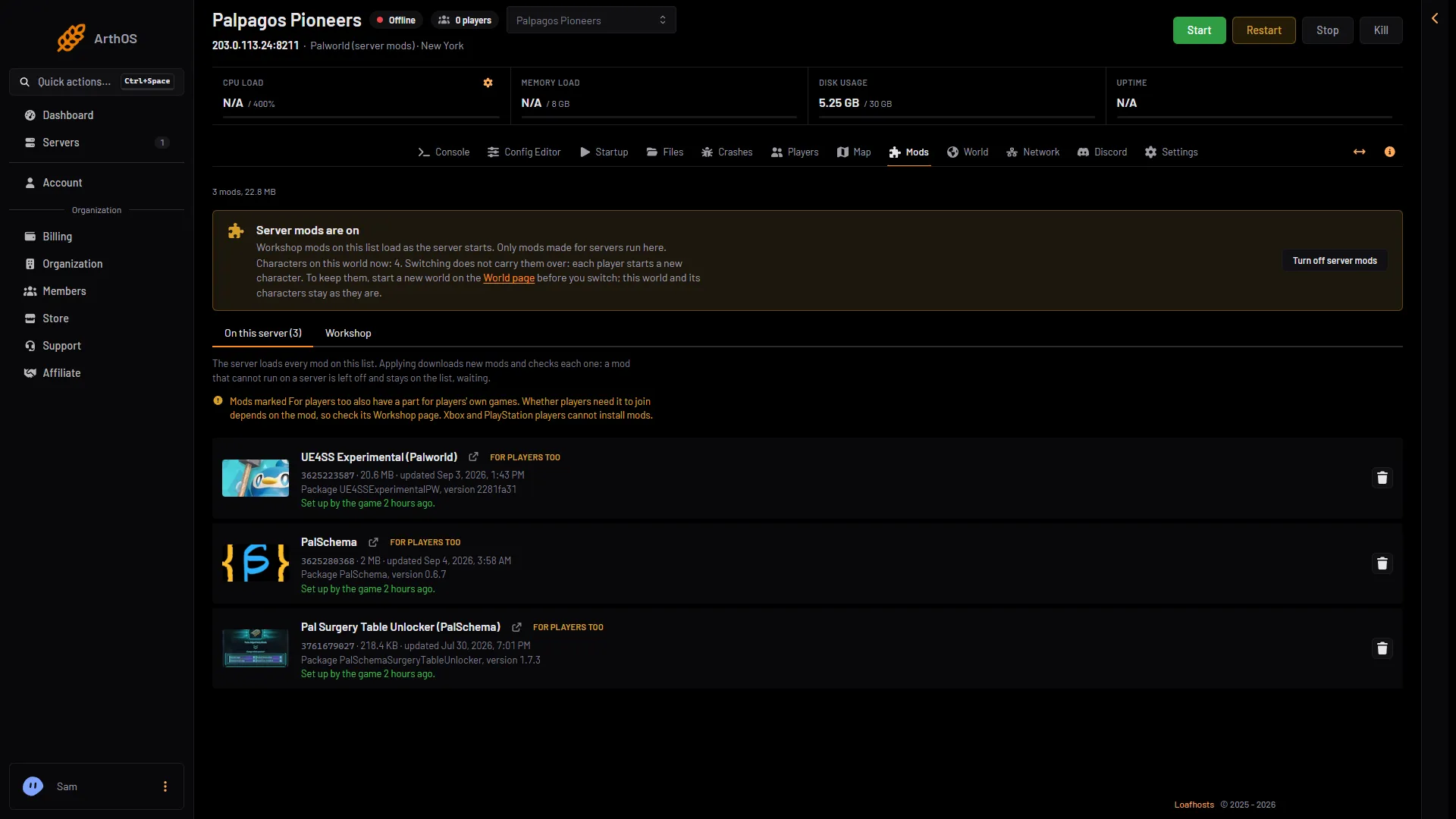
- A mod on the list
- Set up by the game
- For players too
The For players too chip
Both helpers may show the chip For players too. That means the mod also has a part for players’ own games. Whether players need it to join depends on the mod, so read its Workshop page. Xbox and PlayStation players cannot install mods. See mods and players.
Not checked on 1.0.5 as of 4 November 2026: whether an Xbox or PlayStation 5 player can join a server that runs UE4SS Experimental (Palworld) or PalSchema.
By hand
This is Pocketpair’s way, for a server you manage yourself. On Loafhosts the Mods page writes Mods/PalModSettings.ini when you apply. Not checked on 1.0.5 as of 4 November 2026: whether an edit by hand survives the next apply.
[PalModSettings]
bGlobalEnableMod=true
ActiveModList=GamingCattiva
Add one ActiveModList line per mod, using the PackageName from its Info.json, not the folder name. The file exists after the server has run once. The -NoMods argument turns every mod off. At the next start the game writes Mods/ManagedMods/(PackageName)/InstallManifest.json and puts files where the mod’s InstallRules say: UE4SS in Mods/NativeMods/UE4SS, PalSchema mods in Mods/NativeMods/UE4SS/Mods/PalSchema/mods/(PackageName), Lua mods in Mods/NativeMods/UE4SS/Mods/(PackageName).
If it does not work
- The mod stays off after Apply. Look at its row. A “Needs (name)” line means a helper is missing. For other reasons, see Palworld mods not loading.
- The helper is added but the mod still does nothing. The server has not restarted since Apply. Start it, then check the row says “Set up by the game.”
- You cannot find the helper in the search. Use Add by link or ID with the Workshop number above.
More about the game: Palworld servers.
Sources: docs.palworldgame.com: Mod, steamcommunity.com: Filedetails, steamcommunity.com: Filedetails