












When a Palworld server mod does not load, the answer is on its row on the Mods page. The row says what the game did, and the panel says why a mod was left off. Read that line first.
Check that server mods are on
Open the Mods page. If it says Server mods are off, nothing loads, whatever is on the list. Choose Turn on server mods. Pocketpair says server-side mods run only on the version of the server that runs mods, so turning server mods on downloads that version. See install Palworld server mods.
Read the row
On the On this server tab, look under the mod’s name. The line tells you the state.
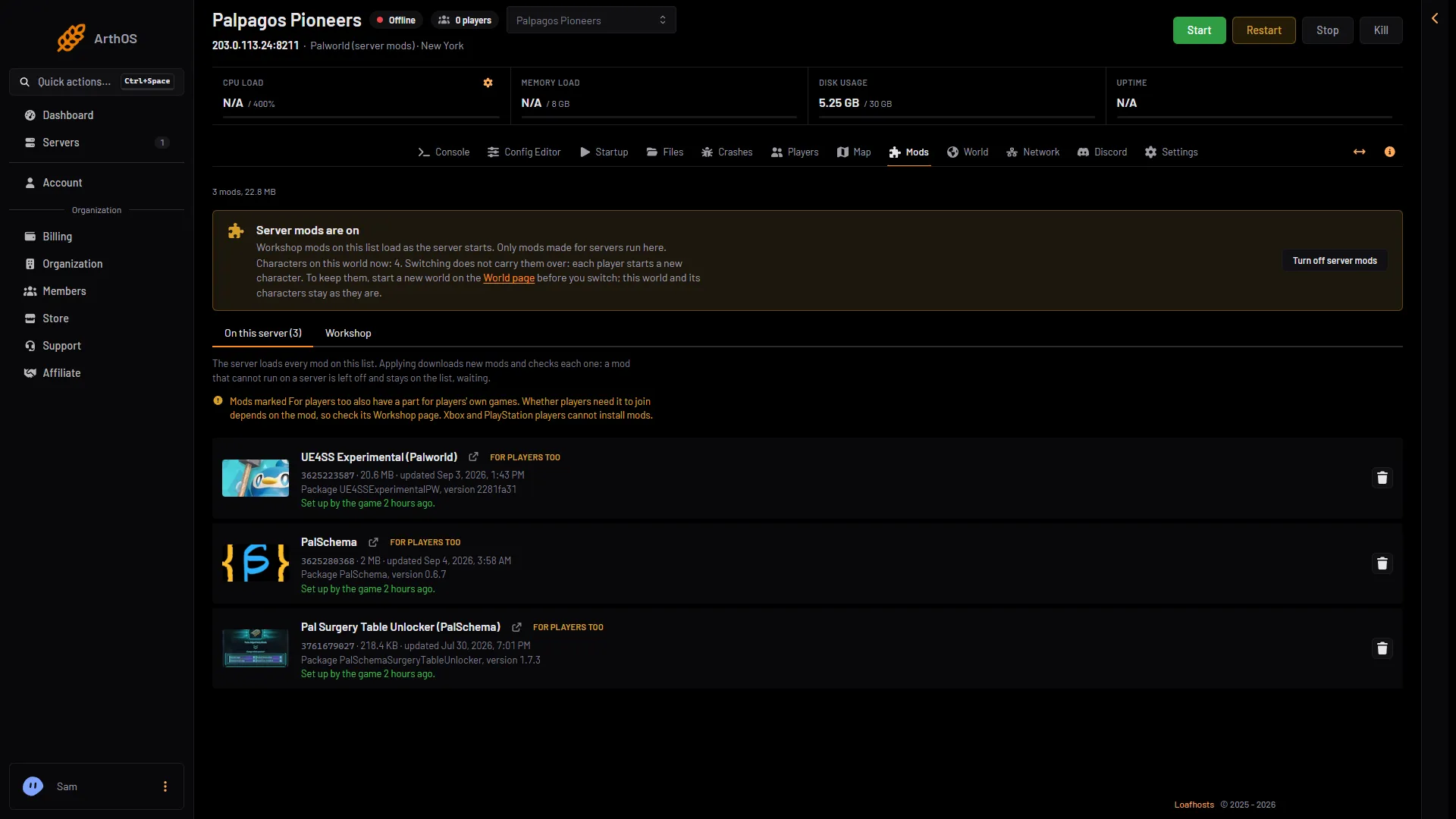
- The mod's name
- What the game did
- Set up by the game (when). The game loaded it. If it still does nothing in play, the mod itself may be the cause. Check its Workshop page.
- The game sets it up at the next start. You applied, but the server has not started since. Start or restart it.
- The game runs version (version); the one in its folder is set up at the next start. The game has an older copy of the mod. A restart sets up the new one.
- The game did not set it up at its last start. The row adds “Its log from that start says why.” That is a link to the Crashes page. Open the log for that start and look near the mod’s name.
If the server will not start after a change, take the newest mod off the list and choose Apply. See remove Palworld mods.
Two more things you may see on a row or at the top of the page:
- Wrong game. The row says “This is a mod for (game), so this server cannot use it.”
- Not on the Workshop. The mod is no longer on the Workshop.
- A note at the top of the page: “Workshop downloads for Palworld are not set up yet, so new mods and updates cannot be downloaded. Ask support to set them up.”
The panel left it off
After Apply, a mod that cannot run on a server is left off. It stays on the list, waiting, and the rest loads. The page says why. There are three reasons.
- Made for players only. The row shows the chip Not for servers. Pocketpair says a mod works on a server only if its
Info.jsonhas"IsServer": true. A mod without that is for players’ own games. It cannot run on your server. Remove it, or ask the mod’s author. - Missing a mod it needs. The row says “Needs (name), which is not on the list.” Choose Add (name), then Apply. Most need UE4SS Experimental (Palworld). See UE4SS and PalSchema.
- Needs a newer game build. The mod asks for a Palworld build newer than the one the server has. Update the server first: it updates when it starts if Update on start is on. Then apply again.
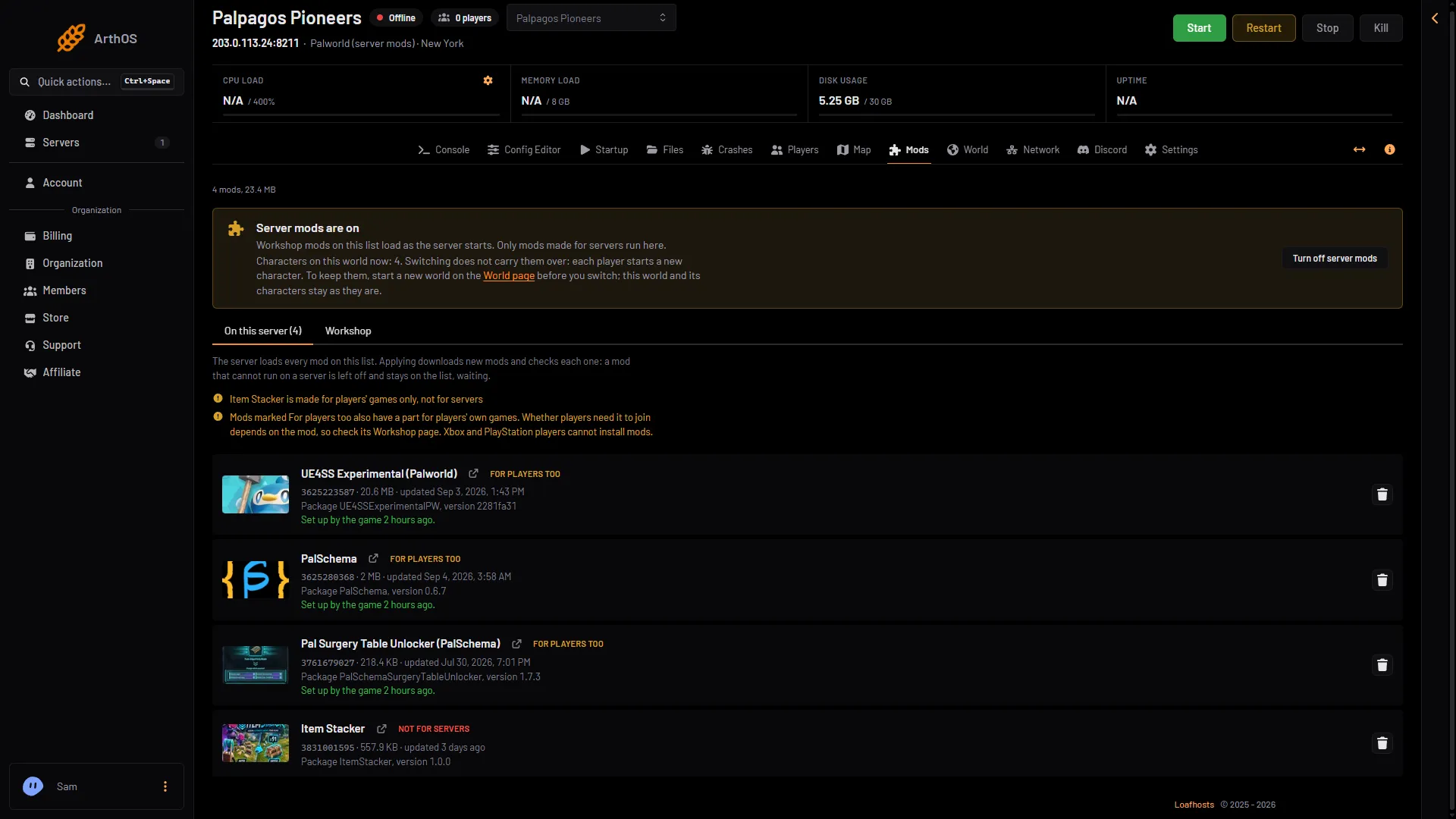
- Why it is left off
- Not for servers
Not downloaded
The chip Not downloaded means the mod is on the list but not on the server. The row says: “On the list but not on the server. Applying downloads it.” Choose Apply.
If a download fails, the page says “(name) could not be downloaded ((reason)), so it was left off. It is still on the list, waiting.” Apply again later. A failed update keeps the old copy.
Pocketpair’s own checklist
Pocketpair lists three questions for a mod that “doesn’t work or won’t enable”:
- Is the mod made for dedicated servers? (
IsServer) - Are the prerequisite mods installed?
- Was the mod deployed correctly? Mods are deployed when the server restarts.
The panel answers the first two on the row. The third is the “Set up by the game” line.
Use mods with care
Pocketpair warns: “Use mods at your own risk. They may cause save-data corruption or crashes.” A mod that loads and then breaks on a new game build is not caught by the panel, so test one change at a time.
More about the game: Palworld servers.
Sources: docs.palworldgame.com: Mod