












Players must run the same Palworld version as the server. After Palworld updates, players who updated cannot join a server that is still on the old build. Restart the server so it updates, and make sure the players have updated their game too.
See the versions
Open the World page and find the card Game version.
A build is the number Steam gives each release.
- Running is the version the server is running now.
- Steam build installed is the build the server has on its disk.
- Newest Steam build is the newest build Steam offers.
The Players page also shows the server’s Version.
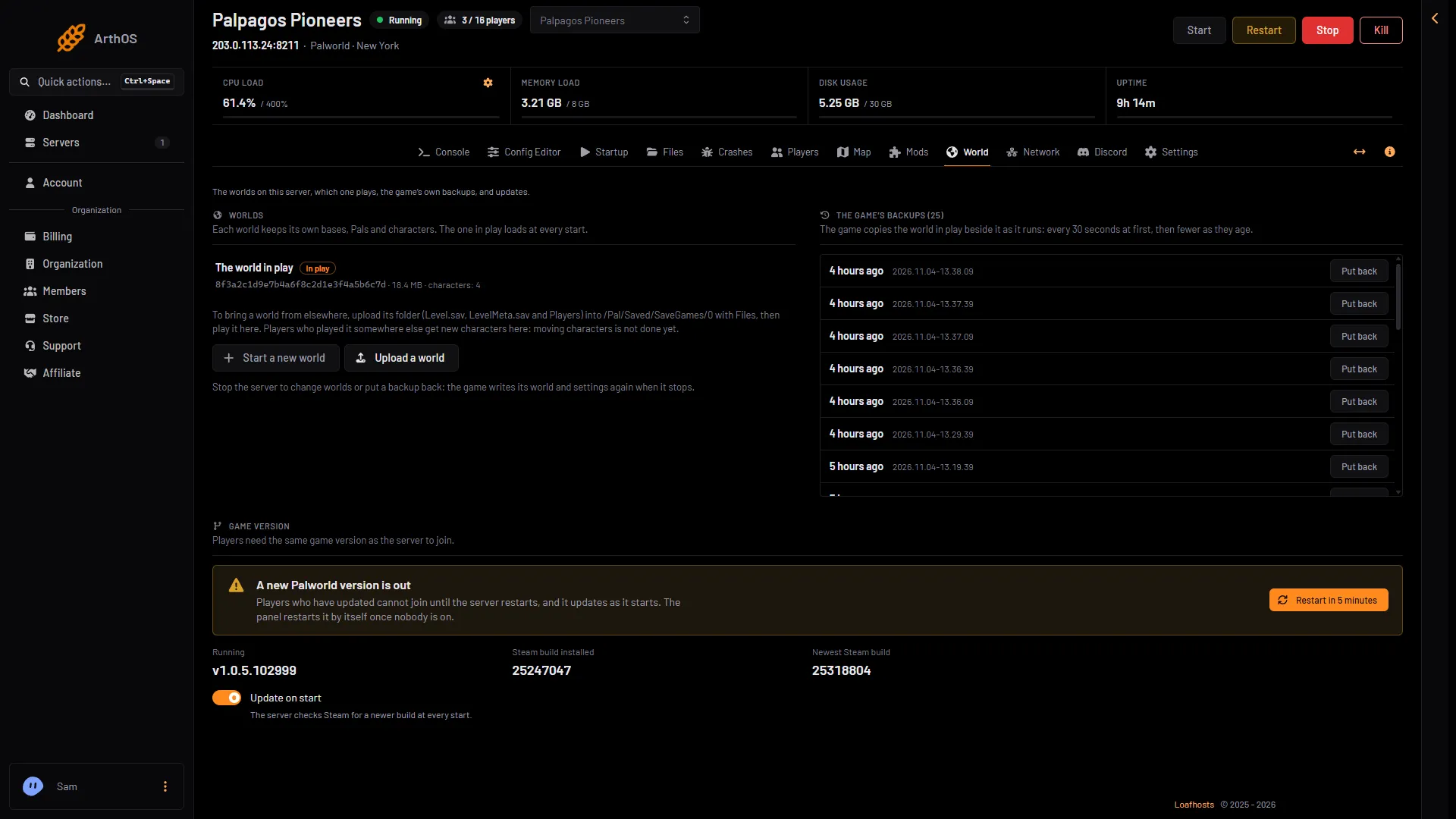
- Installed build
- Newest build
- A new version is out
- Restart in 5 minutes
If Steam build installed (1) is lower than Newest Steam build (2), the server is behind. Players who have updated will be turned away.
When a new version is out
The World page shows “A new Palworld version is out” (3 in the picture above). It says “Players who have updated cannot join until the server restarts, and it updates as it starts.” The Restart in 5 minutes button shows only while a new version is out.
You have three ways to update:
- Do nothing. With Update on start on, the panel restarts the server by itself once nobody is on. A server with players on it is left alone, and the page says an update waits. The restart saves the world first while the game’s API is on.
- Restart with a warning. Choose Restart in 5 minutes (4 in the picture above). Players see announcements in the game first. The server updates as it starts. The game’s API is how the panel talks to the game. The panel keeps it on while the Admin password is 16 characters or more (a new server gets a 20-character one), and this restart needs it.
- Restart at a time you choose. Restart it from the panel when you like. See restart the server.
After the start, check that Running now matches Newest Steam build.
Update on start must be on
Update on start makes the server check Steam for a newer build at every start. It is on for a new server. You find it on the World page, and in the Config Editor under Server settings, card Updates.
When it is off, the page says “Updates are held. Players who have updated their game cannot join until the server updates too.” Turn it on, and restart the server. A change to Update on start applies at the next start.
Players update their game too
If the server is newer than a player’s game, the player must update Palworld through Steam, the Microsoft Store, Xbox or PlayStation. Only then can they join.
If it still does not work
- The restart did not update. Read Steam build installed again after the server is fully running. If the server comes back on the old build, the panel does not try again for that build for 7 days: restart it yourself. See update the server.
- A mod needs a newer build. Open the Mods page; a mod that needs a newer game build is left off.
- The version is the same and the join still fails. See cannot connect.
More about the game: Palworld servers.
Sources: docs.palworldgame.com: About server