












Your Palworld server updates itself every time it starts, as long as Update on start is on. It is on for a new server. After Pocketpair puts out an update, restart the server and it downloads the new version as it starts.
Players must run the same game version as the server. If a player has updated and the server has not, they cannot join until the server restarts and updates.
See which version you have
A version is the number Pocketpair gives the game, such as v1.0.5.102999. A build is the number Steam gives each release, such as 25247047. The panel shows both.
- Open the World page.
- Find the card Game version.
- Compare Steam build installed with Newest Steam build. If they match, the server is up to date. Running shows the game version the server runs.
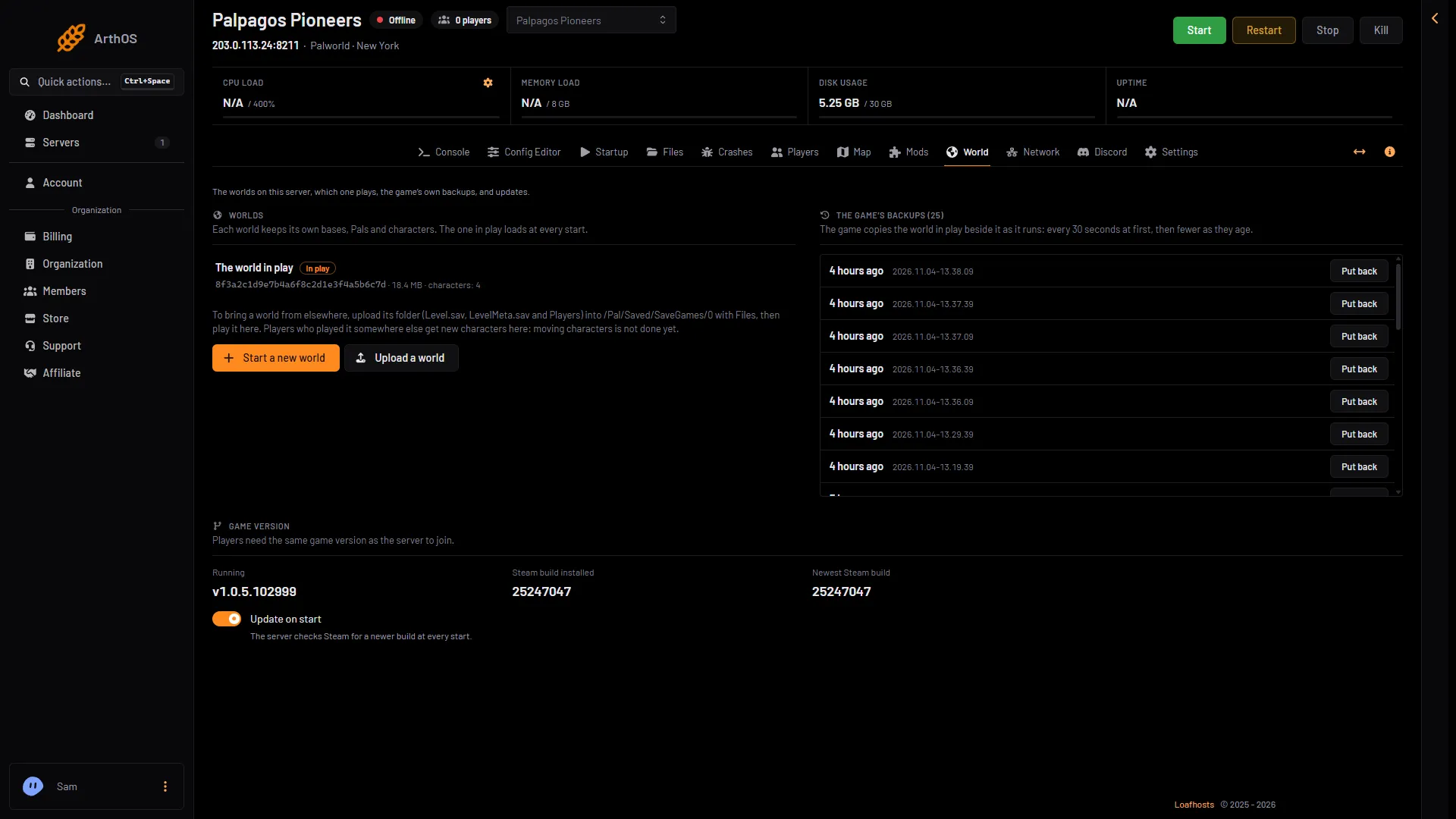
- Game version
- Update on start
The Game version card (1) holds the three numbers. The Update on start switch (2) is under them.
When a new version is out, the card also shows A new Palworld version is out: “Players who have updated cannot join until the server restarts, and it updates as it starts. The panel restarts it by itself once nobody is on.”
Update now
- Warn your players. If you want, send a message from the Players page with Message everyone.
- Take a backup first if you like. Choose Save now on the Players page. Then open Settings, Backups, choose Create, then Create Backup.
- When a new version is out, the World page shows Restart in 5 minutes. Choose it. Players see announcements in the game, then the server saves, restarts and updates. You can also use Restart with a warning on the Players page at any time.
- Both need the game’s API. The game’s API is how the panel talks to the game. The panel keeps it on while the Admin password is 16 characters or more (a new server gets a 20-character one). See restart a Palworld server.
- If you do not need a warning, choose Restart at the top right. When you restart the server from the panel, it saves the world first while the game’s API is on.
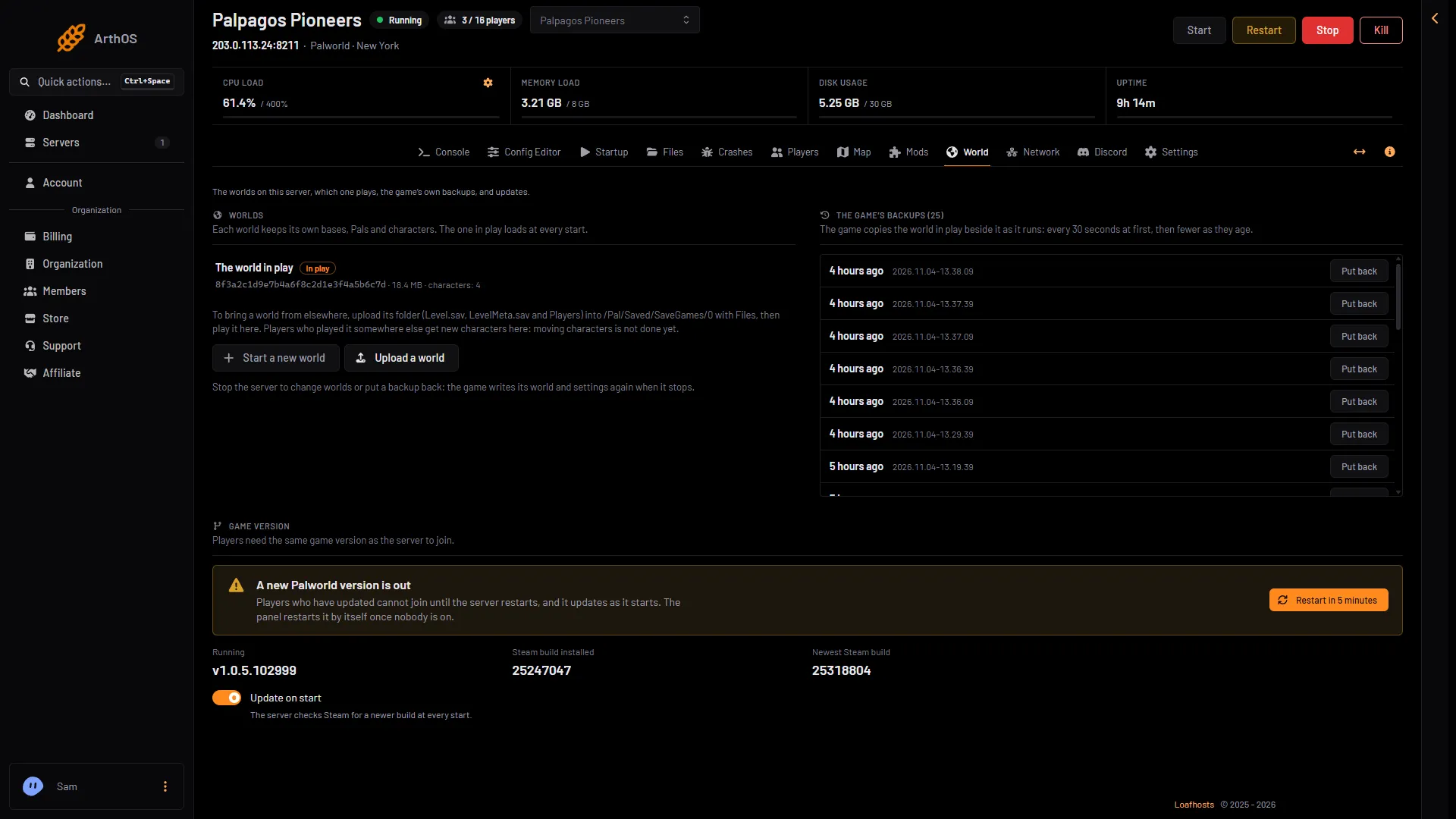
- A new version is out
- Installed build
- Newest build
- Restart in 5 minutes
In this picture the notice (1) says a new version is out. When the two builds differ (2, 3), choose Restart in 5 minutes (4).
The server is offline for a short while as it downloads and starts. A big world takes longer to load.
Let the panel do it
With Update on start on, the panel watches Steam for a newer build. If your server is running, behind, and nobody is on, the panel restarts it once to update. The stop saves the world first.
- A busy server is left alone. The World page tells you an update is waiting, so you can pick a time with Restart in 5 minutes.
- If the panel cannot read how many players are on, it does not treat the server as empty.
- Sometimes the server comes back still on the old build. Then the panel waits 7 days before it tries that build again. Restart the server yourself.
Turn Update on start on or off
The same switch is in three places. Use any of them.
- Config Editor: open Server settings and find Update on start.
- Startup: Update on start.
- World: the card Game version.
The change applies at the next start. When it is off, the server keeps its build and “Players who have updated their game cannot join until the server updates too.” Turn it off only if you want to hold a version on purpose, and turn it back on before your players update.
If you use server mods
Mods are separate. A mod made for an older build may stop working after a game update, or a mod may need its own update. See remove Palworld mods before updating your server and update Palworld mods.
If it does not work
- Players still cannot join. Compare Steam build installed with Newest Steam build. If the server is behind, restart it. See Palworld version mismatch.
- The panel did not restart it. Players are on, the count cannot be read, or Update on start is off. Restart it yourself when it suits you.
- There is no Restart in 5 minutes button. It shows only while a new version is out. Use Restart with a warning on the Players page.
- The warned restart does not work. The game’s API is off because the Admin password is shorter than 16 characters. Set a longer one in the Config Editor and restart.
More about the game: Palworld servers.
Sources: docs.palworldgame.com: About server