









The server ini is the file that holds a Project Zomboid server’s name, joining rules, chat, safehouses, saving and anti-cheat. On Loafhosts it is .cache/Server/<Server Name>.ini. The easy way to change it is the Config Editor. This guide explains the keys people change most.
Where the file is
The file is named after the Server Name on the Startup page. With the default name servertest it is .cache/Server/servertest.ini. Open Files, then the .cache folder, then Server. The world rules are in a second file beside it, <Server Name>_SandboxVars.lua. See the sandbox settings.
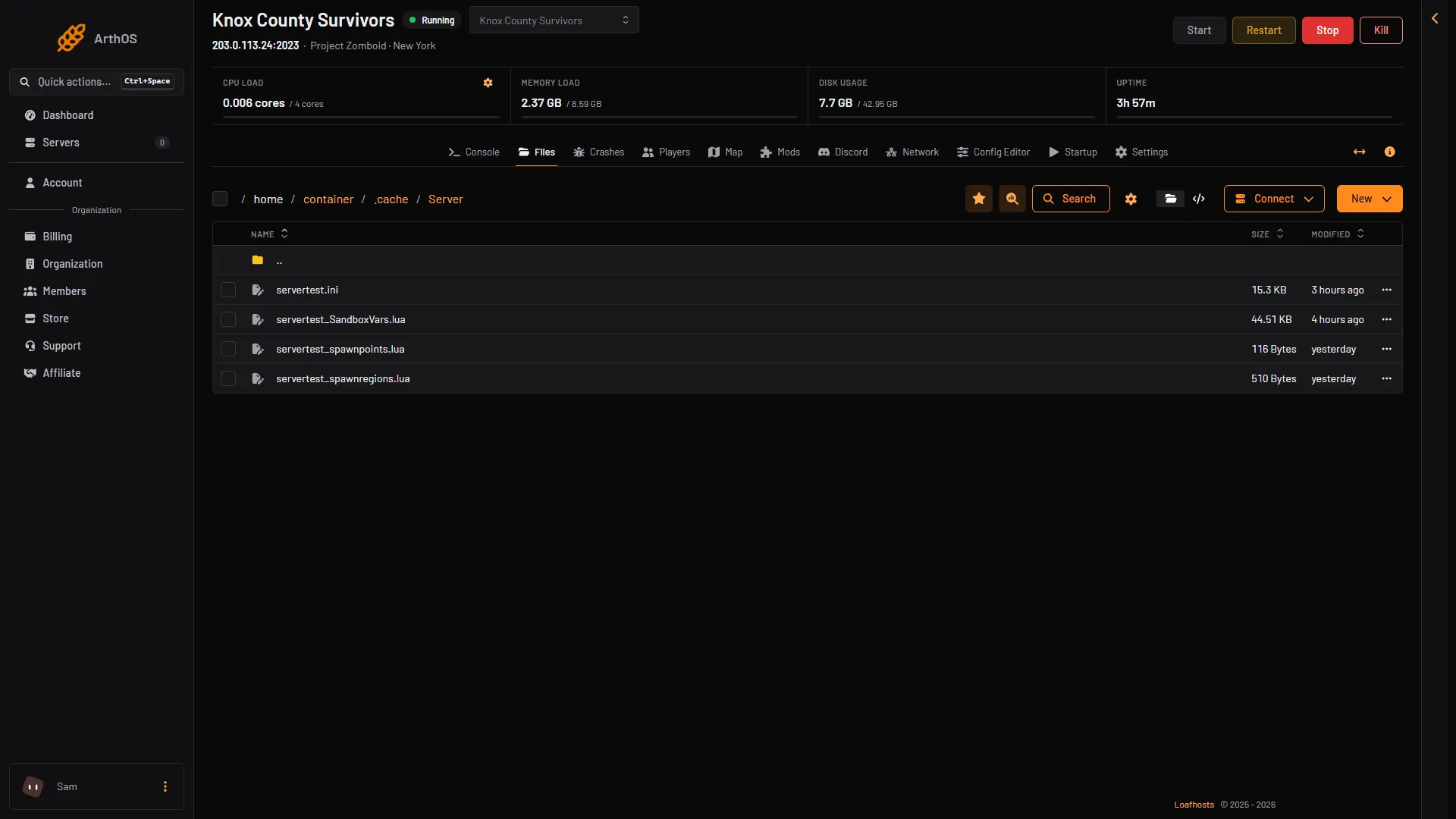
- The server ini
- The sandbox file
A server run on your own machine keeps the same file in the game’s Zomboid data folder, under Server/: ~/Zomboid on Linux, C:\Users\<you>\Zomboid on Windows. A -cachedir= start option moves that folder (Loafhosts uses -cachedir=/home/container/.cache).
The most used keys
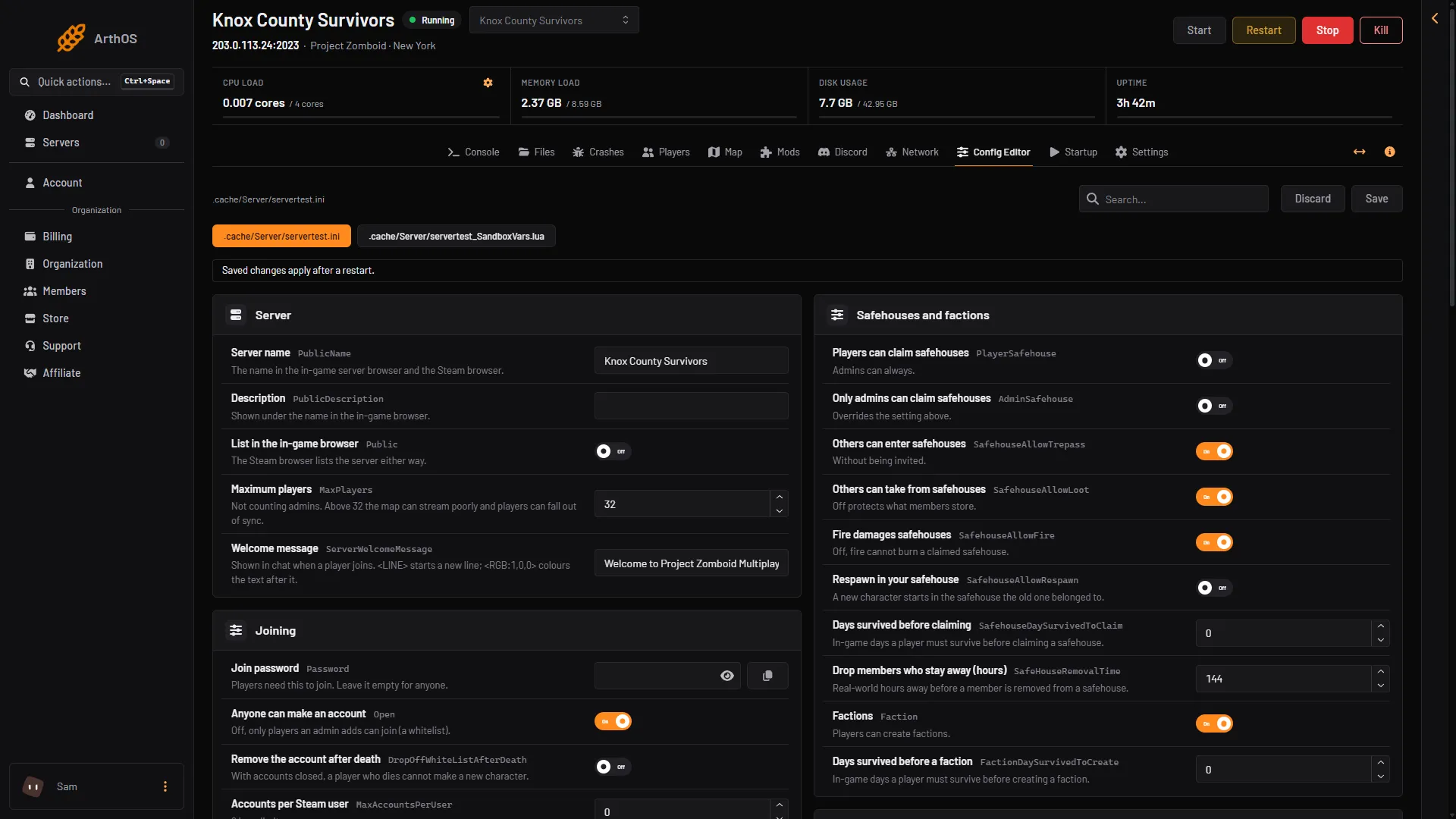
- Server name
- Maximum players
- Join password
- Anyone can make an account
The first column is the key as it appears in the file. The second is the row label in the Config Editor. Keys marked “new file” show the value a new ini file holds, as PZwiki lists it. The others show the Default the game writes in its own comment.
| Key | Config Editor label | What it does | Default (game comment, or a new file per PZwiki) |
|---|---|---|---|
PublicName | Server name | The name in the in-game browser and the Steam browser. | My PZ Server (new file) |
Public | List in the in-game browser | Shows the server in the in-game browser. The Steam browser lists it either way. | false (new file) |
MaxPlayers | Maximum players | Most players at once, not counting admins. Above 32 the map can stream poorly and players can fall out of sync. | 32 |
Password | Join password | Players need it to join. | empty (new file) |
Open | Anyone can make an account | Off, only accounts an admin adds can join. | true (new file) |
PVP | Players can hurt each other | Players can hurt and kill other players. | true (new file) |
SafetySystem | Players choose PVP for themselves | A player can only hurt another when one of them has turned PVP on. | true (new file) |
PauseEmpty | Pause time when nobody is on | Game time stops with no players online. | true (new file) |
GlobalChat | Global chat | Turns global chat on or off. | true (new file) |
VoiceEnable | Voice chat | Voice chat on or off. | true (new file) |
SaveWorldEveryMinutes | Save the world every (minutes) | Saves loaded parts of the map after this many real minutes. 0 saves an area when players leave it. | 0 (new Loafhosts servers start at 10) |
PlayerSafehouse | Players can claim safehouses | Both admins and players can claim safehouses. | false (new file) |
Faction | Factions | Players can create factions. | true (new file) |
SpawnPoint | Fixed spawn point | Every new player spawns at these x,y,z coordinates. Ignored when 0,0,0. | 0,0,0 (new file) |
SpawnItems | Starting items | Item types new players spawn with, such as Base.Axe,Base.Bag_BigHikingBag. | empty (new file) |
AnnounceDeath | Announce deaths in chat | A global chat message when a player dies. | false (new file) |
PingLimit | Kick above this ping (ms) | Kicks a player above this ping. 0 turns it off. | 0 |
BackupsCount | Game backups kept | How many of the game’s own backups to keep. | 5 |
MapRemotePlayerVisibility | Other players on the map | 1 Hidden, 2 Friends, 3 Friends and players nearby, 4 Everyone. | 1 |
Anti-cheat keys are in the anti-cheat guide. Voice and chat keys are in the voice and chat guide.
Keys the panel sets for you
These rows are locked in the Config Editor: DefaultPort, UDPPort, UPnP, RCONPort, RCONPassword, Mods, WorkshopItems and Map. The panel writes the ports and RCON at every start.
On Loafhosts the Mods page writes WorkshopItems, Mods and Map. Change mods there. Do not edit these lines by hand.
On your own server, the game’s own comments say WorkshopItems= is a semicolon list of Workshop IDs, Mods= lists the mod IDs, and Map= lists the map folders with Muldraugh, KY last.
Two more keys the game itself warns about. ResetID and ServerPlayerID decide whether a saved character belongs to this server. The game’s comment says it is strongly advised to back them up. For Seed, the comment says to delete map_worldgen.bin in the save folder if you change it.
Edit the file by hand
- Stop the server.
- Open Files, then
.cache, thenServer, and open the.inifile. - Change the line after the
=. Keep the key as it is. Lines that start with#are the game’s comments. - Choose Save File.
- Start the server. The change applies when it starts.
Change an option while the server runs
PZwiki lists three admin commands. Type them in the Console without a slash. In game, an admin types them in chat with a slash.
showoptionsshows the current options and their values.changeoption <optionName> "<newValue>"changes one option.reloadoptionsreloads the server options from the ini and sends them to players.
PZwiki says you can save ini changes while the server runs and use reloadoptions to make them live. On Loafhosts the simple route is Save in the Config Editor, then Restart at the top of the server page. The page shows “Saved changes apply after a restart.” while the server runs.
Not checked on Build 42.21 as of 18 October 2026: which options take effect at once, and whether the game writes a changed option back into the ini.
If it does not work
- A port or RCON line changed back. The panel writes those lines at every start from the server’s own ports and password.
- The file does not exist. Start the server once. The game creates it at its first start.
- Players cannot join. Check Password and Open. With Anyone can make an account off, only accounts an admin has added can join.
More about the game: Project Zomboid servers.
Sources: pzwiki.net: Server settings, pzwiki.net: Admin commands