






Clans (by k1lly0u) lets players form a clan with a short tag, invite others, chat in a clan channel and ally with other clans. Install it from the Plugins tab. Players then type /clan create <tag> "description" in game chat. The plugin registers no permissions, so anyone can start a clan.
Your server needs Oxide or Carbon first (see install Oxide or Carbon).
uMod lists version 0.2.10, released 6 May 2026 and last updated on uMod on 9 October 2026, as read on 11 October 2026.
In the ArthOS panel
- Open your server and choose Plugins. Under Find plugins, type
Clansin Search uMod (1), find the Clans card (2) by k1lly0u, and choose Install (3). The panel offered version 0.2.10 on 11 October 2026. It does not ask a question.
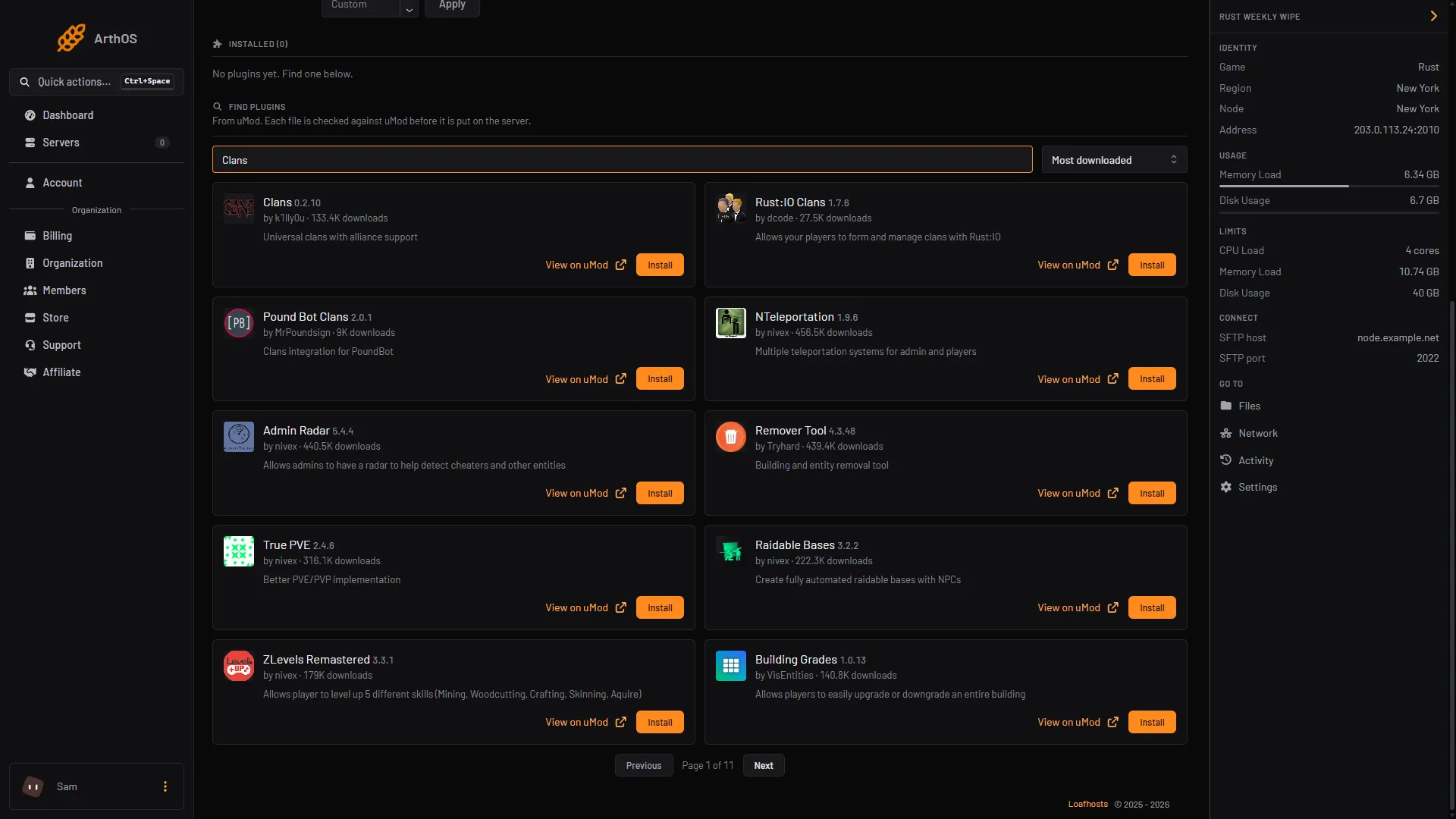
- Search uMod
- Clans card
- Install
- Look at its row under Installed. It should say LOADED. If it says NOT LOADED, see plugins not loading. Not checked as of 11 October 2026: that the newest Clans loads on your framework.
- Tell players to type
/clanhelpin game chat. The plugin prints the commands for their role.
What players type
These are typed in game chat, with the slash.
| Who | Command | What it does |
|---|---|---|
| Anyone | /clan create <tag> "description" | Forms a clan |
| Anyone | /clan | Shows your clan |
| Invited player | /clan accept <tag> or /clan reject <tag> | Answers an invitation |
| Member | /c <message> | Sends a message to your clan |
| Member | /clan leave | Leaves the clan |
| Moderator | /clan invite <name or ID> | Invites a player |
| Moderator | /clan withdraw <name or ID> | Takes back an invitation |
| Moderator | /clan kick <name or ID> | Removes a member |
| Owner | /clan promote <name or ID> or /clan demote <name or ID> | Changes a member’s role |
| Owner | /clan disband forever | Deletes the clan |
A player who is invited is told when they connect. A player can be in one clan at a time.
Alliances
Alliances are on by default. The clan owner uses /ally invite <tag>, /ally withdraw <tag>, /ally accept <tag>, /ally reject <tag> and /ally revoke <tag>. Members of allied clans talk with /a <message>.
Settings
The settings are in Clans.json. Config appears on the plugin’s row once it has loaded and written that file. These are the plugin’s defaults.
| Key | Default | What it does |
|---|---|---|
Member limit | 8 | Most members in one clan |
Moderator limit | 2 | Most moderators in one clan |
Enable clan alliances | true | Turns alliances on or off |
Tag character limits | 2 to 5 | Shortest and longest tag |
Enable clan tags (requires BetterChat) | true | Shows the clan tag in chat when Better Chat is installed |
Enable clan purging | true | Removes clans that have been away too long |
Purge clans that havent been online for x amount of day | 14 | Days before a purge |
Change a value, save, and press Reload on the plugin’s row.
Team size versus clan size
These are two separate settings:
- The game’s team size limit is
relationshipmanager.maxteamsize, 8 by default. It caps a team, and Facepunch, the maker of Rust, describes it as capping tool cupboard authorisation too. See set the team size limit. - The plugin’s
Member limitcaps a clan, 8 by default.
Neither page says one changes the other, and the plugin’s source does not create or change Rust teams. A clan of 8 is not a team of 8. To keep a clan no bigger than a team, set both to the same number. Not checked as of 11 October 2026: whether a clan larger than the team limit gets any benefit in game.
By hand
Download Clans.cs from its uMod page and upload it to oxide/plugins (Oxide) or carbon/plugins (Carbon). The settings are in Clans.json in oxide/config or carbon/configs. The clan list is a data file named clan_data in oxide/data or carbon/data. The plugin’s source reads and writes that name. Reload with oxide.reload Clans or c.reload Clans.
What it costs your server
No listed source gives a figure for its cost. Not checked as of 11 October 2026: its effect on server speed.
If it does not work
/clandoes nothing. The plugin is not loaded. Check its row says LOADED.- “The tag you have chosen is invalid”. The tag must be 2 to 5 characters long, or the length set in the config.
- A player cannot be invited. The clan is at its
Member limit, or the player is already in a clan. - Clans disappeared. With
Enable clan purgingon, the plugin removes clans that have not been online for 14 days. - Clans after a wipe. The plugin’s list stays until you remove it. See fix a wipe that went wrong.
Hosting Rust? See the Rust page.
Sources: umod.org: Clans, umod.org: Configuration, wiki.facepunch.com: Getting Started w Server, wiki.facepunch.com: Teams