






A wipe goes wrong when a file was left behind or a setting was not changed. Match what you see to the sections below, then fix it with the server stopped. The files are listed in Wipe your Rust server, and Rust forced wipe day covers the monthly update.
Check the files first
Stop the server, then open Files and go to server/rust. Look at the save files. On the October 2026 update the folder held these:
proceduralmap.<size>.<seed>.<protocol>.sav, and the copies.sav.1and.sav.2(1 in the picture). The save holds the map’s entities, buildings and deployables.player.blueprints.<number>.dband its-walfile (2 in the picture). Blueprints live here.
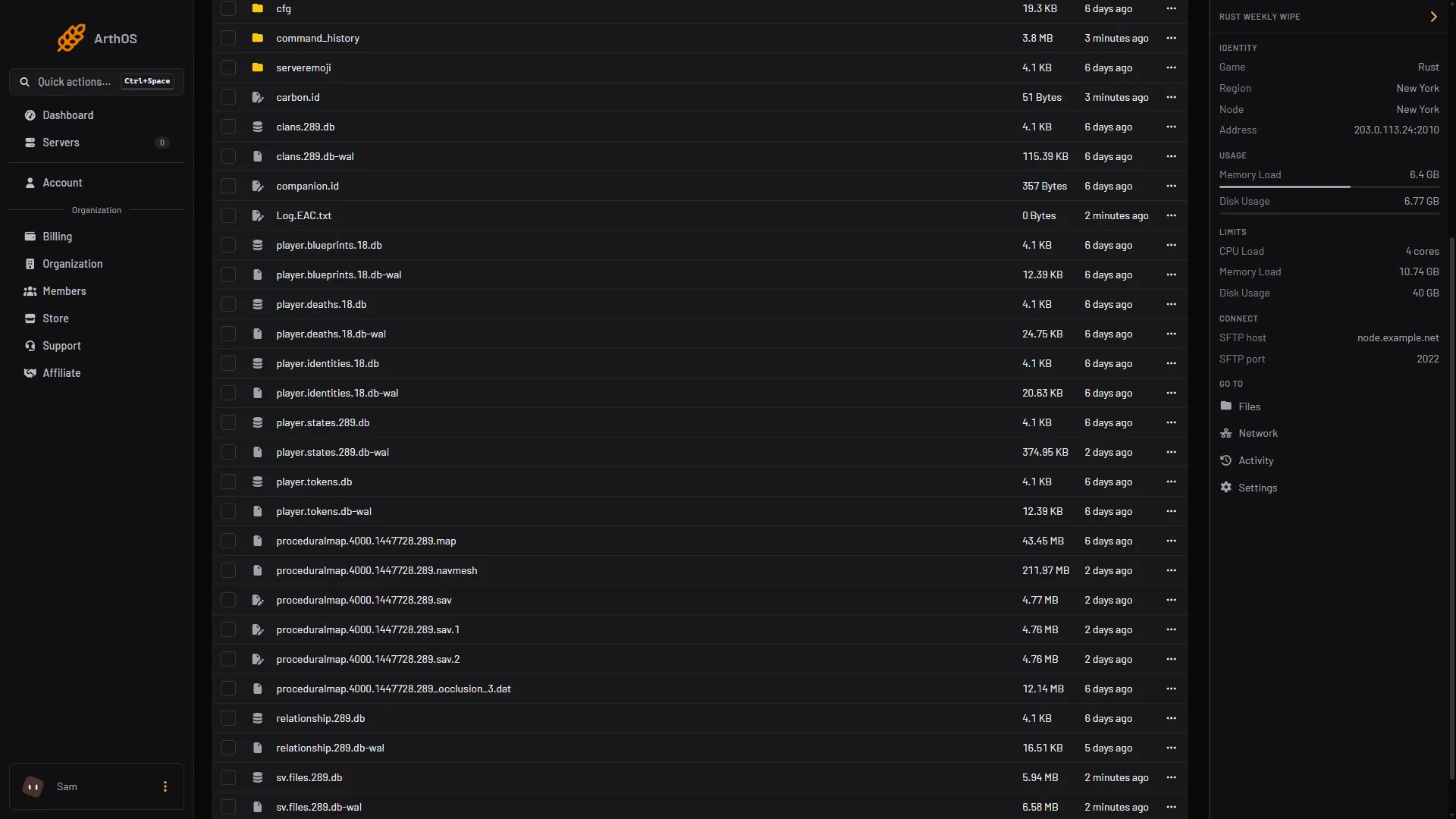
- Save file and its copies
- Blueprint files
The old map still loads
Look for one of these causes, in this order.
- A save copy was left behind. The game keeps older saves as
.sav.1and.sav.2. If you delete only the.sav, the game can load an old copy. Delete the.savand every.sav.<number>together. The number of copies is the Config Editor row World backups kept (server.savebackupcount, game default 2). - The seed and size are the same. The same size and seed always make the same map. After you delete the save you get the same layout with fresh loot and no buildings. For a new layout, change Map seed on the Startup tab and choose Save.
- A custom map is set. If Custom map URL on the Startup tab holds a link, the server loads that file. Clear the field for a generated map. See Rust custom map will not load.
- Players see an old custom map. Facepunch, the maker of Rust, says a player with an older
.mapof the same name loads that one. Give the changed map a new unique name.
Then start the server. A new map takes a few minutes to generate. The Console says Server startup complete when it is ready.
Blueprints are still there
A map wipe keeps blueprints on purpose. Facepunch’s wiki says that to force a blueprint wipe you must delete the blueprints file at the same time.
- Stop the server.
- In
server/rust, delete theplayer.blueprintsfile and its-walfile. - Start the server.
Do not compare the numbers. On the October 2026 update the blueprint file ended in 18 while the map files ended in 289. Look for the file name that starts with player.blueprints.
Facepunch sometimes wipes blueprints in a monthly update, and says so in its news post. Read the post before wipe day.
Plugin data was not reset
A plugin keeps its own data apart from the game’s save. Oxide plugins keep it in oxide/data and Carbon plugins in carbon/data. The panel does not know which files a plugin needs wiped. The plugin’s page on uMod says.
- Kits. The Rust Kits page lists the option “Wipe player data when the server is wiped”. It is off by default, so run
/kit resetafter a wipe if you want everyone to start again. See add kits to your Rust server. - Backpacks. Backpacks keep their items across a wipe unless
Clear on wipeis turned on. See the Backpacks guide, section “What happens on a wipe”. - Clans. The game’s own
clans.<protocol>.dbfile is one a full wipe deletes. A clan plugin keeps a separate list in its own data file,clan_datainoxide/dataorcarbon/data. Stop the server first. Not checked as of 11 October 2026: deleting that file.
Do not delete a plugin’s whole data folder without reading its page. Some plugins keep settings in that folder. Stop the server before you delete anything.
The server will not start after a forced wipe
Facepunch does not publish a list of start problems after a monthly update. These are the causes its pages point to.
- The map is still being made. The first start after a wipe generates a new map and a large one takes minutes. Wait for
Server startup complete. - A custom map link is set. Clear Custom map URL on the Startup tab, or check that the link still downloads.
- Not enough memory. A bigger map needs more memory. See fix a Rust server running out of memory.
- An old save was renamed to avoid the wipe. Facepunch’s wiki calls this dangerous and not recommended. Delete it instead, or restore a backup made on the matching game version.
- Plugins fail. A plugin that does not compile leaves the server running, and its row says NOT LOADED; the Console holds the reason. See Rust plugins not loading after an update.
Read the Console from the start of the server for the first error line.
By hand
Take a backup first. Stop the server. The full file list is in the wipe guide. In server/<identity>, delete the .sav and every .sav.<number> for a map wipe, and the player.blueprints files and their -wal files for a blueprint wipe. Set a new seed with +server.seed 1234 on the start line, or server.seed 1234 in server.cfg. Then start the server.
If it does not work
- The same map comes back. Check Map seed and Map size on the Startup tab, and that no
.savfile is left inserver/rust. - A file comes back after you delete it. Stop the server first and wait until it shows as offline.
- You want the old world back. Restore a backup from Settings, then Backups. Use a backup made on the matching game version.
More about the game: Rust servers.
Sources: wiki.facepunch.com: Getting Started w Server, wiki.facepunch.com: Creating a server, wiki.facepunch.com: FAQ and Troubleshooting, rust.facepunch.com: News, umod.org: Rust kits