






Quick Smelt (by misticos) makes furnaces smelt faster. Install it from the Plugins page, then raise the global number under Speed Multipliers in its settings. Out of the box it changes nothing, because every speed starts at 1.0. Your server needs Oxide or Carbon first (see install Oxide or Carbon).
Quick Smelt or gather rates?
They change different things. Pick the one that matches what you want.
| Quick Smelt | Gather rates | |
|---|---|---|
| What it changes | How fast a furnace turns ore into metal and wood into charcoal | How much wood, stone, ore and loot players get when they gather |
| Where you set it | The plugin’s settings file | The Gather rates section of the Plugins page |
| Plugin behind it | Quick Smelt | Gather Manager |
You can use both. See Rust gather rates.
In the ArthOS panel
- Open your server and choose Plugins. Under Find plugins, type
quick smeltin Search uMod. Search uMod (1) lists the Quick Smelt card (2) by misticos. Choose Install (3). The panel offered version 5.1.5 on 11 October 2026.
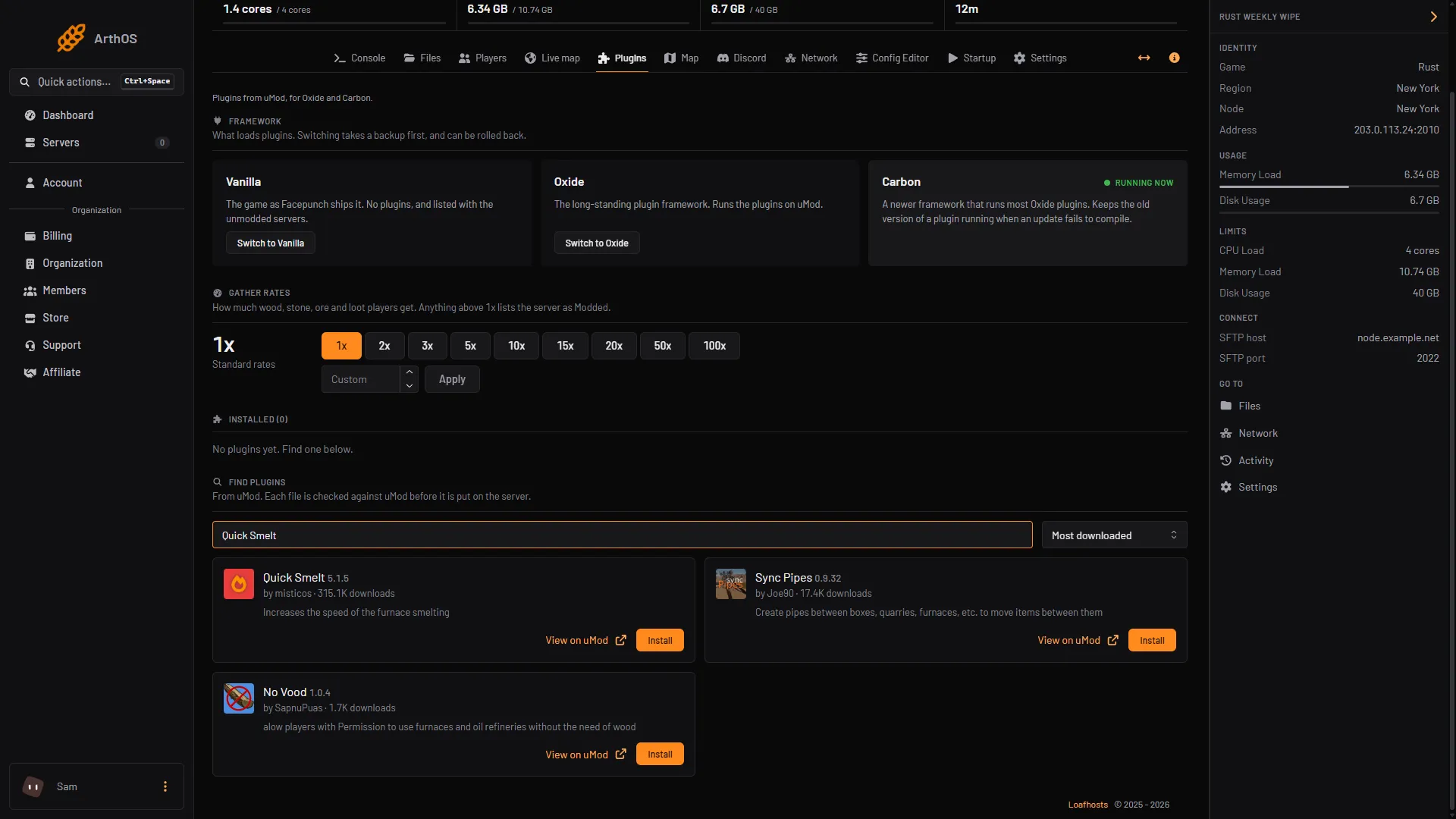
- Search uMod
- Quick Smelt card
- Install
- Look at its row under Installed. It should say LOADED. If it says NOT LOADED, read the Console for the reason.
- Press Config on the row. It opens
QuickSmelt.json. Config appears once the plugin has loaded and written its file. - Under
Speed Multipliers, change the number next toglobal. Keep the file valid JSON, with its commas.
"Speed Multipliers": {
  "global": 2.0
},- Save the file, then press Reload on the plugin row. The plugin reads its settings again when it loads.
- If you left
"Use Permission"astrue, grant the permission (next section). Then start a furnace and time it.
The permission
By default "Use Permission" is true, so the speed-up only works for players who hold quicksmelt.use. The plugin checks the furnace’s owner and the player who switches the furnace on, and either one holding it is enough. Type in the Console tab, with no slash:
| Framework | Everyone | One player |
|---|---|---|
| Oxide | oxide.grant group default quicksmelt.use | oxide.grant user YourName quicksmelt.use |
| Carbon | c.grant group default quicksmelt.use | c.grant user YourName quicksmelt.use |
To speed up every furnace for everyone with no permission, set "Use Permission" to false. More about groups is in grant plugin permissions.
The other settings
Each of these lists has a global entry, which applies to every furnace. Replace the example name furnace.shortname with a furnace’s short prefab name to set one furnace type on its own, or delete that line.
| Setting | What it does |
|---|---|
Speed Multipliers | Smelting speed. 1.0 is normal. Higher is faster. |
Fuel Usage Speed Multipliers | How fast fuel burns. |
Fuel Usage Multipliers | How much fuel is used each time (a whole number). |
Output Multipliers | How much each smelt produces, per item. |
Smelting Frequencies (Smelt items every N smelting ticks) | How often the furnace smelts (a whole number). |
Whitelist and Blacklist | Item short names that are or are not sped up. |
What it costs your server
No listed source gives a figure for its cost. Not checked as of 11 October 2026: its effect on server speed, and using it together with Furnace Splitter.
By hand
Download QuickSmelt.cs from its uMod page and upload it to oxide/plugins (Oxide) or carbon/plugins (Carbon). The settings file is QuickSmelt.json in oxide/config or carbon/configs. After editing it, reload with oxide.reload QuickSmelt or c.reload QuickSmelt in the console.
If it does not work
- Nothing is faster.
Speed Multipliersis still1.0, or you edited the file and did not press Reload. - It works for you and not for a player. Neither they nor the furnace’s owner hold
quicksmelt.use. Check withoxide.show user <name>. - A furnace that was already running did not change. Switch it off and on again.
- The plugin loads but ignores your settings. The JSON is probably invalid. The plugin then prints an error and uses its default values. Fix the file, then reload.
- The plugin says NOT LOADED. See plugins not loading after a Rust update.
Hosting Rust? See the Rust page.
Sources: umod.org: Quick smelt, umod.org: QuickSmelt.cs, umod.org: Permissions, umod.org: Configuration