
















Standby stops a server that nobody has played on. By default a Rust server goes into standby after 10 days with nobody on. Nothing is deleted. Standby is on for new servers unless the owner turned it off. Press Start, or open the wake link, and it comes back. The stop is a normal stop, so the game saves first.
Standby is not a crash. If the server stopped while people were playing, read why a Rust server stopped instead.
Change the wait
- Open Settings, then the Settings tab.
- Find the card Standby.
- Use the switch in the card header (2) to turn standby on or off.
- In After nobody plays for (3), choose the wait: 30 minutes, 1 hour, 3 hours, 12 hours, 1 day, 2 days, 3 days, 7 days, 10 days, 14 days or 24 days.
- Tick Email the owner each time (4) if you want an email whenever it stops.
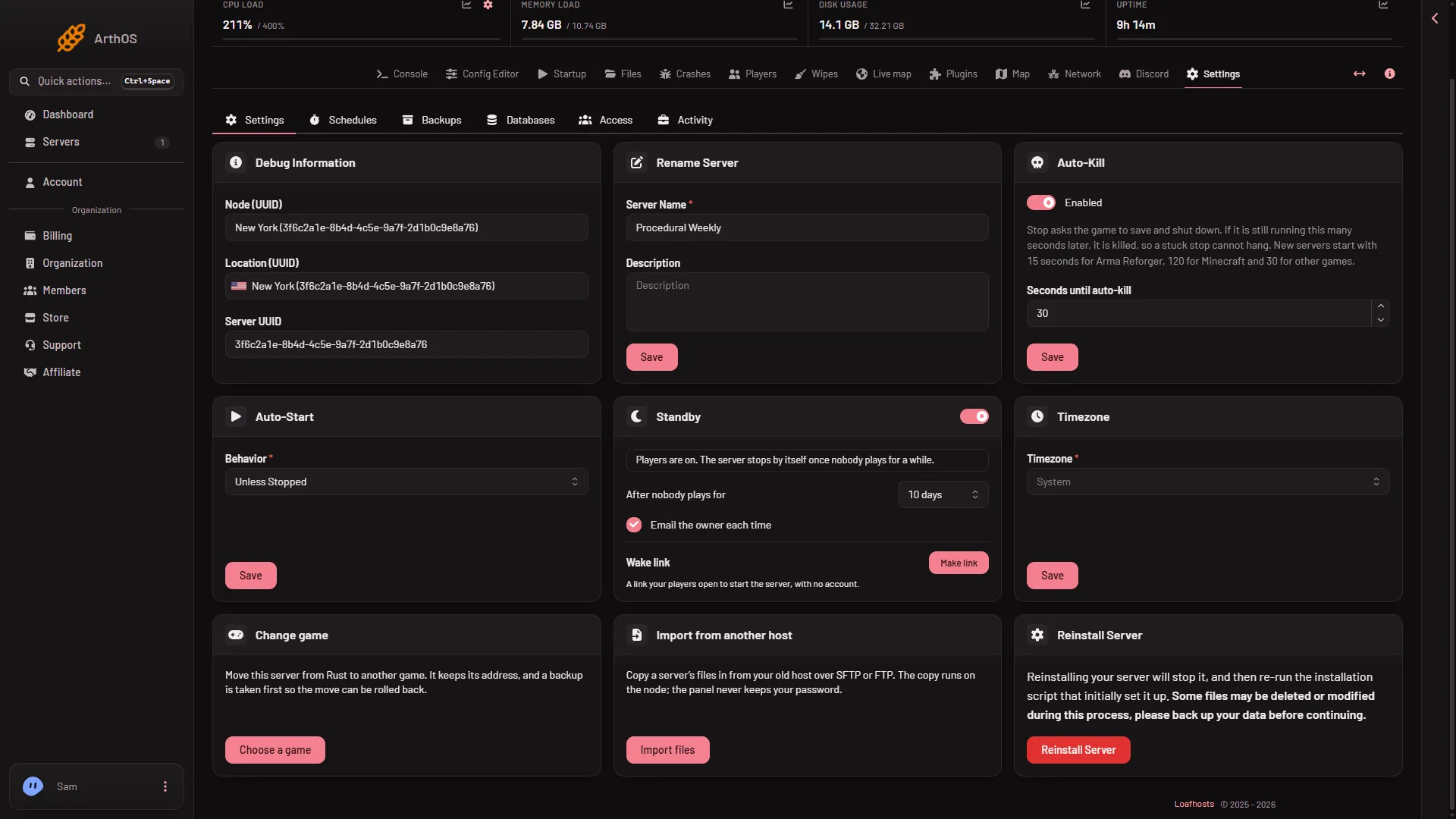
- Standby card
- Standby switch
- After nobody plays for
- Email the owner each time
- Wake link
The card (1) saves as you change it. A message says “Standby settings saved.” There is no Save button. To see or change it, your role needs the standby permissions. To change it you need to be allowed to stop the server too.
If you choose a wait shorter than the time nobody has been on, a box asks Go into standby now? Choosing Save stops the server within a few minutes.
What the card says
A line at the top says where it stands:
- “Players are on. The server stops by itself once nobody plays for a while.”
- “Nobody on for 16 minutes. Standby on a date and time unless someone joins.”
- “Off. The server keeps running when nobody plays.”
- “Went into standby on a date and time. Nothing was deleted. Start it here or from its wake link.”
How it decides nobody plays
Only a player count that the game itself answered counts. If the panel cannot read the count, it never treats the server as empty. A second count must agree before the stop. A change, a backup or a wipe that is running also holds standby off. The card then says “Waiting” and why.
Start it again
- Press Start on the server page.
- Or open the Wake link (5). Choose Make link, then Copy link, and give it to your players. Anyone with the link can start the server and nothing else: no stop, no settings, no files. It can start the server 12 times a day.
- A wipe from the Wipes tab starts the server too.
The link has Options: show the join address on the wake page, and add a Start server button to Discord status messages. New link makes the old one stop working at once. Turn off removes it. Making a link needs the standby link and start permissions.
A server started by the wake link that nobody joins within 60 minutes goes back to standby. A start you make yourself gets the whole wait again.
While it sleeps
Schedules you made on the Schedules tab wait instead of waking the server, so a nightly restart does not start a sleeping server.
The server header shows Standby. If your role may change standby, a box This server is in standby also opens. You can pick a longer wait, choose Turn standby off or Not now. Choosing Save there never starts the server.
If it does not work
- The server stopped and standby is off. Standby did not do it. See the Crashes tab.
- The card says the server did not stop within 10 minutes. It was left running and standby tries again later.
- The Standby card is missing. Your role cannot see it. Ask the owner.
- The card says “Waiting”. Read its reason. Often a wipe or a backup is running.
- You plan wipes. See automatic wipes for the Wipes tab.
More about the game: Rust servers.