












The Wipes tab can wipe your Rust server for you. You choose how often. At each wipe time the panel warns players, stops the server, deletes the world and starts it again on a fresh map. Nothing runs until you save a plan and switch it on.
For the game side of wipes, see Rust forced wipe day. For deleting files yourself, see wipe a Rust server. For other Rust topics, see Rust servers.
Turn on a plan
- Open the Wipes tab of your Rust server.
- Before you have a plan, the top of the page says No wipe plan yet and shows three starters: Monthly, Every two weeks and Every week. Choose one. It fills in the plan and switches it on, but only in the draft (the draft is what you have not saved yet). You can change anything below it. The starters wipe blueprints at the forced wipe, so check What is wiped before you save.
- Under When, check the cadence, the time and the time zone (see the next section).
- Choose Save in the bar at the bottom. The panel asks Turn on wipes? and says in words what the plan will do. Choose Turn on wipes.
Nothing is stored while you edit. Until you choose Save, the page is a draft, and Discard drops your changes.
- Next wipe
- Wipes on or off
- Coming up
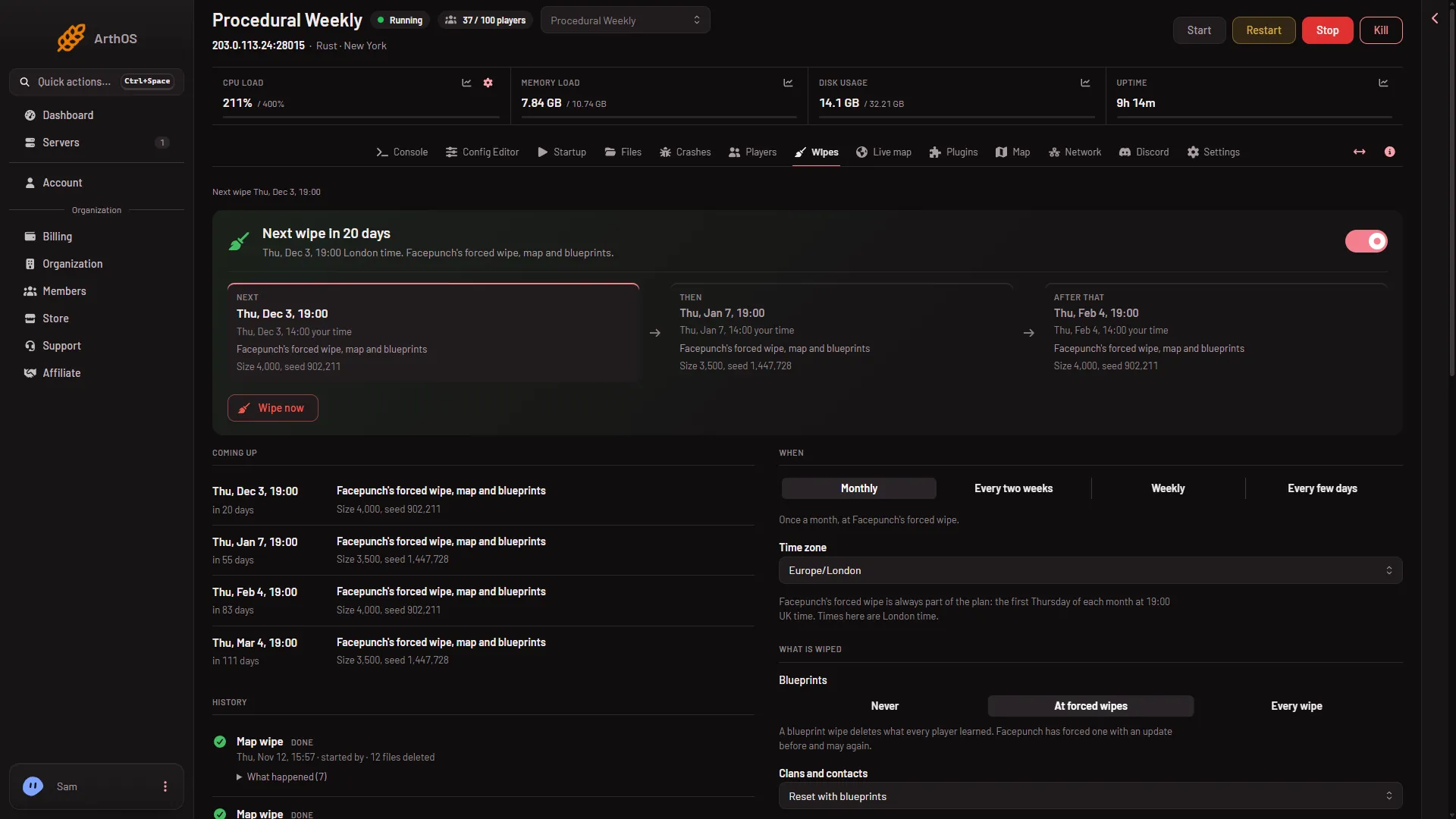
The band at the top shows the next wipe (1). The switch on its right (2) turns the whole plan on or off. Coming up (3) lists the next wipes with the map each one starts on.
Choose how often
- Monthly
- Every two weeks
- Weekly
- Every few days
- Time zone
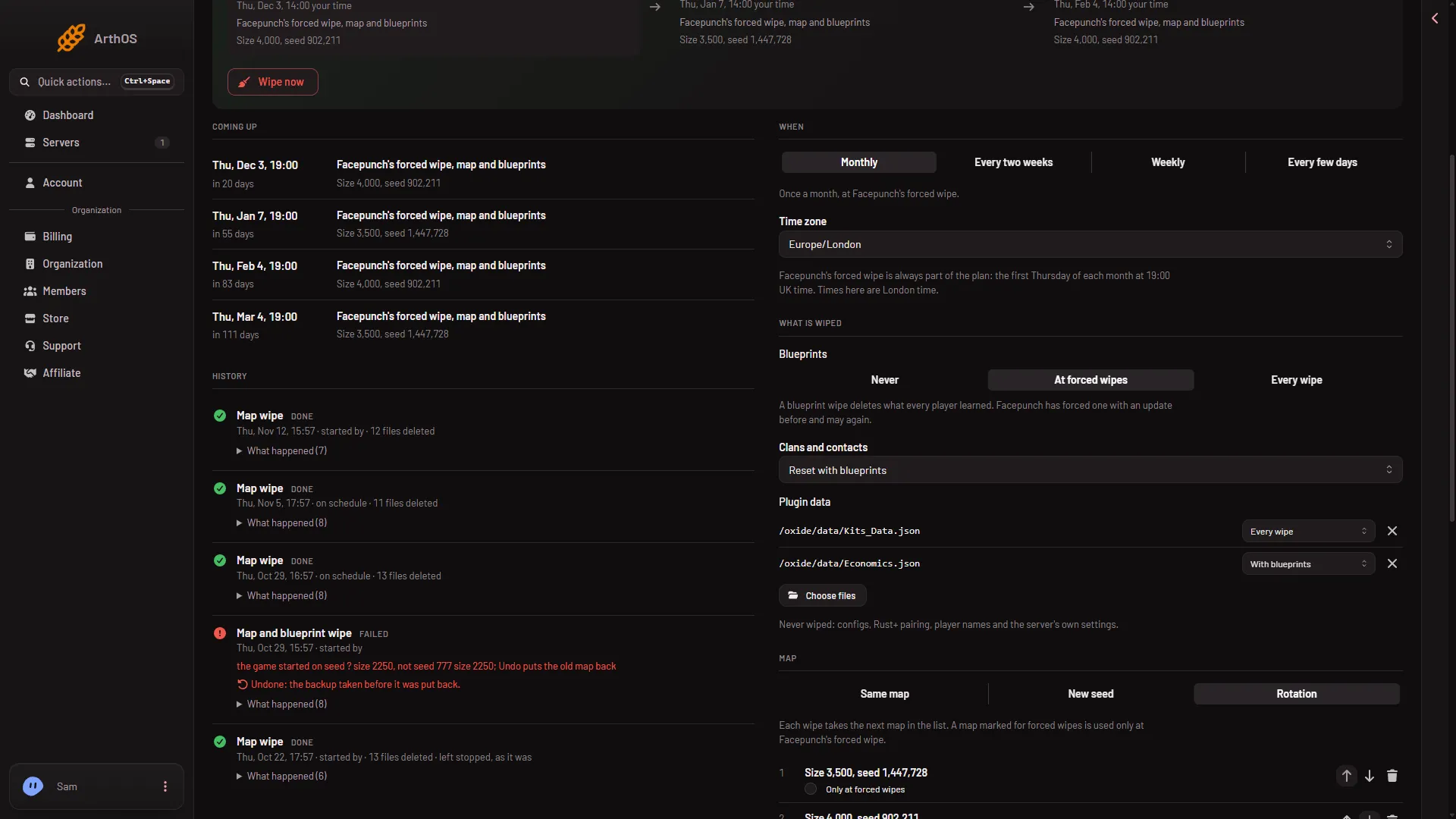
- Monthly (1): once a month, at Facepunch’s forced wipe (the game’s own monthly reset, explained below). There is no time box, because the forced wipe has its own time.
- Every two weeks (2): the 1st, 3rd and 5th Thursday of each month. In a month with five Thursdays the gap to the next month can be 1 or 2 weeks.
- Weekly (3): on the days you choose, every week. Pick at least one day. You also set the Time.
- Every few days (4): Every how many days (2 to 60), Counting from a date, and Skip within days after a forced wipe (0 to 10).
The Time is a 24 hour clock. The Time zone (5) is the zone every time on the page uses. It does not have to be your own.
Facepunch’s forced wipe is always in the plan
Facepunch resets every Rust map on the first Thursday of each month at 19:00 London time. The panel keeps that wipe in every plan, whatever cadence you choose. The page says so under Time zone.
Two rules keep you from wiping twice in a row:
- Your own wipe within 12 hours of a forced wipe is replaced by the forced one. In Coming up the row is greyed out and says “Skipped: Facepunch’s forced wipe is the wipe this day”.
- With Every few days only: a wipe up to the number of days in Skip within days after a forced wipe is skipped, because the map is new. The row says “Skipped: Facepunch’s forced wipe reset the map just before”.
By default the plan waits for Facepunch’s update before the forced wipe, for up to 6 hours. See make your Rust forced wipe wait for the update.
Defaults of a new plan
- Take a backup before each wipe is off. Turn it on under Safety if you want Roll back.
- Blueprints is At forced wipes when you start from a starter. That includes Monthly, so the forced wipe also wipes blueprints. See blueprints and plugin data in a wipe.
- Warn players before has 1 hour, 30, 10, 5 and 1 minutes on. See warnings and the server name.
- Wait for Facepunch’s update at the forced wipe is on, for up to 6 hours.
- To change the map after each wipe, see rotate map sizes and seeds.
What to know
- A change applies when you save. Saving also sets the start point of the plan to now. A wipe that the old plan was due to make before that moment is never run.
- The switch. Turning wipes off keeps your plan. The panel then wipes nothing on its own. Facepunch’s update still resets the map at the server’s first start after it.
- The next three. The band shows Next, Then and After that. When your browser’s time zone differs from the plan’s, each also shows “your time”.
- Who may do it. Everyone with access to Startup can read the plan. Changing it takes Change startup and Delete files. A role without both sees a summary and the note “Your role can see the plan.”
- A server that is off. A server in standby is started by the wipe. A server you stopped yourself stays stopped, and the history says so.
- Late wipes. If the panel was down, a wipe up to two hours late still runs. After that it is recorded as skipped.
- What a wipe deletes. It deletes the map, the saves and some player data. It never deletes configs, Rust+ pairing or player names.
If it does not work
- There is no Wipes tab. The server must run Rust, and your role needs access to Startup.
- Save is refused. The page shows the reason, such as “choose at least one day for a weekly wipe”, “every N days is from 2 to 60” or “that time zone is not known”. Fix that field and save again.
- “A file rule limits your role on the files a wipe deletes”. A file rule on the server’s data folder keeps your role from planning wipes. Ask the owner.
- A wipe did not happen. Open History on the Wipes tab. It lists each run and its reason. See read your Rust wipe history and fix a failed wipe.
- The wipe time is wrong by one hour. Check the Time zone box. A weekly time keeps its local clock time through clock changes, and the forced wipe follows London time.