












The Players group on the Wipes tab does three things around a wipe. It warns players in game chat before the server goes down. It renames the server after the wipe, so the server list shows the new date. It sets the wipe tag in the server list.
These settings only work while the plan is on. Check the switch at the right of the band at the top of the Wipes tab. If you turn it on, choose Turn on wipes when the panel asks. Saving needs a role that can change startup settings and delete files.
Warn players before a wipe
- Open the Wipes tab and find Warn players before.
- Press the marks you want: 2 h, 1 h, 30 min, 15 min, 10 min, 5 min, 1 min. A mark with a coloured background is on.
- Choose Save.
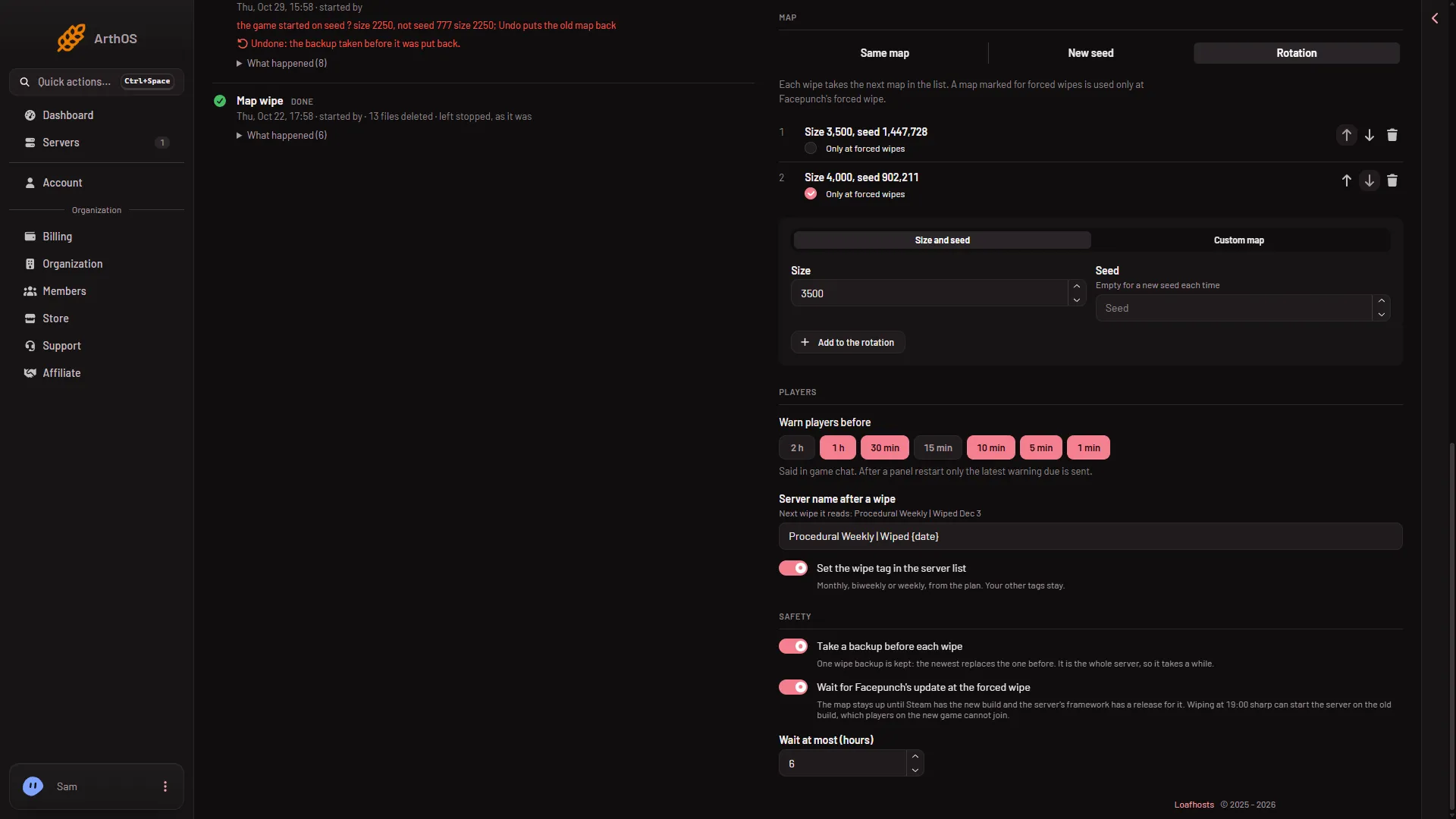
- Warn players before
- Server name after a wipe
- Wipe tag
Players read the warning in game chat. It says what kind of wipe is coming and how long is left, for example “Map wipe in 30 minutes.” A wipe that takes blueprints says so.
- A new plan starts with 1 h, 30 min, 10 min, 5 min and 1 min on.
- Each mark is said once. If the panel was late and several marks have passed, it says only the newest one.
- After a panel restart, only the latest warning that is due is sent.
- Nothing is said when the server is stopped.
Wipe now has its own warning choice in its window: Wipe straight away, In 1 min, In 5 min or In 10 min.
Rename the server after a wipe
Players see the date in the server list and know the map is new.
- In Server name after a wipe, type a name that holds
{date}, for exampleMy server | Wiped {date}. - Read the line under Server name after a wipe: “Next wipe it reads:” shows the result.
- Choose Save.
{date} becomes the wipe date written like “Oct 16”, in the time zone of your plan. The panel writes the new name into Server name on the Startup page as the wipe finishes, before the server starts. Each wipe replaces Server name on Startup with this name, so a name you type there is replaced at the next wipe. To keep a name you type there, leave this box empty.
The name can be up to 60 characters including the date. It cannot hold quotes or line breaks. For the name when you are not wiping, see your server name and description.
Set the wipe tag in the server list
Switch on Set the wipe tag in the server list. The panel adds one tag to Browser tags on Startup when it wipes:
| Plan | Tag |
|---|---|
| Monthly | monthly |
| Every two weeks | biweekly |
| Weekly | weekly |
| Every few days | weekly for 7 days or fewer, biweekly for 8 to 14, monthly above |
An older weekly, biweekly or monthly tag is replaced. Your other tags stay. Tags may hold only letters and commas, up to 128 characters. Nothing changes until the next wipe.
If it does not work
- The box says the game setup has no server name the panel can set. This server has no name setting the panel can change. The same goes for the tag switch and “server list tags”.
- “the server name with its date is longer than the game allows”. Shorten the name. The date takes some of the 60 characters.
- “the server name cannot hold quotes or line breaks”. Remove them.
- No warning came. Check that the mark was on and saved. The server must be running. Warnings come from a plan that is on. A mark that was already in the past when you saved the plan is not sent. See the wipe’s row in History.
- The name did not change. It changes when a wipe finishes, not when you save.
More about running Rust on the Rust page.