

















The Meteorites setting decides how often meteor showers hit your Space Engineers world. Choose None for no meteors, Normal for the game’s usual showers, or Cataclysm or Cataclysm unreal for more. Change it in the Config Editor with the server stopped. It applies at the next start.
The four choices
The panel’s help line says: “How often meteor showers hit. Showers damage grids.”
- None turns meteor showers off. The game calls this value
SAFE. - Normal is the game’s own default (
NORMAL). - Cataclysm (
CATACLYSM) is harder than Normal. - Cataclysm unreal (
CATACLYSM_UNREAL) is harder again. The game’s own screens call it Armageddon.
The game’s own name for the setting is Meteor Activity. Older pages call it environment hostility. Keen Software House, the game’s makers, says only that the rate of each choice is set inside the game’s own files, so no number of showers an hour is given here.
Change it
- On the server page, choose Stop and wait until the server shows Offline. Players are disconnected, so tell them first. A normal stop saves the world.
- Open the Config Editor and choose the World settings tab (1). Its name ends with the world’s folder name.
- In the World group, find Meteorites (2) and pick a choice from the list.
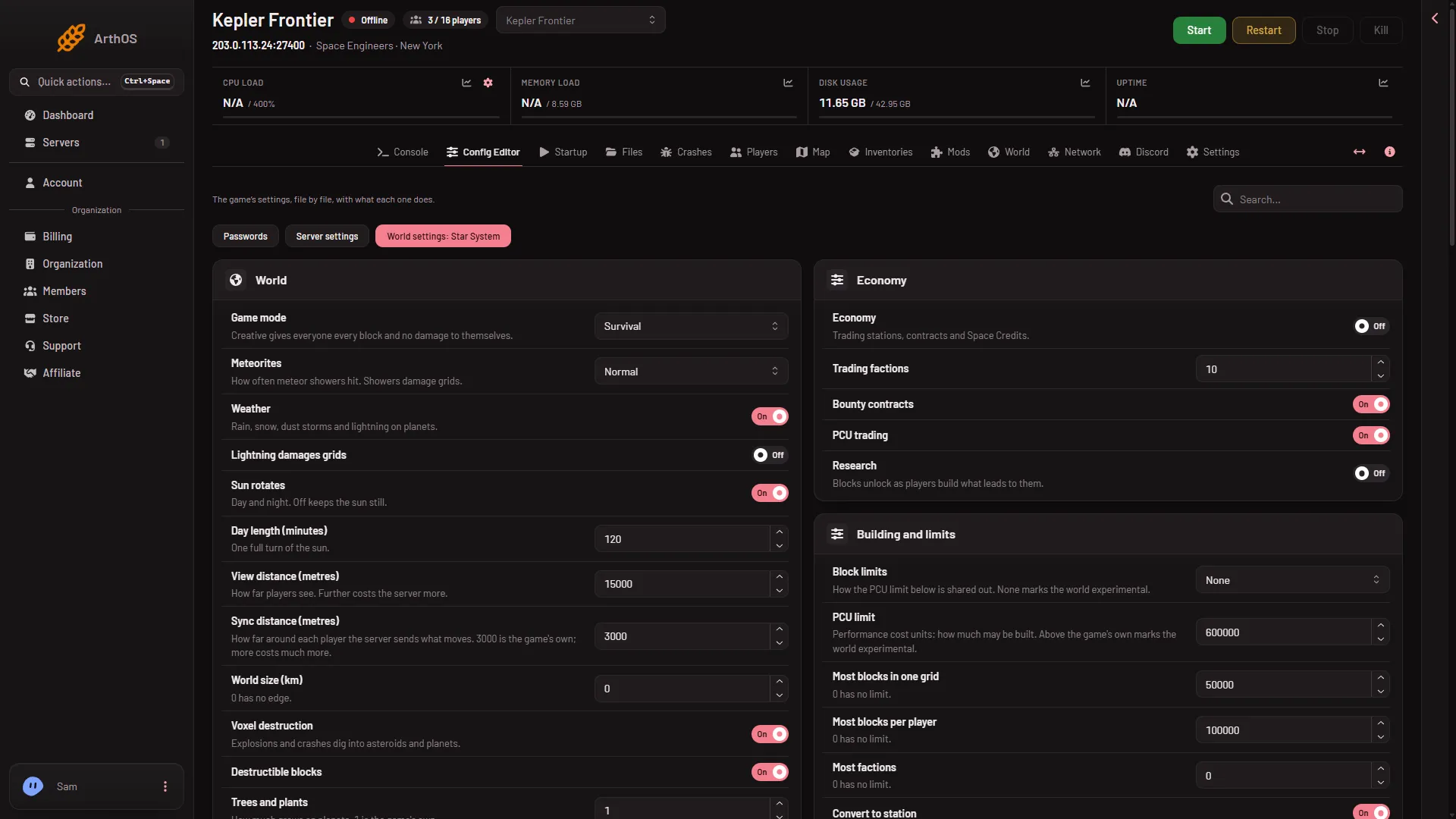
- World settings tab
- Meteorites row
- Press Save in the bar at the bottom. The panel says “Saved. The changes apply when the server starts.”
- Start the server.
The picture shows demo values. Open your own page to read what your world has now.
If it does not work
- Save is greyed out. The server is not stopped. The page says “The game writes this file itself when it stops, over anything changed while it runs. Stop the server to change these settings.”
- Meteors still fall. Check the row after the next start. The world’s file wins over every other copy of the setting, so you must change it in World settings, not in Server settings.
- You cannot find World settings. A new server shows only Passwords and Server settings until it has started twice: the first start makes the world, the next start names it as the world that loads. Start it again (or restart it), then stop it to change world settings. The same happens after Make it at the next start on the World page. Use this world shows the tab at once.
More about the game: Space Engineers servers on Loafhosts.
Sources: spaceengineers.wiki.gg: SessionSettings, spaceengineers.wiki.gg: World Settings