

















Guides / Space Engineers
Space Engineers server guides.
One task per guide: how to do it in the ArthOS panel, and by hand where there is a way.
Basics
22 guides-
 Basics
Can Xbox and PlayStation players join my server?
Console players cannot join a Loafhosts Space Engineers server: it runs on Steam networking with console compatibility off. PC players on Steam can join. - Basics
Change the max players on a Space Engineers server
Set the player limit of a Space Engineers server on the Startup page, Players, from 1 to 64. It wins over the world's own limit and applies at the next start. -
Change your Space Engineers server name
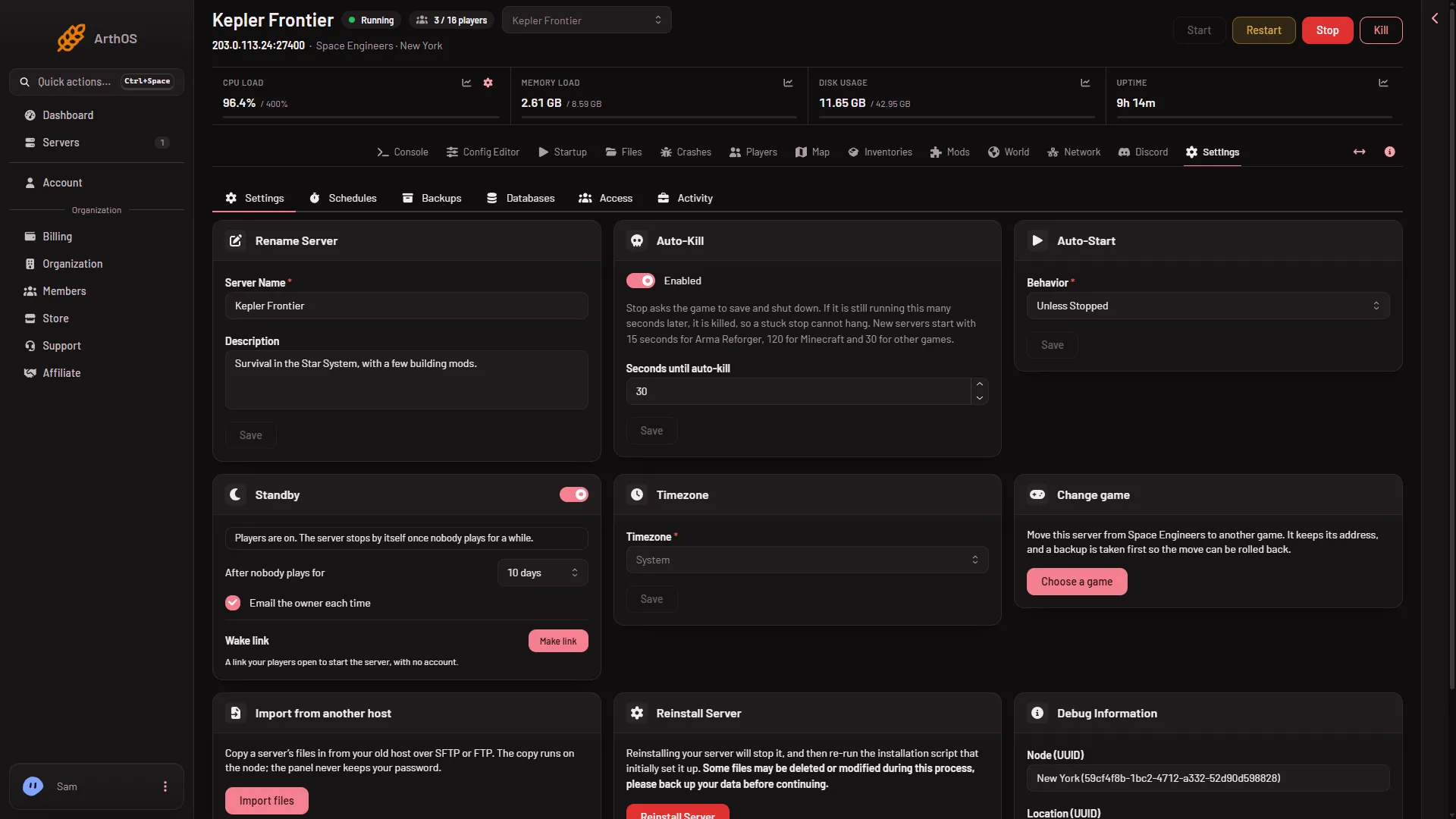
The name in the game's server list is Startup, Server name, up to 64 characters, written at every start. Rename Server in Settings renames it in the panel only. - Basics
How to join a Space Engineers server
Join your Loafhosts Space Engineers server: copy the address from the Players page, use Join Game, then the Servers tab or Direct Connect. - Basics
Set or change a Space Engineers server password
Set, change or remove the join password of a Space Engineers server on the Config Editor, Passwords page. Letters, digits, dash and underscore, 1 to 64. - Basics
Space Engineers 2 dedicated server: not out yet
Space Engineers 2 has no dedicated server yet, Keen says one will come later. Loafhosts servers run Space Engineers, the first game, not Space Engineers 2. -
Space Engineers Experimental mode on a server
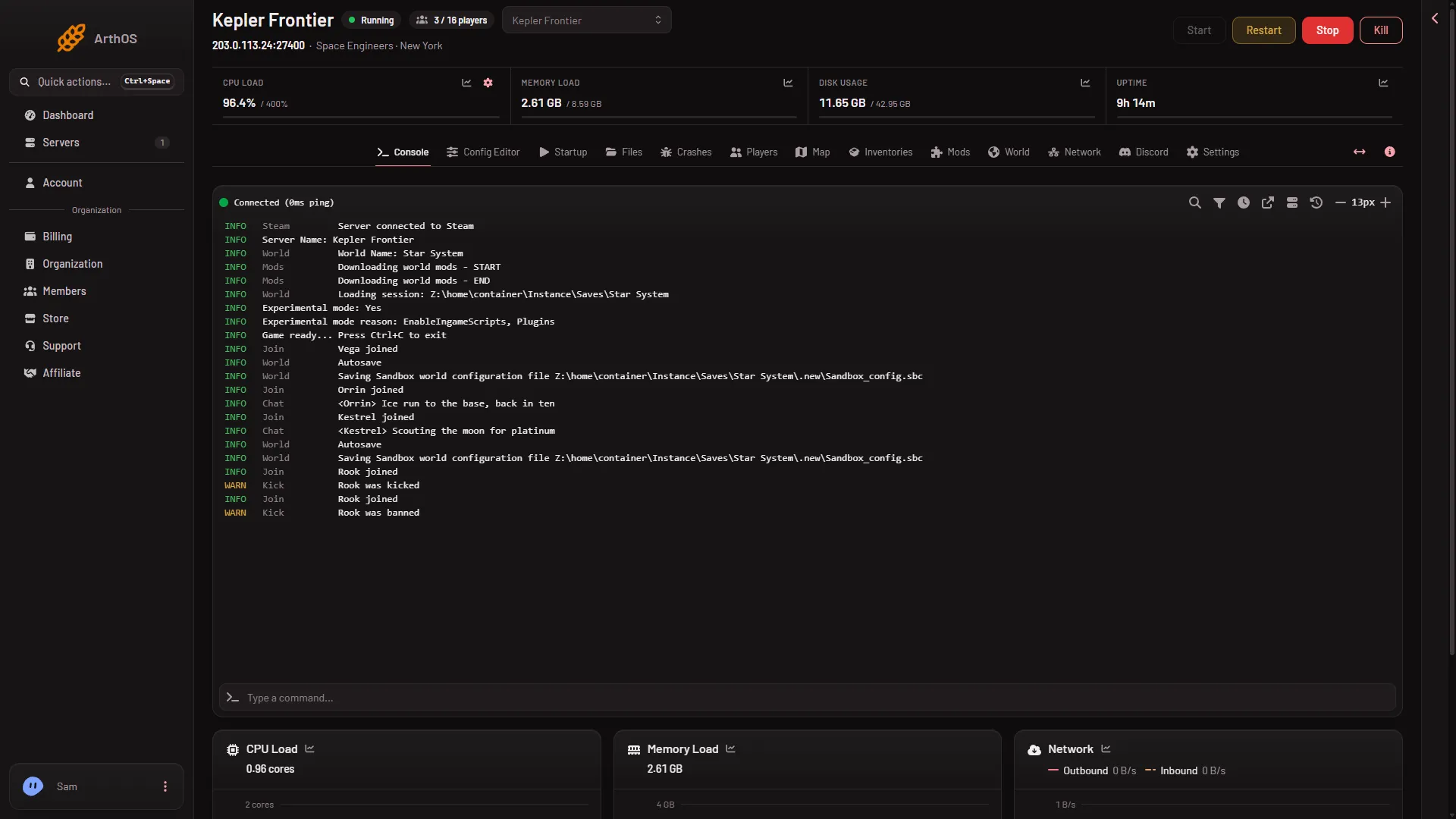
What Experimental mode is, why your Space Engineers server is marked experimental, where players turn it on, and why it does not harm saves. - Basics
Space Engineers panel tools: what they do
What the panel tools add to a Space Engineers server, what still works without them, how to turn them on or off, and why players need Experimental mode. - Basics
Space Engineers server setup: the first hour
Set up a new Space Engineers server: what it starts with, the first start, how players join, a join password, panel tools, mods and backups. -
Turn off Experimental mode on a Space Engineers server
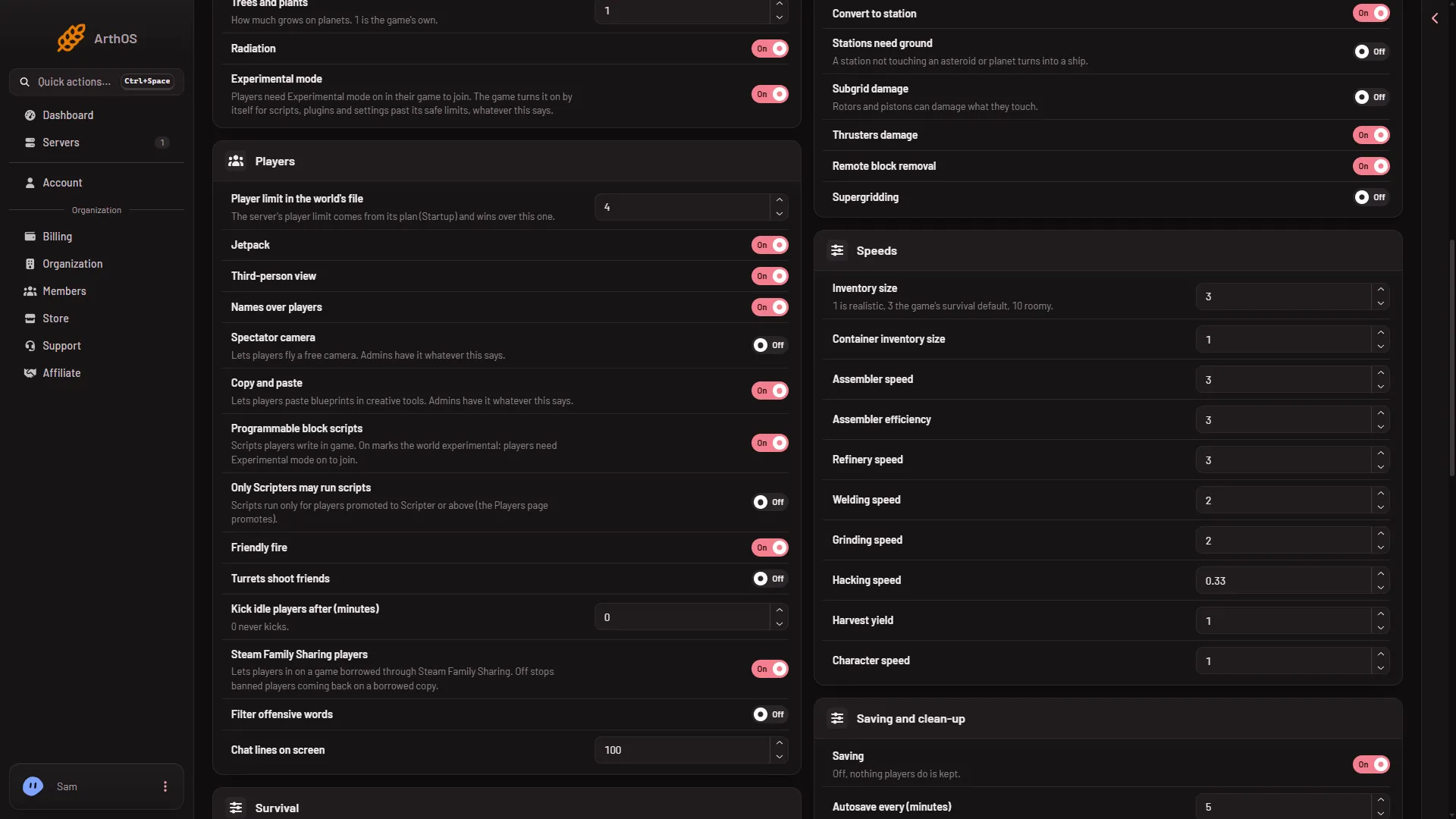
Make a Space Engineers server join without Experimental mode: turn off the panel tools and scripts, change Block limits and keep PCU within the game's own. -
Update your Space Engineers server to the latest version
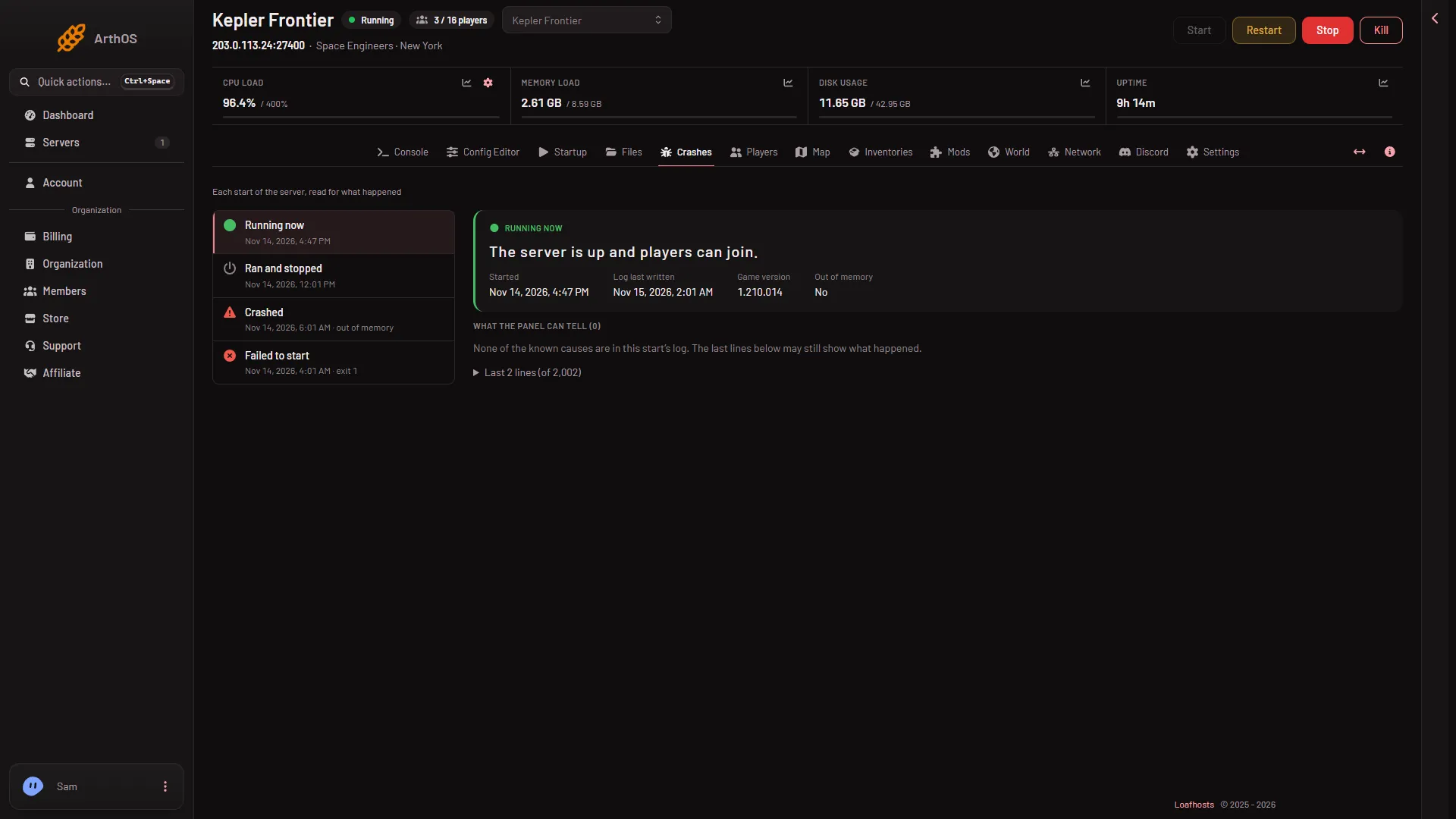
Keep Update on start on and restart to take a new Space Engineers build. Players on a newer game cannot join an older server. Check the version on Crashes. - Basics
Find your Space Engineers server's IP address
Where your Space Engineers server's address and port are in the panel, how to copy them, and how players use them with Direct Connect in the game. - Basics
How much memory a Space Engineers server needs
An empty Space Engineers server uses 2.0 to 2.6 GB. See what makes it grow, the 6, 8 and 12 GB plan sizes, Keen's minimums and what to do when memory runs out. - Basics
Let a friend run your Space Engineers server
Give a friend a role on your Space Engineers server. See who has access under Settings, Access, and which permission Players, Map and Inventories need. -
Read the Space Engineers server console
The Console tab shows the game's own log with a tag on each line: Steam, World, Mods, Join, Leave, Chat and Kick. See how to read it, show the clock and search. - Basics
Restart a Space Engineers server every day
Set a daily restart on a Space Engineers server: a Daily trigger and a Send Power Signal Restart step. Players get no warning, so message them first. - Basics
Space Engineers server files and folders explained
What is in the Files tab of a Space Engineers server: the Instance folder, the config, each world in Saves, mods, logs, and the folders you should leave alone. - Basics
Space Engineers server port: which one and where
A Space Engineers server on Loafhosts uses one UDP port for play and the Steam server list. See it on the Network page. You never forward a port. - Basics
Space Engineers server Settings tab: every card
What each card on a Space Engineers server's Settings tab does: rename, Auto-Kill, Auto-Start, Standby, Timezone, reinstall, and the Schedules and Backups tabs. - Basics
Space Engineers server standby and the wake link
Standby stops a Space Engineers server nobody plays on, after 10 days by default, and saves first. Change the time, set the email and make a wake link. - Basics
Space Engineers server status and events in Discord
Show your Space Engineers server in a Discord channel with a live status message, and post starts, stops, crashes and backups with a webhook. - Basics
Start, stop and restart a Space Engineers server
What Start, Restart, Stop and Kill do on a Space Engineers server. A stop saves the world, a kill does not. Set Auto-Kill and never use the game's /stop.
Players and admins
23 guides- Players and admins
Give an item to a player on a Space Engineers server
Open a player's box button, press Give an item, pick from the game's own list, set how many and press the button. Here is what it refuses and why. - Players and admins
How to ban a player on a Space Engineers server
Ban a Space Engineers player by SteamID64 on the Players page: Ban from a row, or Add to Bans. A ban covers every world on the server. - Players and admins
How to kick a player on a Space Engineers server
Kick a player from your Space Engineers server on the Players page: open Actions for their name, choose Kick, add a reason if you like. They can join again. - Players and admins
Make yourself admin on a Space Engineers server
Add your SteamID64 to the Admins list, or use Change rank with the panel tools on. Then press Alt+F10 in the game to open the Admin Screen. Steps for both ways. - Players and admins
Player stuck in a wall or ship on Space Engineers
Free a player stuck in a wall or a broken ship on your Space Engineers server: send them to the respawn screen from the Players page or the map. - Players and admins
See what a player carries on a Space Engineers server
Press the box button on a player's row on the Players page to see their items. Live while they are on with the panel tools, else as of the last save. - Players and admins
Space Engineers player ranks: Scripter to Admin
What each Space Engineers rank can do, Scripter, Moderator, Space Master and Admin, and how to change a player's rank from the Players page. - Players and admins
Space Engineers Players page: a full tour
A tour of the Players page of a Space Engineers server: Join box, who is on with health and oxygen, row actions, event log, Admins, Bans and Reserved slots. - Players and admins
Factions on a Space Engineers server: where to see them
The Players page lists each player-made faction with its tag, name and members, read from the last save. The tag also shows beside each player's name. - Players and admins
How to find a Space Engineers SteamID64
Find a player's SteamID64 for your Space Engineers server: the Players page shows it under every name, or read it from their Steam profile address. - Players and admins
How to unban a player on a Space Engineers server
Lift a Space Engineers ban from the Players page: press Lift on the Bans list, or Lift the ban under Everyone the world knows. At once with the panel tools. - Players and admins
Kick idle players on a Space Engineers server
Set Kick idle players after (minutes) in the World settings of the Config Editor. A whole number from 1 to 1440; 0 never kicks. Stop the server to save it. - Players and admins
Let only Scripters run scripts on a Space Engineers server
Turn on Only Scripters may run scripts in the World settings, then give trusted players the Scripter rank from the Players page (needs the panel tools). - Players and admins
Message players on a Space Engineers server
Send a message to everyone or to one player on a Space Engineers server from the Players page. Up to 200 characters, shown in game chat. -
Read the chat and join log on a Space Engineers server
With the panel tools on, the Players page lists joins, leaves, chat and panel actions, and the Console tags Join, Leave, Chat and Kick lines. - Players and admins
Remove an item from a player on a Space Engineers server
Press Remove next to an item in a player's list, choose All of it or an amount, and confirm. Removed items are gone from the world for good. - Players and admins
Reserved slots on a Space Engineers server
Put a player on Reserved slots so they can join your Space Engineers server even when it is full. Add them by SteamID64 on the Players page. - Players and admins
See who is online on a Space Engineers server
See who is on your Space Engineers server now. The Players page shows each player's health and ship with the panel tools on, or names and time on without. - Players and admins
Show a Space Engineers server only to a Steam group
Put a Steam group's number in Steam group only on the Config Editor's Server settings tab, and the server is visible only to that group's members. - Players and admins
Space Engineers Admin Screen (Alt+F10) explained
Who can open the Space Engineers Admin Screen with Alt+F10, and what is in it: Admin Tools, Entity List, Trash removal, Safe Zones, Weather and Economy. - Players and admins
Space Engineers chat commands for players and admins
The chat commands Keen's pages list for Space Engineers: /g, /f, /w, /m, /u, /GPS, and admin ones like /save and /weather. Why /stop is wrong on Loafhosts. - Players and admins
Steam Family Sharing on a Space Engineers server
Steam Family Sharing players is a World setting. The panel says off stops banned players coming back on a borrowed copy. Stop the server to save it. - Players and admins
Teleport a player on a Space Engineers server
Move a player next to another player, or beside a ship or station, on your Space Engineers server. Use the Players page or the map.
Map, planets and inventories
14 guides- Map, planets and inventories
Delete a ship or station on a Space Engineers server
Delete a ship or station from the Map page: open its dialog, press Delete, then Delete for good. It leaves the world at once. The game's Entity List can too. - Map, planets and inventories
Find an item anywhere in a Space Engineers world
Search the whole world for an item on the Inventories page: type two letters, see the biggest stacks first, and open the block that holds it. - Map, planets and inventories
See a Space Engineers planet in 3D on your server
Open any planet of your Space Engineers world in 3D from the Map page: its ground, air, ores and everything on and around it. Drag to turn, scroll to zoom. -
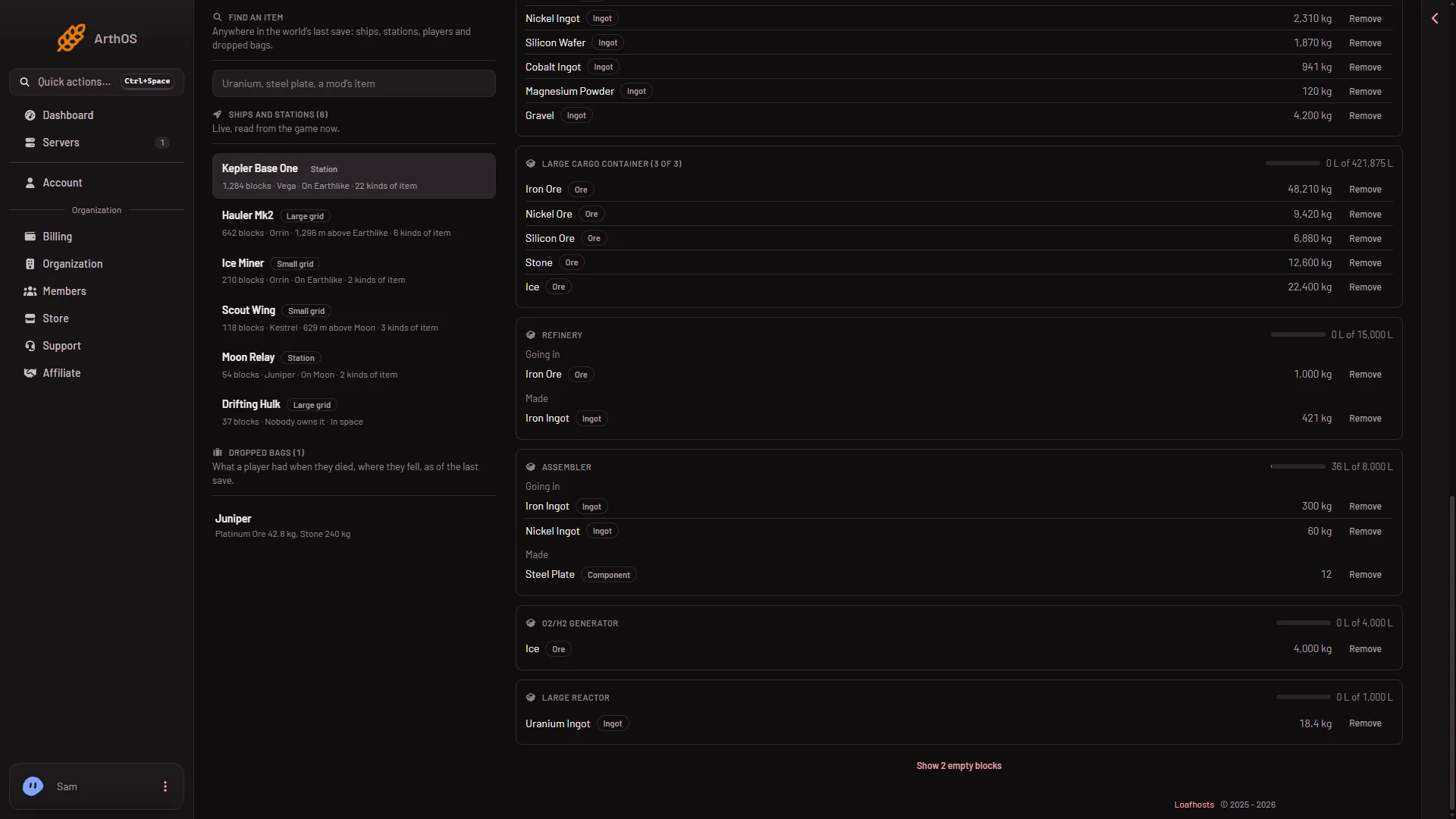
Space Engineers Inventories page: what ships hold
A tour of the Inventories page: every ship and station with its owner and place, a grid's items in all and per block, how full each block is, and dropped bags. - Map, planets and inventories
Space Engineers planet ores: which ore, how deep
Which ores each Space Engineers planet has and how deep the shallowest deposit starts. Platinum is on the Moon, Europa and Titan. Uranium is in asteroids. - Map, planets and inventories
Space Engineers server map: planets, players and ships
A tour of the Map page for your Space Engineers server: planets to scale, trading stations, players and ships, zoom, Map settings and the tools-off view. - Map, planets and inventories
Dropped bags in Space Engineers: what a dead player had
The Inventories page lists dropped bags: what a player carried when they died, as of the last save. See what is in one and find an item inside it. - Map, planets and inventories
Find a player on the Space Engineers map
See where a player is on your Space Engineers server: the On the map list, Follow, and the player card with health and x, y, z position. - Map, planets and inventories
Give items to a ship or station in Space Engineers
Put any item into a cargo container or other block on a ship or station from the Inventories page: choose Into, pick the item, set How many, press Give. - Map, planets and inventories
Remove items from a block in Space Engineers
Take items out of a cargo container, refinery or other block from the Inventories page: press Remove on the item line, set All of it or an amount. -
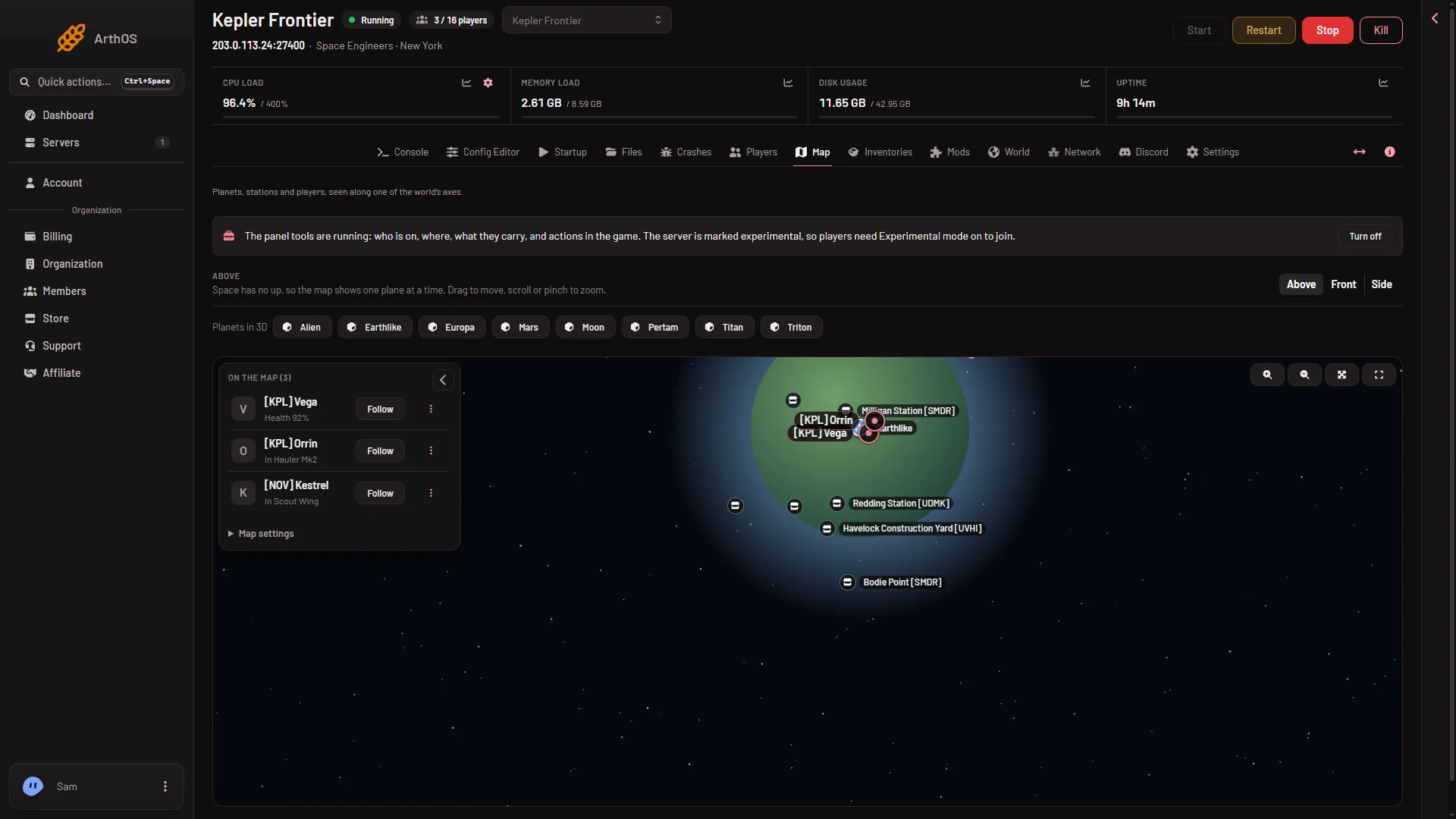
See ships and stations on the Space Engineers map
Find every ship and station on the Space Engineers map, read its owner and size on hover, open its dialog and see what it holds. Needs the private map. - Map, planets and inventories
Stop a drifting ship on a Space Engineers server
Stop a ship that is drifting in space from the Map page with Stop it, and set how long the game waits before it stops far-off grids itself. - Map, planets and inventories
Trading stations on the Space Engineers server map
See the game's trading stations on your Space Engineers server map: the Places layer, names with faction tags, hiding them, and why Economy must be on to trade. - Map, planets and inventories
What the Space Engineers map shows without panel tools
With the panel tools off, the Space Engineers map still shows planets, trading stations and ships as of the last save, but no players. How to get the rest.
Worlds and backups
14 guides- Worlds and backups
Download your Space Engineers server world
Save the world first, then on Files open Instance/Saves, Archive the world's folder and download it, or use SFTP. Put it in your own Saves folder to play it. - Worlds and backups
Reset a planet's ground on a Space Engineers server
Put one planet's ground back as the game made it on your Space Engineers server. Every hole dug is undone, your grids stay. Stop the server first. - Worlds and backups
Restore a Space Engineers backup: put a world back
Put a Space Engineers world back from a backup. Press Put back on the World page to load a saved copy at the next start, or restore a panel backup. - Worlds and backups
Start a new world on a Space Engineers server
On the World page, pick one of the 17 worlds in Start from under New world, name it and press Make it at the next start. Your old world stays on the server. - Worlds and backups
Switch to another world on a Space Engineers server
Press Use this world on the other world's row on the World page, then restart. The server loads it at the next start, with its own mods and settings. - Worlds and backups
The World page on a Space Engineers server, explained
A tour of the World page: which world loads, its planets and backups, making a new world, bringing one in, and when each change takes effect. - Worlds and backups
Upload your own world to a Space Engineers server
Zip your world from %AppData%\SpaceEngineers\Saves, upload it to Instance/Saves on Files, Unpack it on the World page, then Use this world. Mods come with it. - Worlds and backups
Copy a Space Engineers world on your server
Make a copy of a Space Engineers world from the World page: three-dots menu, Make a copy, Name of the copy. Save first if the server is running. - Worlds and backups
Delete a Space Engineers world that does not load
Delete a Space Engineers world from the World page. It and its backups go to the trash for 3 days. The world that loads can't be deleted until you pick another. - Worlds and backups
Move a Space Engineers world from another host
Bring your world from an old host to Loafhosts: copy the world folder into Instance/Saves, or import a whole server folder, then press Use this world. - Worlds and backups
Space Engineers premade worlds and their planets
The 17 of the game's own worlds that Start from offers for a new world, from Empty World to Star System, with the panel's count of voxel files in each. - Worlds and backups
Space Engineers server backups: create, lock, restore
Back up a whole Space Engineers server in Settings, Backups: Create, Restore, Lock and Export to Files. Take it after Save now, or with the server stopped. - Worlds and backups
Space Engineers: how many backups the game keeps
Set how many backups a Space Engineers server keeps and how often it autosaves, in World settings. Set Backups kept to 0 and the saved copies are deleted. - Worlds and backups
When Space Engineers saves the world on a server
The server saves by itself every few minutes, and a normal stop saves too. A kill does not. With the panel tools on, Save now saves on demand.
Workshop mods
11 guides- Workshop mods
Add a Workshop collection to a Space Engineers server
Paste a Steam Workshop collection link into Add by link or ID, press Look up, and every mod in it is added to your list, up to 200. Then apply the list. - Workshop mods
Add Steam Workshop mods to a Space Engineers server
Add Workshop mods from the Mods page: search or paste a link or ID, press Look up, add them, then Apply and restart. The game downloads them at the start. - Workshop mods
Change the mod load order on a Space Engineers server
Reorder mods on your Space Engineers server: drag a row or type its number on the Mods page, then apply. Which end of the list wins was not checked. - Workshop mods
Remove a mod from a Space Engineers server
Take a mod off your Space Engineers server's list and apply. Blocks from that mod leave the world, so back up first. Its files stay until you delete them. - Workshop mods
Do Space Engineers mods make a server experimental?
Mods alone do not make a Space Engineers server experimental since update 1.206, but a new server already needs it for other reasons. Check the Console. - Workshop mods
Mods that need other mods on a Space Engineers server
A mod can need other mods. The game adds them to your server's list at its next save, so you do not add them. Reference issue log lines were harmless. - Workshop mods
Save and reuse a mod list on Space Engineers servers
Keep one Space Engineers server's mod list as a collection on the Mods page, then add it to or replace another server's list. Nothing changes until you apply. - Workshop mods
Space Engineers blueprints on a server: not mods
A blueprint, world or script is not a mod, so the Mods page refuses it. Here is how blueprints work on a server: projectors, admin paste and permissions. - Workshop mods
Space Engineers mods and disk space on your server
See how much disk your Space Engineers mods use, why Apply can refuse for space, and how to delete mod files the game downloaded that are no longer on the list. - Workshop mods
Space Engineers mods belong to a world, not the server
Each Space Engineers world keeps its own mod list. Switch worlds and the mods switch too; a world you bring in brings its mods. See which list you edit. - Workshop mods
Update mods on a Space Engineers server
The game updates every mod each time your Space Engineers server starts. Restart it to take an update, so players with the newer mod version can join.
Server and world settings
25 guides- Server and world settings
Change inventory size on a Space Engineers server
Set Inventory size and Container inventory size on a Space Engineers server: 1 is realistic, higher holds more. Lowering the number later cuts items. - Server and world settings
Change the PCU limit on a Space Engineers server
Set the PCU limit (TotalPCU) on a Space Engineers server: what PCU is, why Block limits must not be None, how it is shared, and the Experimental mode catch. - Server and world settings
Creative mode on a Space Engineers server
Switch a Space Engineers server between Survival and Creative, allow copy and paste and the spectator camera, and see what admins keep either way. - Server and world settings
Programmable block scripts on a Space Engineers server
Turn Programmable Block scripts on or off, limit them to Scripters, and fix the game's 'This world has disabled scripts' error on your server. - Server and world settings
Space Engineers assembler and refinery speed settings
Set Assembler speed, Assembler efficiency and Refinery speed on a Space Engineers server: speed is how fast, efficiency is how many items, and prices follow. - Server and world settings
Space Engineers Config Editor: a tour of every tab
The Config Editor holds your Space Engineers join password, server settings and world settings. See what each tab does and when a change applies. - Server and world settings
Space Engineers economy setting: trading and credits
Turn the Space Engineers economy on or off in the Config Editor: trading stations, contracts and Space Credits, plus factions, bounties, PCU trading, research. - Server and world settings
Space Engineers trash removal: why ships vanish
Set up Space Engineers trash removal in the Config Editor: small grids, distance, absent owners, bodies, dug ground, floating objects, and why ships disappear. - Server and world settings
Space Engineers world settings: every group explained
Every World settings group in the Config Editor for a Space Engineers server, what each row does, and why you must stop the server before you save. - Server and world settings
Turn Space Engineers meteorites off, or raise them
Set Meteorites to None, Normal, Cataclysm or Cataclysm unreal in the Config Editor of a Space Engineers server. How to change it and when it applies. - Server and world settings
Change how often a Space Engineers server saves
Set the Space Engineers autosave interval in minutes, what the Saving switch and Backups kept do, and how much a crash can lose. Config Editor, world settings. - Server and world settings
Oxygen and airtight rooms on a Space Engineers server
Turn Oxygen, Airtight rooms, Health comes back and Radiation on or off for a Space Engineers server, and see which setting needs which. - Server and world settings
Pause a Space Engineers server when nobody is on
Turn on Pause when nobody is on so the world waits for players, and learn how it differs from Standby, which still stops an empty server after its time. - Server and world settings
Permanent death on a Space Engineers server
Turn Permanent death on or off for a Space Engineers server. What it does to players who die, how it counts for Experimental mode, and how to change it. - Server and world settings
Respawn settings on a Space Engineers server
What Respawn ships, Respawn ship wait, Respawn by themselves, Spawn distance and Spawn with tools do on a Space Engineers server, and how to change them. - Server and world settings
Space Engineers auto restart after a crash and on a timer
Set Restart after a crash, Restart every (minutes), Save before a timed restart and the watchdog rows, and see how the panel restarts a stopped server. - Server and world settings
Space Engineers block limits: grid, player and type caps
Block limits on a Space Engineers server: None turns off every limit including the PCU limit. For everyone together, Per faction and Per player share it. - Server and world settings
Space Engineers chat spam protection settings
Switch Space Engineers chat spam protection on or off, change its three timers, and choose whether chat is kept in the game's log. Set in the Config Editor. - Server and world settings
Space Engineers floating objects limit and cargo bags
Loose items cost a Space Engineers server. Set Most floating objects and Most cargo bags in World settings so older ones are removed past the limit. - Server and world settings
Space Engineers message of the day and description
Set the description shown in the game's server list and a message of the day, with a link, that every player sees when they join your server. - Server and world settings
Space Engineers view distance and sync distance
What View distance and Sync distance do on a Space Engineers server, why 3000 is the game's own sync value, and how to change both in the Config Editor. - Server and world settings
Space Engineers weather, lightning and day length
Turn weather and lightning damage on or off, stop the sun, or set how many minutes a Space Engineers day lasts. All four are World settings. - Server and world settings
Space Engineers welding and grinding speed settings
Change welding, grinding, hacking, harvest and walking speed on a Space Engineers server from the Config Editor. What each number does and when it applies. - Server and world settings
Space Engineers world size, asteroids and voxels
Set a world edge in km, change asteroid density, stop ground being dug away, and thin out or grow trees on a Space Engineers server. - Server and world settings
Turn off pirates, drones and animals on Space Engineers
Stop pirate drones, wolves, spiders, cargo ships, encounters and container drops on a Space Engineers server with the Encounters and NPCs settings.
Fixes
14 guides- Fixes
Can't join your Space Engineers server: fixes
Players cannot join your Space Engineers server? Check standby, Experimental mode, game version, join password, full slots, bans and Steam group only. -
Read the Crashes tab on a Space Engineers server
The Crashes tab lists each start of your Space Engineers server and how it ended. See what each outcome means and what the findings and last lines tell you. - Fixes
Space Engineers mod script did not compile: what to do
The Mods page says a mod's script did not compile. The mod loaded without its script and is broken. Find which mod, then update it or take it off the list. - Fixes
Space Engineers server lag and low simulation speed
Fix Space Engineers server lag: turn on trash removal, lower floating objects, find the heaviest grid, and read the simulation speed on the Players page. - Fixes
Space Engineers server makes a new world after restart
Your base is gone after a restart because the server loaded a different world. Read the World page notice, then choose the right world with Use this world. - Fixes
Space Engineers server not showing in the server list
Your Space Engineers server is running but players cannot find it: check Steam or EOS, the list filters, the start, Experimental mode, then use Direct Connect. - Fixes
Space Engineers server out of memory: what to do
Your Space Engineers server crashed out of memory. What the two Crashes findings mean, what uses memory, and how to fix it with clean-up or a bigger plan. - Fixes
Space Engineers: the world could not be loaded
The Crashes tab says the world could not be loaded. A world file, often a planet's .vx2 file, is missing or damaged. Put back a backup or choose another world. - Fixes
Space Engineers server lost progress after restart
Work vanished after a restart or crash? The server went back to its last save. Bring a recent backup back from the World page first, then find why. -
Space Engineers server stuck on starting
A new Space Engineers server can take about 11 minutes longer on its first start. See what it is doing, how to tell it is ready, and what Failed to start means. - Fixes
Space Engineers ships and stations disappearing
Ships, wrecks or stations vanish from a Space Engineers server. Check Trash removal, the respawn ship rule, the world edge and the map's Delete, then fix it. - Fixes
Space Engineers: a mod could not be downloaded
The Crashes page says a mod could not be downloaded. Find which mod, check it is still public on the Steam Workshop, or take it off the list. - Fixes
Space Engineers: PCU limit reached, how to fix it
Players see PCU limit reached and cannot build. Check Block limits, raise PCU limit in the Config Editor with the server stopped, or let an admin ignore it. - Fixes
Space Engineers: server could not connect to Steam
The Crashes page says the server could not connect to Steam. Restart the server first. If it happens again, Steam may be down, so ask support.
- Add a Workshop collection to a Space Engineers server Paste a Steam Workshop collection link into Add by link or ID, press Look up, and every mod in it is added to your list, up to 200. Then apply the list.
- Add Steam Workshop mods to a Space Engineers server Add Workshop mods from the Mods page: search or paste a link or ID, press Look up, add them, then Apply and restart. The game downloads them at the start.
- Can Xbox and PlayStation players join my server? Console players cannot join a Loafhosts Space Engineers server: it runs on Steam networking with console compatibility off. PC players on Steam can join.
- Can't join your Space Engineers server: fixes Players cannot join your Space Engineers server? Check standby, Experimental mode, game version, join password, full slots, bans and Steam group only.
- Change inventory size on a Space Engineers server Set Inventory size and Container inventory size on a Space Engineers server: 1 is realistic, higher holds more. Lowering the number later cuts items.
- Change the max players on a Space Engineers server Set the player limit of a Space Engineers server on the Startup page, Players, from 1 to 64. It wins over the world's own limit and applies at the next start.
- Change the mod load order on a Space Engineers server Reorder mods on your Space Engineers server: drag a row or type its number on the Mods page, then apply. Which end of the list wins was not checked.
- Change the PCU limit on a Space Engineers server Set the PCU limit (TotalPCU) on a Space Engineers server: what PCU is, why Block limits must not be None, how it is shared, and the Experimental mode catch.
- Change your Space Engineers server name The name in the game's server list is Startup, Server name, up to 64 characters, written at every start. Rename Server in Settings renames it in the panel only.
- Creative mode on a Space Engineers server Switch a Space Engineers server between Survival and Creative, allow copy and paste and the spectator camera, and see what admins keep either way.
- Delete a ship or station on a Space Engineers server Delete a ship or station from the Map page: open its dialog, press Delete, then Delete for good. It leaves the world at once. The game's Entity List can too.
- Download your Space Engineers server world Save the world first, then on Files open Instance/Saves, Archive the world's folder and download it, or use SFTP. Put it in your own Saves folder to play it.
- Find an item anywhere in a Space Engineers world Search the whole world for an item on the Inventories page: type two letters, see the biggest stacks first, and open the block that holds it.
- Give an item to a player on a Space Engineers server Open a player's box button, press Give an item, pick from the game's own list, set how many and press the button. Here is what it refuses and why.
- How to ban a player on a Space Engineers server Ban a Space Engineers player by SteamID64 on the Players page: Ban from a row, or Add to Bans. A ban covers every world on the server.
- How to join a Space Engineers server Join your Loafhosts Space Engineers server: copy the address from the Players page, use Join Game, then the Servers tab or Direct Connect.
- How to kick a player on a Space Engineers server Kick a player from your Space Engineers server on the Players page: open Actions for their name, choose Kick, add a reason if you like. They can join again.
- Make yourself admin on a Space Engineers server Add your SteamID64 to the Admins list, or use Change rank with the panel tools on. Then press Alt+F10 in the game to open the Admin Screen. Steps for both ways.
- Player stuck in a wall or ship on Space Engineers Free a player stuck in a wall or a broken ship on your Space Engineers server: send them to the respawn screen from the Players page or the map.
- Programmable block scripts on a Space Engineers server Turn Programmable Block scripts on or off, limit them to Scripters, and fix the game's 'This world has disabled scripts' error on your server.
- Read the Crashes tab on a Space Engineers server The Crashes tab lists each start of your Space Engineers server and how it ended. See what each outcome means and what the findings and last lines tell you.
- Remove a mod from a Space Engineers server Take a mod off your Space Engineers server's list and apply. Blocks from that mod leave the world, so back up first. Its files stay until you delete them.
- Reset a planet's ground on a Space Engineers server Put one planet's ground back as the game made it on your Space Engineers server. Every hole dug is undone, your grids stay. Stop the server first.
- Restore a Space Engineers backup: put a world back Put a Space Engineers world back from a backup. Press Put back on the World page to load a saved copy at the next start, or restore a panel backup.
- See a Space Engineers planet in 3D on your server Open any planet of your Space Engineers world in 3D from the Map page: its ground, air, ores and everything on and around it. Drag to turn, scroll to zoom.
- See what a player carries on a Space Engineers server Press the box button on a player's row on the Players page to see their items. Live while they are on with the panel tools, else as of the last save.
- Set or change a Space Engineers server password Set, change or remove the join password of a Space Engineers server on the Config Editor, Passwords page. Letters, digits, dash and underscore, 1 to 64.
- Space Engineers 2 dedicated server: not out yet Space Engineers 2 has no dedicated server yet, Keen says one will come later. Loafhosts servers run Space Engineers, the first game, not Space Engineers 2.
- Space Engineers assembler and refinery speed settings Set Assembler speed, Assembler efficiency and Refinery speed on a Space Engineers server: speed is how fast, efficiency is how many items, and prices follow.
- Space Engineers Config Editor: a tour of every tab The Config Editor holds your Space Engineers join password, server settings and world settings. See what each tab does and when a change applies.
- Space Engineers economy setting: trading and credits Turn the Space Engineers economy on or off in the Config Editor: trading stations, contracts and Space Credits, plus factions, bounties, PCU trading, research.
- Space Engineers Experimental mode on a server What Experimental mode is, why your Space Engineers server is marked experimental, where players turn it on, and why it does not harm saves.
- Space Engineers Inventories page: what ships hold A tour of the Inventories page: every ship and station with its owner and place, a grid's items in all and per block, how full each block is, and dropped bags.
- Space Engineers mod script did not compile: what to do The Mods page says a mod's script did not compile. The mod loaded without its script and is broken. Find which mod, then update it or take it off the list.
- Space Engineers panel tools: what they do What the panel tools add to a Space Engineers server, what still works without them, how to turn them on or off, and why players need Experimental mode.
- Space Engineers planet ores: which ore, how deep Which ores each Space Engineers planet has and how deep the shallowest deposit starts. Platinum is on the Moon, Europa and Titan. Uranium is in asteroids.
- Space Engineers player ranks: Scripter to Admin What each Space Engineers rank can do, Scripter, Moderator, Space Master and Admin, and how to change a player's rank from the Players page.
- Space Engineers Players page: a full tour A tour of the Players page of a Space Engineers server: Join box, who is on with health and oxygen, row actions, event log, Admins, Bans and Reserved slots.
- Space Engineers server lag and low simulation speed Fix Space Engineers server lag: turn on trash removal, lower floating objects, find the heaviest grid, and read the simulation speed on the Players page.
- Space Engineers server makes a new world after restart Your base is gone after a restart because the server loaded a different world. Read the World page notice, then choose the right world with Use this world.
- Space Engineers server map: planets, players and ships A tour of the Map page for your Space Engineers server: planets to scale, trading stations, players and ships, zoom, Map settings and the tools-off view.
- Space Engineers server not showing in the server list Your Space Engineers server is running but players cannot find it: check Steam or EOS, the list filters, the start, Experimental mode, then use Direct Connect.
- Space Engineers server out of memory: what to do Your Space Engineers server crashed out of memory. What the two Crashes findings mean, what uses memory, and how to fix it with clean-up or a bigger plan.
- Space Engineers server setup: the first hour Set up a new Space Engineers server: what it starts with, the first start, how players join, a join password, panel tools, mods and backups.
- Space Engineers trash removal: why ships vanish Set up Space Engineers trash removal in the Config Editor: small grids, distance, absent owners, bodies, dug ground, floating objects, and why ships disappear.
- Space Engineers world settings: every group explained Every World settings group in the Config Editor for a Space Engineers server, what each row does, and why you must stop the server before you save.
- Space Engineers: the world could not be loaded The Crashes tab says the world could not be loaded. A world file, often a planet's .vx2 file, is missing or damaged. Put back a backup or choose another world.
- Start a new world on a Space Engineers server On the World page, pick one of the 17 worlds in Start from under New world, name it and press Make it at the next start. Your old world stays on the server.
- Switch to another world on a Space Engineers server Press Use this world on the other world's row on the World page, then restart. The server loads it at the next start, with its own mods and settings.
- The World page on a Space Engineers server, explained A tour of the World page: which world loads, its planets and backups, making a new world, bringing one in, and when each change takes effect.
- Turn off Experimental mode on a Space Engineers server Make a Space Engineers server join without Experimental mode: turn off the panel tools and scripts, change Block limits and keep PCU within the game's own.
- Turn Space Engineers meteorites off, or raise them Set Meteorites to None, Normal, Cataclysm or Cataclysm unreal in the Config Editor of a Space Engineers server. How to change it and when it applies.
- Update your Space Engineers server to the latest version Keep Update on start on and restart to take a new Space Engineers build. Players on a newer game cannot join an older server. Check the version on Crashes.
- Upload your own world to a Space Engineers server Zip your world from %AppData%\SpaceEngineers\Saves, upload it to Instance/Saves on Files, Unpack it on the World page, then Use this world. Mods come with it.
- Change how often a Space Engineers server saves Set the Space Engineers autosave interval in minutes, what the Saving switch and Backups kept do, and how much a crash can lose. Config Editor, world settings.
- Copy a Space Engineers world on your server Make a copy of a Space Engineers world from the World page: three-dots menu, Make a copy, Name of the copy. Save first if the server is running.
- Delete a Space Engineers world that does not load Delete a Space Engineers world from the World page. It and its backups go to the trash for 3 days. The world that loads can't be deleted until you pick another.
- Do Space Engineers mods make a server experimental? Mods alone do not make a Space Engineers server experimental since update 1.206, but a new server already needs it for other reasons. Check the Console.
- Dropped bags in Space Engineers: what a dead player had The Inventories page lists dropped bags: what a player carried when they died, as of the last save. See what is in one and find an item inside it.
- Factions on a Space Engineers server: where to see them The Players page lists each player-made faction with its tag, name and members, read from the last save. The tag also shows beside each player's name.
- Find a player on the Space Engineers map See where a player is on your Space Engineers server: the On the map list, Follow, and the player card with health and x, y, z position.
- Find your Space Engineers server's IP address Where your Space Engineers server's address and port are in the panel, how to copy them, and how players use them with Direct Connect in the game.
- Give items to a ship or station in Space Engineers Put any item into a cargo container or other block on a ship or station from the Inventories page: choose Into, pick the item, set How many, press Give.
- How much memory a Space Engineers server needs An empty Space Engineers server uses 2.0 to 2.6 GB. See what makes it grow, the 6, 8 and 12 GB plan sizes, Keen's minimums and what to do when memory runs out.
- How to find a Space Engineers SteamID64 Find a player's SteamID64 for your Space Engineers server: the Players page shows it under every name, or read it from their Steam profile address.
- How to unban a player on a Space Engineers server Lift a Space Engineers ban from the Players page: press Lift on the Bans list, or Lift the ban under Everyone the world knows. At once with the panel tools.
- Kick idle players on a Space Engineers server Set Kick idle players after (minutes) in the World settings of the Config Editor. A whole number from 1 to 1440; 0 never kicks. Stop the server to save it.
- Let a friend run your Space Engineers server Give a friend a role on your Space Engineers server. See who has access under Settings, Access, and which permission Players, Map and Inventories need.
- Let only Scripters run scripts on a Space Engineers server Turn on Only Scripters may run scripts in the World settings, then give trusted players the Scripter rank from the Players page (needs the panel tools).
- Message players on a Space Engineers server Send a message to everyone or to one player on a Space Engineers server from the Players page. Up to 200 characters, shown in game chat.
- Mods that need other mods on a Space Engineers server A mod can need other mods. The game adds them to your server's list at its next save, so you do not add them. Reference issue log lines were harmless.
- Move a Space Engineers world from another host Bring your world from an old host to Loafhosts: copy the world folder into Instance/Saves, or import a whole server folder, then press Use this world.
- Oxygen and airtight rooms on a Space Engineers server Turn Oxygen, Airtight rooms, Health comes back and Radiation on or off for a Space Engineers server, and see which setting needs which.
- Pause a Space Engineers server when nobody is on Turn on Pause when nobody is on so the world waits for players, and learn how it differs from Standby, which still stops an empty server after its time.
- Permanent death on a Space Engineers server Turn Permanent death on or off for a Space Engineers server. What it does to players who die, how it counts for Experimental mode, and how to change it.
- Read the chat and join log on a Space Engineers server With the panel tools on, the Players page lists joins, leaves, chat and panel actions, and the Console tags Join, Leave, Chat and Kick lines.
- Read the Space Engineers server console The Console tab shows the game's own log with a tag on each line: Steam, World, Mods, Join, Leave, Chat and Kick. See how to read it, show the clock and search.
- Remove an item from a player on a Space Engineers server Press Remove next to an item in a player's list, choose All of it or an amount, and confirm. Removed items are gone from the world for good.
- Remove items from a block in Space Engineers Take items out of a cargo container, refinery or other block from the Inventories page: press Remove on the item line, set All of it or an amount.
- Reserved slots on a Space Engineers server Put a player on Reserved slots so they can join your Space Engineers server even when it is full. Add them by SteamID64 on the Players page.
- Respawn settings on a Space Engineers server What Respawn ships, Respawn ship wait, Respawn by themselves, Spawn distance and Spawn with tools do on a Space Engineers server, and how to change them.
- Restart a Space Engineers server every day Set a daily restart on a Space Engineers server: a Daily trigger and a Send Power Signal Restart step. Players get no warning, so message them first.
- Save and reuse a mod list on Space Engineers servers Keep one Space Engineers server's mod list as a collection on the Mods page, then add it to or replace another server's list. Nothing changes until you apply.
- See ships and stations on the Space Engineers map Find every ship and station on the Space Engineers map, read its owner and size on hover, open its dialog and see what it holds. Needs the private map.
- See who is online on a Space Engineers server See who is on your Space Engineers server now. The Players page shows each player's health and ship with the panel tools on, or names and time on without.
- Show a Space Engineers server only to a Steam group Put a Steam group's number in Steam group only on the Config Editor's Server settings tab, and the server is visible only to that group's members.
- Space Engineers Admin Screen (Alt+F10) explained Who can open the Space Engineers Admin Screen with Alt+F10, and what is in it: Admin Tools, Entity List, Trash removal, Safe Zones, Weather and Economy.
- Space Engineers auto restart after a crash and on a timer Set Restart after a crash, Restart every (minutes), Save before a timed restart and the watchdog rows, and see how the panel restarts a stopped server.
- Space Engineers block limits: grid, player and type caps Block limits on a Space Engineers server: None turns off every limit including the PCU limit. For everyone together, Per faction and Per player share it.
- Space Engineers blueprints on a server: not mods A blueprint, world or script is not a mod, so the Mods page refuses it. Here is how blueprints work on a server: projectors, admin paste and permissions.
- Space Engineers chat commands for players and admins The chat commands Keen's pages list for Space Engineers: /g, /f, /w, /m, /u, /GPS, and admin ones like /save and /weather. Why /stop is wrong on Loafhosts.
- Space Engineers chat spam protection settings Switch Space Engineers chat spam protection on or off, change its three timers, and choose whether chat is kept in the game's log. Set in the Config Editor.
- Space Engineers floating objects limit and cargo bags Loose items cost a Space Engineers server. Set Most floating objects and Most cargo bags in World settings so older ones are removed past the limit.
- Space Engineers message of the day and description Set the description shown in the game's server list and a message of the day, with a link, that every player sees when they join your server.
- Space Engineers mods and disk space on your server See how much disk your Space Engineers mods use, why Apply can refuse for space, and how to delete mod files the game downloaded that are no longer on the list.
- Space Engineers mods belong to a world, not the server Each Space Engineers world keeps its own mod list. Switch worlds and the mods switch too; a world you bring in brings its mods. See which list you edit.
- Space Engineers premade worlds and their planets The 17 of the game's own worlds that Start from offers for a new world, from Empty World to Star System, with the panel's count of voxel files in each.
- Space Engineers server backups: create, lock, restore Back up a whole Space Engineers server in Settings, Backups: Create, Restore, Lock and Export to Files. Take it after Save now, or with the server stopped.
- Space Engineers server files and folders explained What is in the Files tab of a Space Engineers server: the Instance folder, the config, each world in Saves, mods, logs, and the folders you should leave alone.
- Space Engineers server lost progress after restart Work vanished after a restart or crash? The server went back to its last save. Bring a recent backup back from the World page first, then find why.
- Space Engineers server port: which one and where A Space Engineers server on Loafhosts uses one UDP port for play and the Steam server list. See it on the Network page. You never forward a port.
- Space Engineers server Settings tab: every card What each card on a Space Engineers server's Settings tab does: rename, Auto-Kill, Auto-Start, Standby, Timezone, reinstall, and the Schedules and Backups tabs.
- Space Engineers server standby and the wake link Standby stops a Space Engineers server nobody plays on, after 10 days by default, and saves first. Change the time, set the email and make a wake link.
- Space Engineers server status and events in Discord Show your Space Engineers server in a Discord channel with a live status message, and post starts, stops, crashes and backups with a webhook.
- Space Engineers server stuck on starting A new Space Engineers server can take about 11 minutes longer on its first start. See what it is doing, how to tell it is ready, and what Failed to start means.
- Space Engineers ships and stations disappearing Ships, wrecks or stations vanish from a Space Engineers server. Check Trash removal, the respawn ship rule, the world edge and the map's Delete, then fix it.
- Space Engineers view distance and sync distance What View distance and Sync distance do on a Space Engineers server, why 3000 is the game's own sync value, and how to change both in the Config Editor.
- Space Engineers weather, lightning and day length Turn weather and lightning damage on or off, stop the sun, or set how many minutes a Space Engineers day lasts. All four are World settings.
- Space Engineers welding and grinding speed settings Change welding, grinding, hacking, harvest and walking speed on a Space Engineers server from the Config Editor. What each number does and when it applies.
- Space Engineers world size, asteroids and voxels Set a world edge in km, change asteroid density, stop ground being dug away, and thin out or grow trees on a Space Engineers server.
- Space Engineers: a mod could not be downloaded The Crashes page says a mod could not be downloaded. Find which mod, check it is still public on the Steam Workshop, or take it off the list.
- Space Engineers: how many backups the game keeps Set how many backups a Space Engineers server keeps and how often it autosaves, in World settings. Set Backups kept to 0 and the saved copies are deleted.
- Space Engineers: PCU limit reached, how to fix it Players see PCU limit reached and cannot build. Check Block limits, raise PCU limit in the Config Editor with the server stopped, or let an admin ignore it.
- Space Engineers: server could not connect to Steam The Crashes page says the server could not connect to Steam. Restart the server first. If it happens again, Steam may be down, so ask support.
- Start, stop and restart a Space Engineers server What Start, Restart, Stop and Kill do on a Space Engineers server. A stop saves the world, a kill does not. Set Auto-Kill and never use the game's /stop.
- Steam Family Sharing on a Space Engineers server Steam Family Sharing players is a World setting. The panel says off stops banned players coming back on a borrowed copy. Stop the server to save it.
- Stop a drifting ship on a Space Engineers server Stop a ship that is drifting in space from the Map page with Stop it, and set how long the game waits before it stops far-off grids itself.
- Teleport a player on a Space Engineers server Move a player next to another player, or beside a ship or station, on your Space Engineers server. Use the Players page or the map.
- Trading stations on the Space Engineers server map See the game's trading stations on your Space Engineers server map: the Places layer, names with faction tags, hiding them, and why Economy must be on to trade.
- Turn off pirates, drones and animals on Space Engineers Stop pirate drones, wolves, spiders, cargo ships, encounters and container drops on a Space Engineers server with the Encounters and NPCs settings.
- Update mods on a Space Engineers server The game updates every mod each time your Space Engineers server starts. Restart it to take an update, so players with the newer mod version can join.
- What the Space Engineers map shows without panel tools With the panel tools off, the Space Engineers map still shows planets, trading stations and ships as of the last save, but no players. How to get the rest.
- When Space Engineers saves the world on a server The server saves by itself every few minutes, and a normal stop saves too. A kill does not. With the panel tools on, Save now saves on demand.