

















Four World settings control the sky: Weather (WeatherSystem), Lightning damages grids (WeatherLightingDamage), Sun rotates (EnableSunRotation) and Day length (minutes) (SunRotationIntervalMinutes). You change them in the Config Editor, on the World settings tab, with the server stopped. They apply at the next start.
A grid is a ship or station. Weather means rain, snow and dust storms on planets. It does not happen in open space. If you run the game yourself, these keys are in the world’s Sandbox_config.sbc, under <Settings>. The game spells the lightning key WeatherLightingDamage in its file.
What each setting does
- Weather. Rain, snow, dust storms and lightning on planets. Turn it off for a world with no weather at all.
- Lightning damages grids. Lightning is part of weather. This switch decides whether a strike damages a grid. It only matters when Weather is on.
- Sun rotates. Day and night. Turn it off for a world that stays in one light.
- Day length (minutes). One full turn of the sun, from 1 to 1440 minutes. The game’s own default is 120 minutes, which is two hours. Keen Software House, the game’s makers, gives the range as 1 minute to 1 day.
Change them
World settings are saved only while the server is stopped. The game writes this file itself when it stops, over anything changed while it runs. The page says so and keeps its Save button greyed out until the server is offline.
- Stop the server. A normal stop saves the world.
- Open Config Editor.
- Choose the World settings tab (1). Its name ends with your world’s name, for example World settings: Star System.
- In the World group, find the rows (the picture shows them). Switch Weather, Lightning damages grids and Sun rotates on or off. Type a number in Day length (minutes).
- Press Save in the bar at the bottom.
- Start the server.
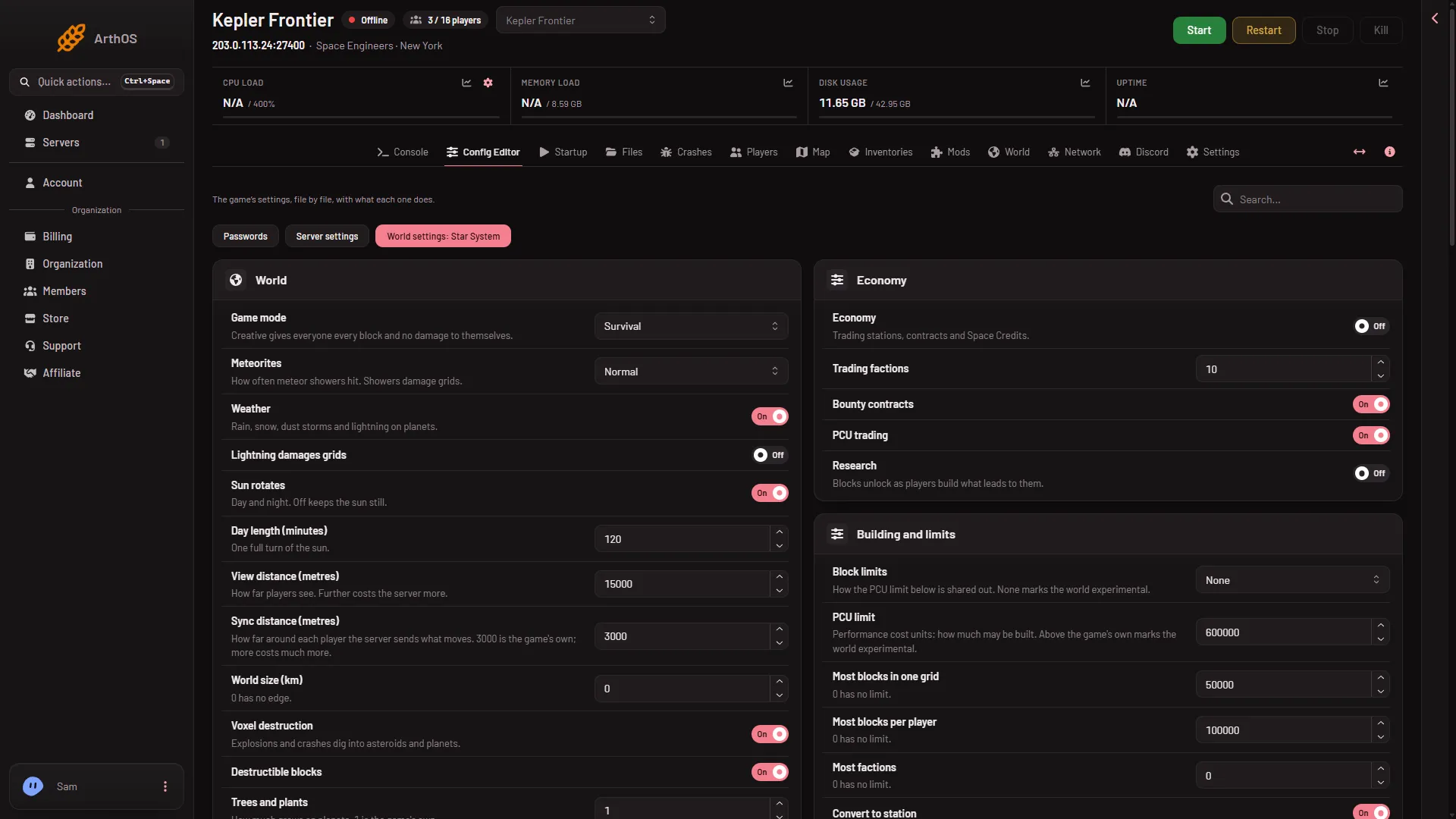
- World settings tab
The box takes numbers from 1 to 1440. Use a smaller number for quicker days and a bigger one for slower days.
Change the weather while the server runs
The settings above decide whether weather exists. Once it exists, an admin can steer it in the game. Keen’s Admin Screen (open it with Alt+F10 in a running game) has a Weather section. It needs Weather switched on in the world settings. From there an admin can force random weather, create lightning, or pick a type such as rain, snow, fog or a thunderstorm.
Admin-level players can also type the chat commands /weatherlist, /weather (name), /rweather and /smite. Not checked: whether the chat commands also need Weather on. To make someone an admin, see make yourself admin.
The Admin Screen also has a time of day offset in its Admin Tools. That moves the clock without changing the day length.
Not checked with a player on 1.210 as of 15 November 2026: what each of these looks like on a Loafhosts server.
If it does not work
- The Save button is greyed out. The server is not offline. Stop it, then save.
- There is no World settings tab. A new server shows only Passwords and Server settings until it has started twice: the first start makes the world, the next start names it as the world that loads. Start it again (or restart it), then stop it to change world settings. The same happens after Make it at the next start on the World page. Use this world shows the tab at once. See the World settings guide.
- I changed it and nothing changed. Start the server again. The game reads World settings at the start.
- I changed Day length and the sun did not jump. Not checked: whether the sun moves at once or keeps its place in the day.
More about the game: Space Engineers servers on Loafhosts.
Sources: spaceengineers.wiki.gg: World Settings, spaceengineers.wiki.gg: SessionSettings, spaceengineers.wiki.gg: Admin Screen, spaceengineers.wiki.gg: Chat