

















The Mods page shows the size of every mod, and checks your disk before it applies a change. The game keeps the mod files it downloaded, even after a mod leaves the list, so unused mods can fill the disk. You can delete those files from the Mods page.
See the sizes
The page’s top line gives the total of the list: the number of mods and their size together (5 mods, 59.4 MB in the picture). Each row on the On this server tab shows the mod’s size next to its Workshop number, and when it was last updated.
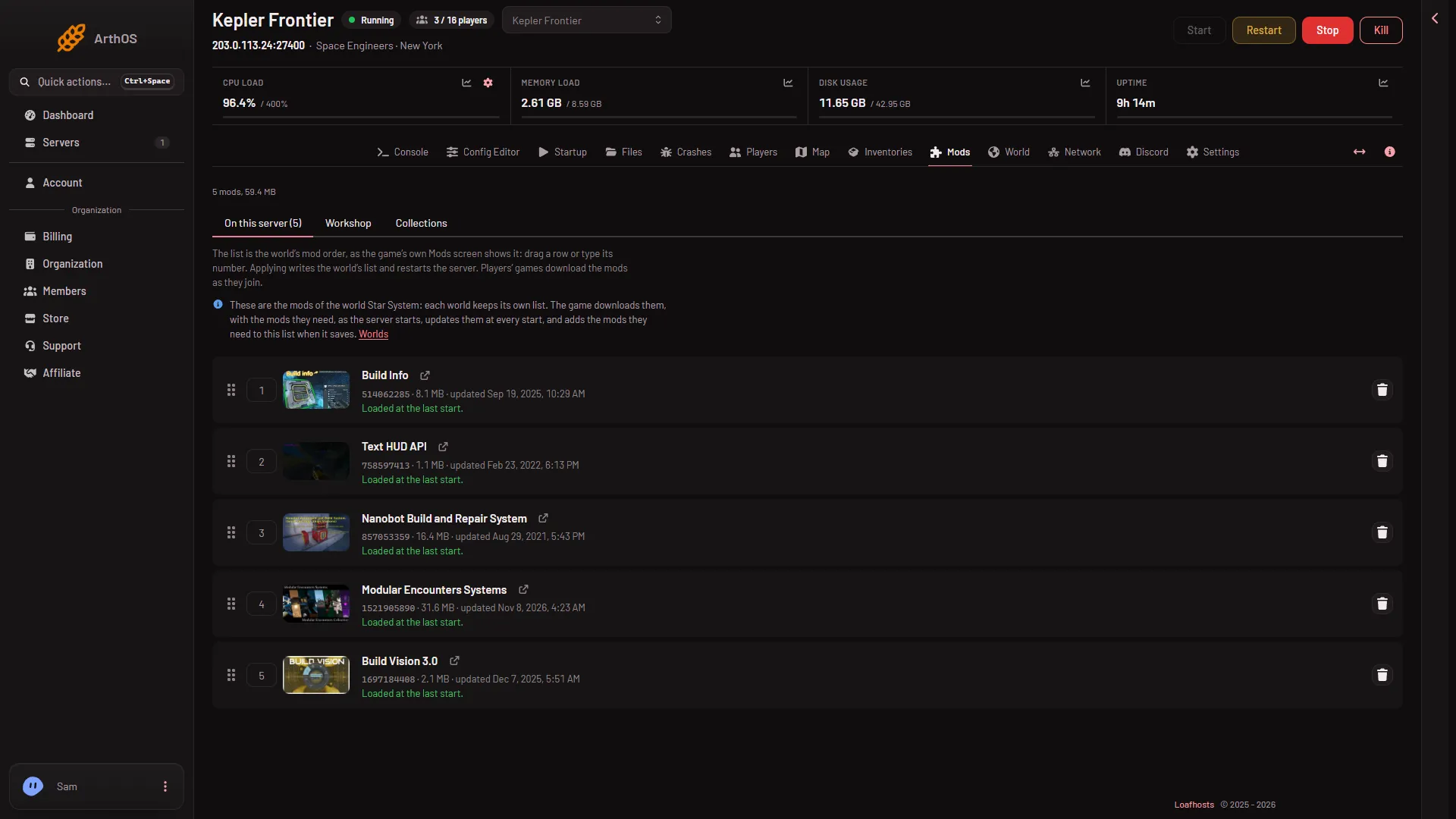
- On this server
Sizes come from the Steam Workshop. Plans have a set disk size: 30 GB on Small, 40 GB on Standard and 50 GB on Large. That disk also holds the game, your worlds and their backups. The disk meter at the top of the server page shows what is used.
The check before Apply
When you press Apply and restart (or Apply if the server is stopped), the panel checks the disk before it stops anything. It adds up the Workshop sizes of the mods that are not on the server yet. If there is not enough room it refuses and says: “the downloads need X GB and the server has Y GB free of Z GB; free some space or raise the disk first”.
Nothing is stopped when you see that message: the server keeps running.
Two things to know:
- The game downloads the mods itself, as the server starts, and not the panel. The panel’s check works from the Workshop sizes to warn you early.
- Mods the game adds because another mod needs them are not counted in the check.
Delete mod files that are not on the list
When you take a mod off the list, the game keeps what it downloaded. The Mods page then shows a section On the server, not loaded, with this text: “These folders are not on the list, so the game does not load them. They only take disk space”, and the total size.
- Open the Mods page, On this server tab, and scroll below the list.
- Find the mod under On the server, not loaded. Each row has the mod’s name, its folder in
Instance/content/244850, and its size. - Choose Delete files (red) to free the space. A box asks “Delete (name)‘s files?”. It says: “This frees the space. Adding the mod again later downloads it again.”
- Confirm.
Or choose Put on the list to use the mod again.
You need the permission to delete files for Delete files, and the permission to change the startup for Put on the list.
Free more room
- Take off mods you do not use: see remove a mod.
- Delete worlds nobody plays on the World page. A deleted world goes to the server’s trash for 3 days and still counts against the disk until it expires.
- A bigger plan has more disk: 40 GB on Standard and 50 GB on Large, against 30 GB on Small.
If it does not work
- Apply says there is no room. Delete files from the On the server, not loaded list first, then try again.
- The section is not on the page. Every folder the game downloaded is on the list, so there is nothing to delete.
- Delete files is missing. Your role may not let you delete files.
More about the game: Space Engineers servers on Loafhosts.