

















Oxygen settings sit in the Survival group of the World settings tab in the Config Editor. Oxygen switches air on. Airtight rooms lets players seal rooms and fill them with air. Health comes back heals players in air. Radiation adds radiation hazards. Change them with the server stopped. They apply at the next start.
What each setting does
- Oxygen (
EnableOxygen): the panel says “Players need air, and air vents, tanks and generators work.” Keen Software House, the game’s makers, says turning it off removes all the oxygen features. - Airtight rooms (
EnableOxygenPressurization): the panel says “Sealed rooms hold air.” Keen says it needs Oxygen on to work. - Health comes back (
AutoHealing): players heal by themselves, slowly, while they are in air. Keen says it needs Oxygen on. It heals only where the air is at least 75 percent, on a planet or in a sealed ship or room. With it off, players heal with a Survival Kit, a Medical Room or medkits. - Radiation (
EnableRadiation): adds radiation hazards from broken reactors and from weather. It sits in the World group, not Survival. Keen’s text says it requires airtight rooms.
So the order is: Oxygen first, then Airtight rooms, then Radiation. A setting switched on without the one before it does nothing. The keys live in the world’s Sandbox_config.sbc under <Settings>.
Change them
- On the server page, choose Stop and wait until the server shows Offline. Players are disconnected, so tell them first. A normal stop saves the world.
- Open the Config Editor and choose the World settings tab. Its name ends with the world’s folder name.
- Find the Survival group (1). Switch Oxygen, Airtight rooms and Health comes back as you want.
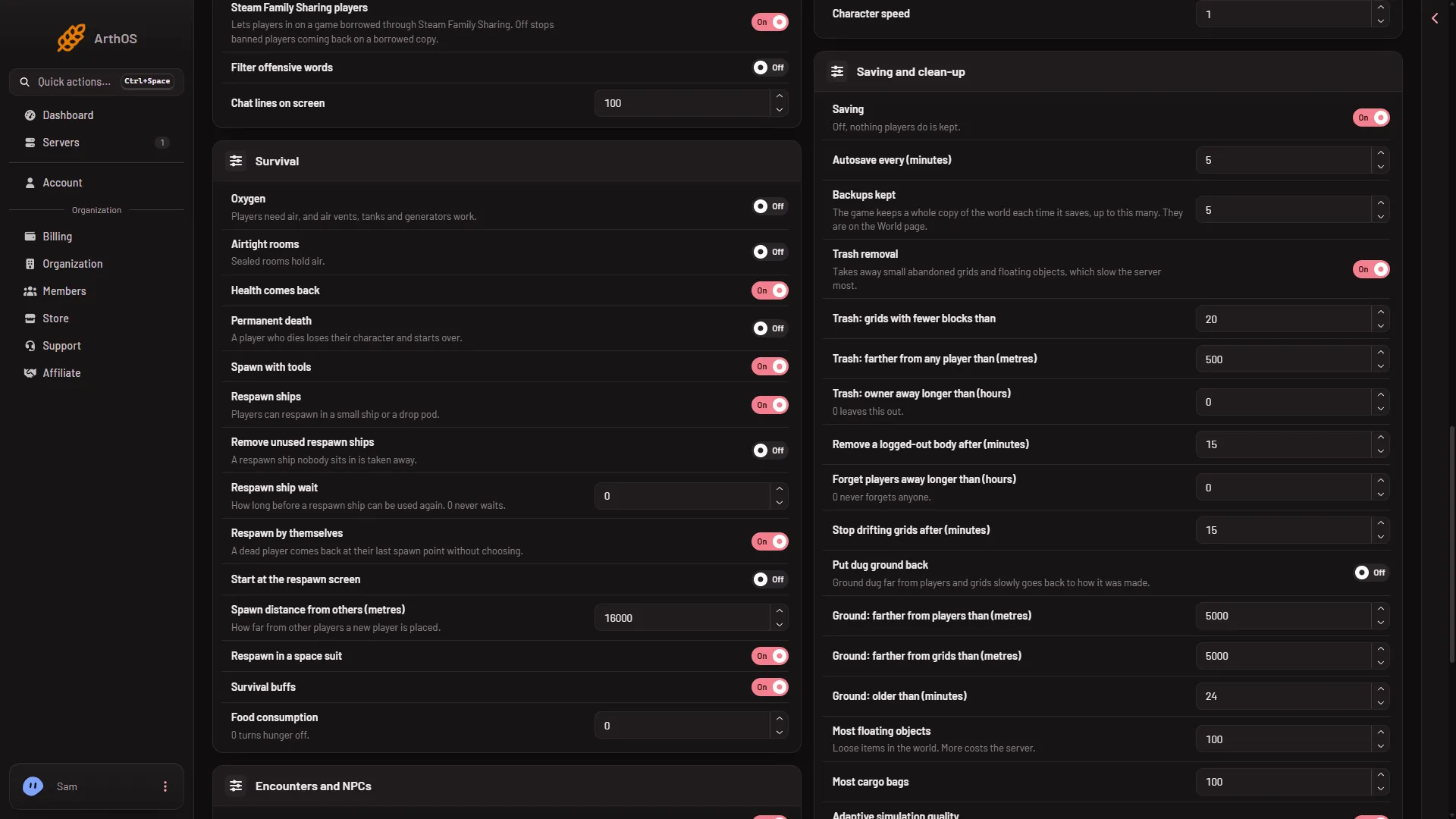
- Survival group
- For radiation, scroll up to the World group and switch Radiation.
- Press Save in the bar at the bottom. The panel says “Saved. The changes apply when the server starts.”
- Start the server.
The picture shows demo values. Open your own page to read what your world has now.
If it does not work
- Save is greyed out. The server is not stopped. The page says “The game writes this file itself when it stops, over anything changed while it runs. Stop the server to change these settings.”
- Players do not heal. Health comes back needs Oxygen on, and the player must stand in air.
- Rooms do not hold air. Check Oxygen is on as well as Airtight rooms.
- No radiation. Radiation needs Airtight rooms on. The game also has a setting for how strong the sun’s radiation is. The panel shows it only if the world file holds it, under Advanced.
- There is no World settings tab. A new server shows only Passwords and Server settings until it has started twice: the first start makes the world, the next start names it as the world that loads. Start it again (or restart it), then stop it to change world settings. The same happens after Make it at the next start on the World page. Use this world shows the tab at once.
More about the game: Space Engineers servers on Loafhosts.
Sources: spaceengineers.wiki.gg: SessionSettings, spaceengineers.wiki.gg: World Settings