

















Any planet in your Space Engineers world can be opened in 3D from the Map page. The panel draws the planet’s ground from the game’s own height data, shows its air as a glow, lists its ores, and puts every player, ship and station near it on the ball with its height. You turn it by dragging and zoom in with the wheel.
It needs no panel tools for the planet itself. Players need the tools, and ships and stations need the private map permission.
Open a planet
- Open your server and choose Map.
- In the Planets in 3D row, press the planet’s name. Or press a planet’s pin on the map. Or zoom in close on a planet: its button then reads See (name) in 3D.
- The page changes to “(name) in 3D”, with the sentence “Its ground from the game’s own heights, with who and what is on and around it.”
The first time you open a planet, the panel says it is reading the planet’s ground from the game’s files. This takes a few seconds, and later views are fast. The panel keeps the heights, so other servers on the same game build use them too.
The address of the page changes, so your browser’s Back button also returns to the map. The button Back to the map (4) does the same.
What the picture shows
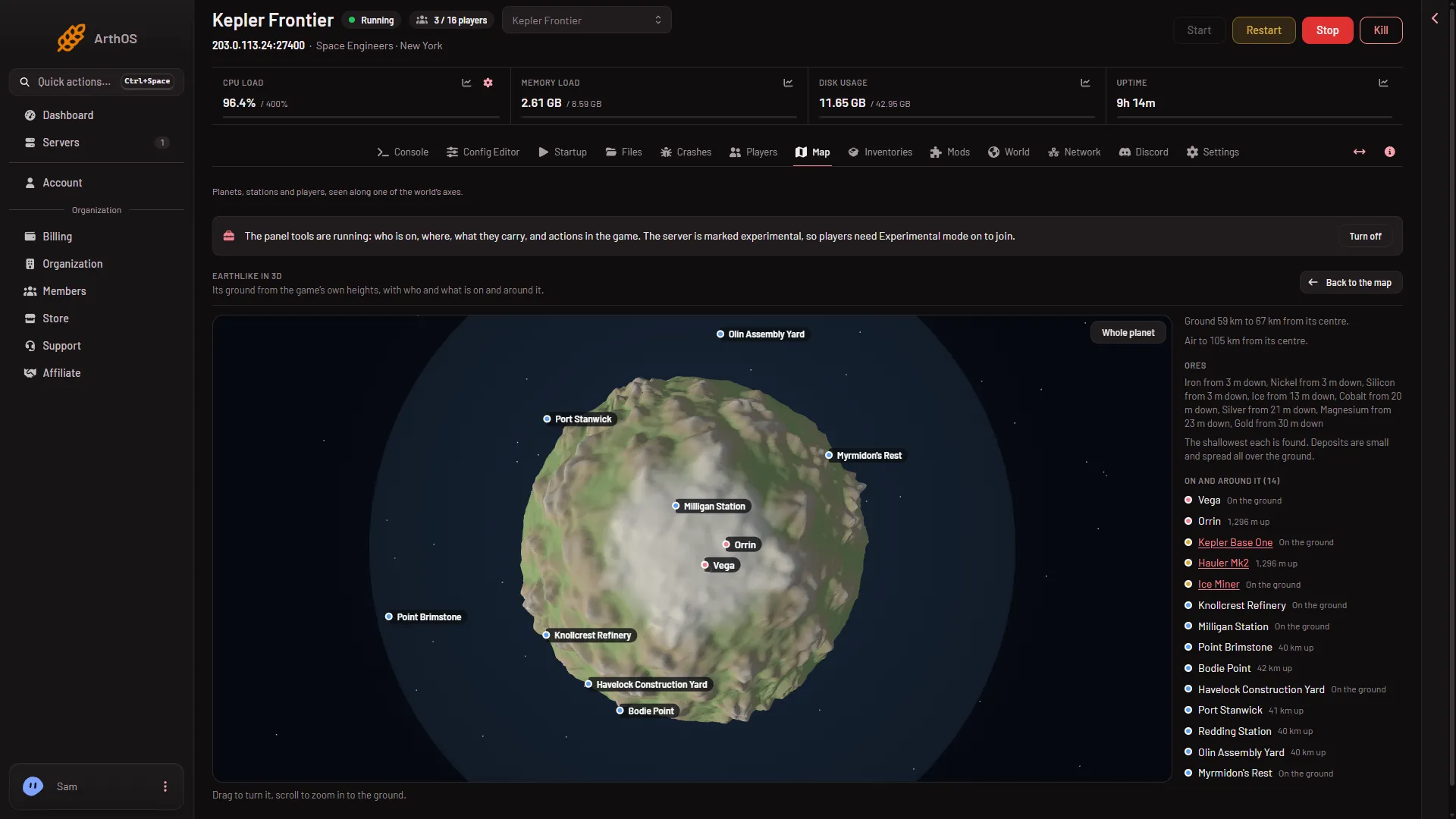
- Whole planet
- Ores
- On and around it
- Back to the map
- The ground. Built from the game’s own heights, six square pieces, one per side of a cube, bent into a ball. The panel colours it by height and by how far it is from the equator, in its own colours. Ice caps sit at the poles of Earthlike, Alien and Titan. The colours are the panel’s, not the game’s pictures.
- The air. A faint glow at the planet’s edge. Beside the picture the panel writes “Ground (low) to (high) from its centre” and either “Air to (height) from its centre” or “No atmosphere.”
- Dots with names. Players, ships, stations and the game’s trading stations that are near the planet are drawn as dots with names. A name that would sit on another name drops to a dot. Players keep their names first. Anything behind the planet is hidden.
Ores
Under Ores (2) the panel lists every ore the planet has, with how deep the shallowest deposit starts, for example “Iron from 3 m down”. The list comes from the game’s own planet files, so it matches your game build. Deposits are small and spread over the whole ground, so the panel lists them and does not draw them. The planet ores guide has the full table.
On and around it
On and around it (3) lists up to 60 things, each with a coloured dot (player, ship or station) and its height above the ground under it, for example “1,296 m up” or “On the ground”. A player or a moving ship counts as on the ground within 150 m of it, and a station or a fixed grid within 600 m. A ship or station name is a link to its Inventories page, for accounts that can see the private map.
With only the basic map permission the list says that players and trading stations may be near, and that ships and stations players built show for those who can see the private map. If nothing is near, the list says so. Not checked with a player on 1.210 as of 15 November 2026: players shown on the planet.
Turn and zoom
- Drag to turn the planet. It turns slower the closer you are to the ground.
- Scroll to zoom in to the ground. On a touch screen, pinch. There is no sliding sideways.
- Whole planet (1) puts the view back to the start, with the planet fitting the frame.
You cannot zoom closer than just above the highest hill, or further than a few times the height of the air. The picture only redraws while something moves.
If it does not work
- “Drawn as a plain sphere”. The game’s files have no ground map for this planet (a planet from a mod, or the files are missing), or the map could not be read. The panel tries again after 10 minutes. The ores, the facts and the dots still show.
- “This browser cannot draw in 3D”. WebGL is off or not available in your browser. Turn on hardware acceleration or use another browser.
- No players on the planet. Players come from the panel tools. See the Map tour.
- The planet takes a while the first time. The panel reads six large height pictures from the server’s game files. It asks again every 2 seconds until the ground is ready.