
















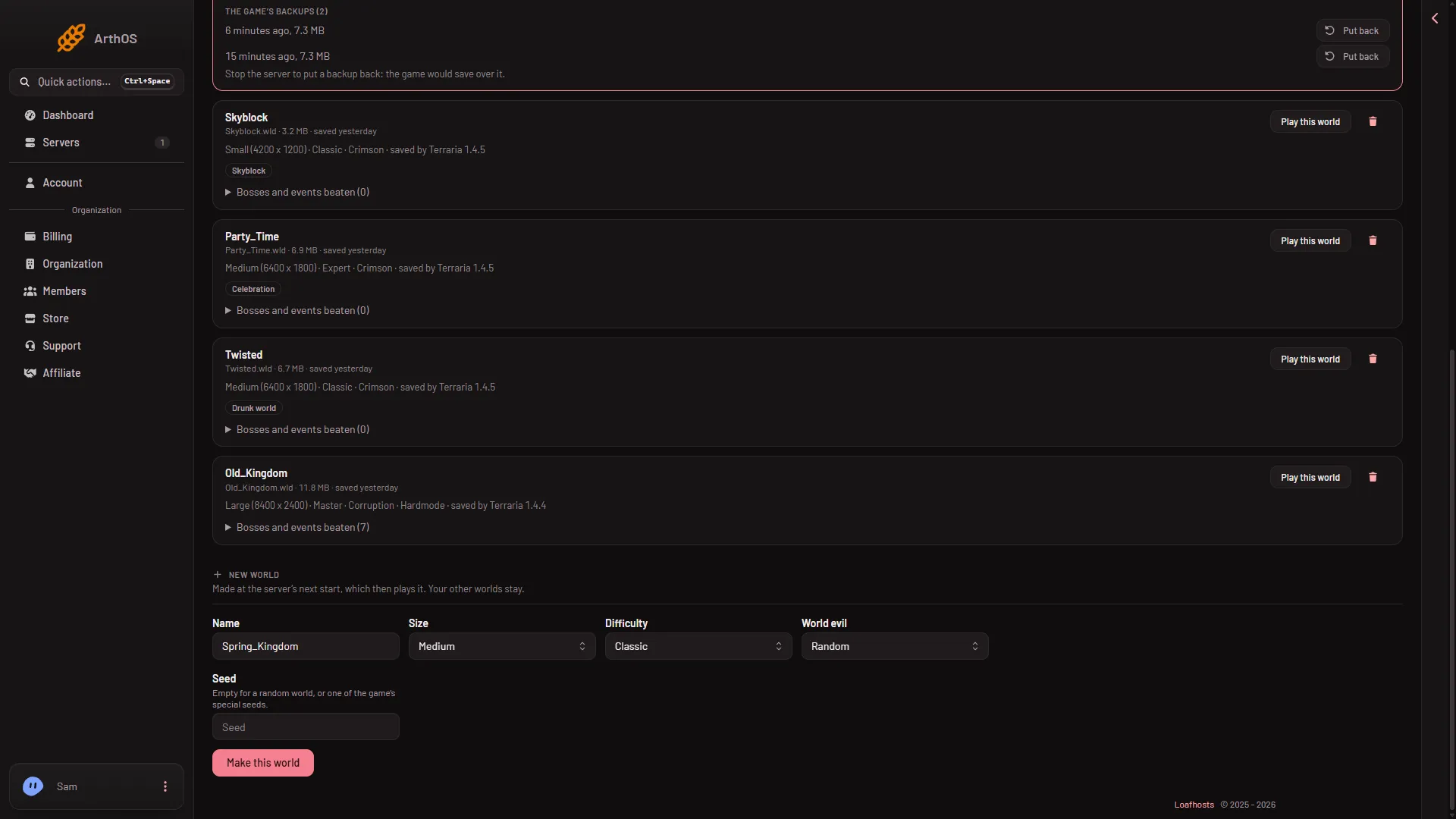
Open the World page, fill in the New world form and press Make this world. The server makes the world at its next start and plays it. Your other worlds stay on the server. The form is the same on Vanilla, TShock and tModLoader. See Terraria servers for the whole product.
Steps
- Open the server’s World page and find the form New world.
- In Name, type a name. Use letters, digits, spaces and the signs
_,-and', up to 27 characters. If a world with that name is already on the server, the page says so: choose another name. - In Size, pick Small, Medium or Large. See world sizes.
- In Difficulty, pick Classic, Expert, Master or Journey.
- In World evil, pick Random, Corruption or Crimson. Only TShock obeys this choice. On Vanilla and tModLoader the game picks at random, whatever you choose.
- In Seed, leave it empty for a random world, or type one of the game’s special seeds. A seed is one line, up to 40 characters, with no quotes and no backslashes.
- Press Make this world.
- Type the name
- Pick the size
- Pick the difficulty
- Pick the evil
- Seed, or empty
- Make this world
The name goes in Name (1), then Size (2), Difficulty (3), World evil (4) and Seed (5). Press Make this world (6). The hint under the form says: “Made at the server’s next start, which then plays it.”
Make it happen
The world does not exist yet. Restart the server. At the start, the game builds the world, then plays it. A large world takes a minute or two, so the server needs longer than usual to be ready. The Players page then notes “A new world was made”.
Restarting drops everyone who is on, so use Message everyone on the Players page first.
The old world is not deleted. To go back to it, use Play this world on its row. The server plays one world at a time.
Special seeds
These seed words are valid on Terraria 1.4.5 and on tModLoader:
notthebeesfortheworthycelebrationmk10theconstantnotrapsdontdigupgetfixedboi
The seed skyblock works on 1.4.5 only, so not on tModLoader, which runs 1.4.4. Once the world exists, its row on the World page names the special seed, such as Not the bees.
The Drunk world is made with a number, 5162020, not a word. Celebration also takes the numbers 5162011 and 5162021. These come from the game’s wiki (Special world seeds) and go in the same Seed field. Not run on a Loafhosts server as of 13 November 2026.
Not checked on 1.4.5.8 as of 13 November 2026: the many other secret seeds that players type into the game’s seed box.
The same values on Startup
The form sets the Startup variables World, World size, Difficulty, Seed and World evil. You can change them there too. A name not used yet makes a new world at the next start.
If it does not work
- The page says the name is taken. Choose another name.
- The name is refused. It has a sign the game does not take, or it is longer than 27 characters.
- The seed is refused. It runs over one line, is longer than 40 characters, or holds a quote or backslash.
- The old world is still playing. The server has not restarted since you made the new one.
- Evil came out the other way. The server is not on TShock. Only TShock obeys World evil.
- The server is slow to start. A large world takes a minute or two to make.
Sources: terraria.wiki.gg: Server