
















On the Players page, a player’s IP address shows next to their name under On now, but only for a role that allows seeing addresses. Roles that do not allow it see the row with no address. Click the address to copy it. See Terraria servers.
Who can see addresses
Only a role that allows seeing addresses sees them. Seeing addresses is a separate thing from kicking, banning or managing players.
To give a role this, open Settings, then Access, and choose Manage roles. That opens the organization page, where roles are changed. Access itself only lists who reaches the server. Give it only to people you trust.
Where the address comes from
The address comes from the server’s own log. When a player connects, the game writes a line like this:
203.0.113.24:51234 is connecting...The next line says who joined. The panel matches the two. On a TShock server the join line also carries the address:
Player_One has joined. IP: 203.0.113.24The panel only has an address for a player who is on now. The list Others who have played has none, because it keeps names only.
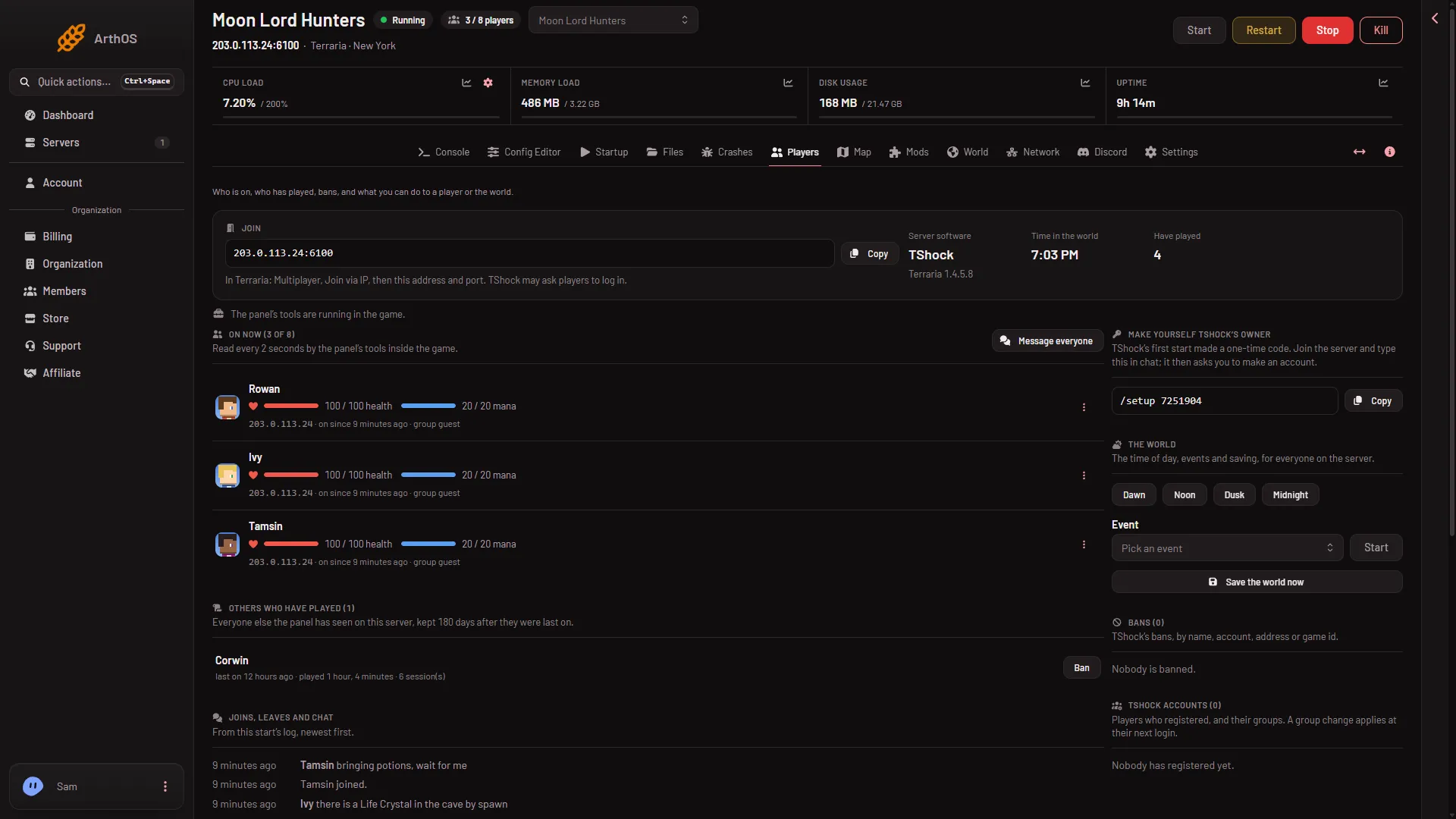
- On now list
Under each name in the list (1) the address shows in small type, for a role that allows it.
What a role without the permission sees
- The online row shows the name, the time on, health and the rest, but no address.
- Bans that are only an address are left out of Bans, and the address is hidden on the rest.
- A line in Joins, leaves and chat about a player who was refused or kicked names them as “a player” instead of by address.
Keep addresses private
An address is personal information. A few places still hold it, so be careful who can open them:
- The start log in Files, under
logs, holds the connect lines. - On Vanilla and tModLoader,
banlist.txtholds the address of every banned player, beside the name. - The Console shows the server’s output as it runs.
A person who can open those pages can read an address, whatever their role says about the Players page. On TShock, the Config Editor also has two settings in the Chat group: Show where players join from (EnableGeoIP in tshock/config.json) and Show addresses to admins (DisplayIPToAdmins). Read their help text there before you change them.
An address is not a person. A family, a school or a VPN can share one. Do not ban one address without a good reason. See ban a player.
If it does not work
- No address shows for a player who is on. Your role does not allow it, or the server has not started with the panel’s launcher yet, so the panel cannot read the log. Choose Restart at the top of the server page. A restart disconnects everyone who is on, so use Message everyone on the Players page first.
- No address on a player who just left. The panel keeps an address only while the player is on.
- You cannot give a role the permission. Changing roles needs a role that allows it. Ask the owner of the organization.