
















Open the Players tab of your Terraria server. The On now list shows everyone who is on, with a count out of the player limit. The page reloads every 5 seconds while the server runs. A player shows up a few seconds after joining.
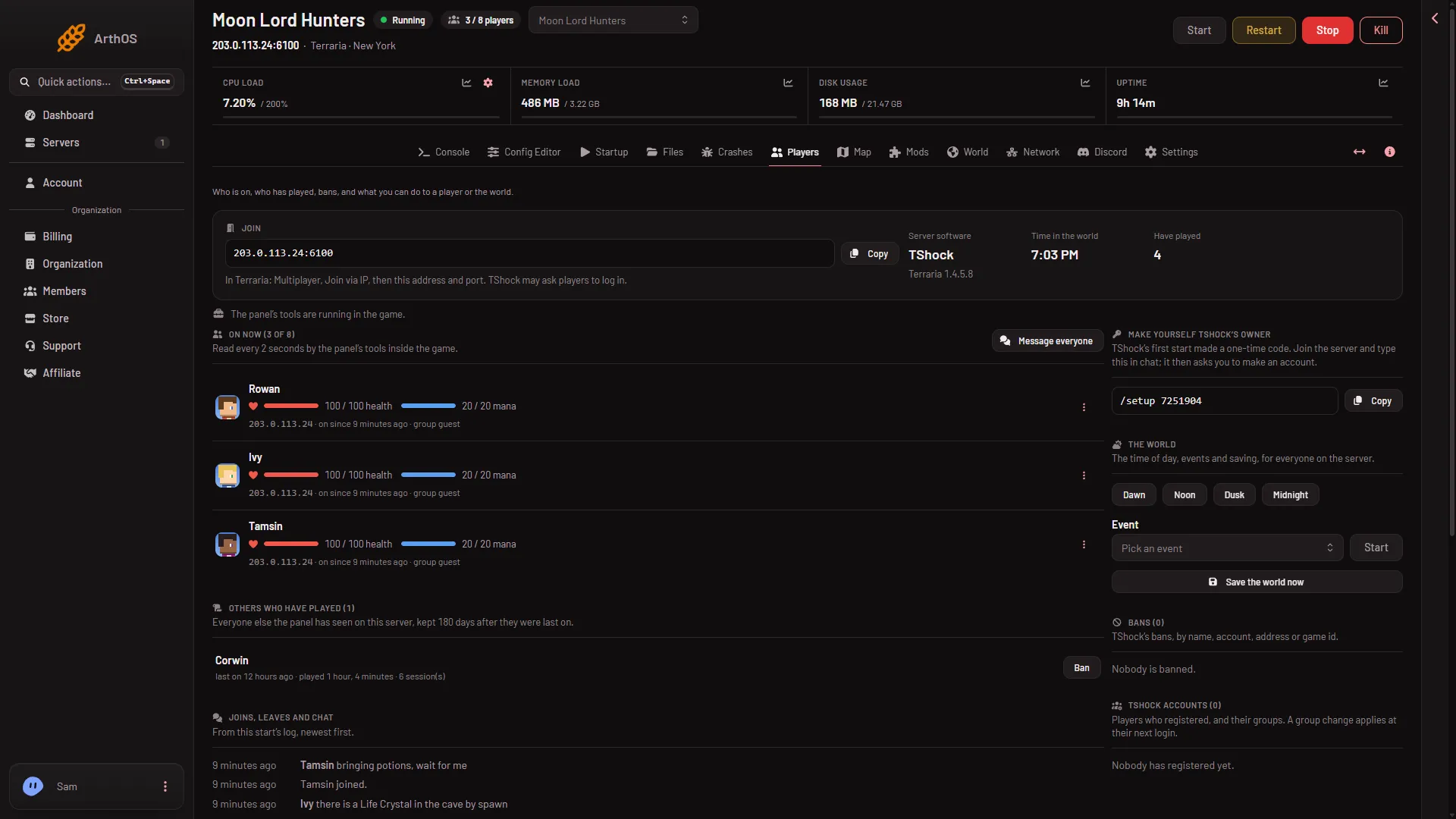
- On now list
- Tools line
The tools line (2) says whether the panel’s tools are running in the game. The list (1) says how it was read.
What a row shows
Each row has the player’s name and how long they have been on. If your role allows it, it also shows their address, and a click copies it. TShock adds the player’s group. When the panel’s tools are running, the row adds their health and mana, how many times they died this session, and tags such as Dead and PvP.
The menu on the row, What to do with (name), holds the things you can do to that player. See the Players page.
How the list is read
The Vanilla server answers no query from outside, and the panel does not use TShock’s own REST API. So the panel reads the list another way. Which way depends on the server program.
- TShock and tModLoader. The panel puts its own tools inside the game. They write who is on every 2 seconds, and the panel reads that. The list says “Read every 2 seconds by the panel’s tools inside the game.”
- Vanilla. Vanilla runs none of the panel’s tools. The panel reads this start’s log instead and counts players who joined and have not left. The list says “Read from this start’s log: who joined and has not left.”
The two ways give the same names in normal use. The log way works from the lines the server writes: has joined. and has left.. The panel pairs each name with the address from the is connecting... line before it. If the server’s own playing answer says no one is connected, the panel empties the list. See the Terraria logs.
The count in the page header and in standby comes from the same reading: the tools first, then the log.
You can change the program on the World page. A new program takes effect at the next start.
An empty server is paused
A Terraria server that has nobody on does not run the world. Time does not pass. Since Terraria 1.4.5.7, an empty server only starts updating when a player fully connects. When the last player leaves, it saves the world.
This is why the page can say “Nobody is on” and, on TShock or tModLoader, that the world is paused. The panel’s tools act once someone joins. The panel refuses an action on the player or the world that needs the tools while nobody is on, and says so.
If it does not work
- The page says the server has not started with the panel’s launcher yet. Restart the server once with Restart at the top of the server page. This disconnects everyone who is on, so warn them first with Message everyone. The panel could not tell who joins before that.
- The page says the server is offline. Who is on shows while it runs. While it is starting, it says so.
- A player is on but not in the list. On Vanilla the panel needs their join line, so wait a few seconds. After a restart, the list starts again from the new log.
- A player left but is still listed. On Vanilla the panel waits for the leave line, so give it a few seconds.
- Addresses are missing. Your role does not allow seeing them. See roles and permissions.
More about the game: Terraria servers.