
















The Players tab shows who is on your Terraria server, who has played before, and what you can do about it. It also holds the world actions, such as the time of day and saving. It reloads every 5 seconds while the server runs and every 30 seconds when it does not.
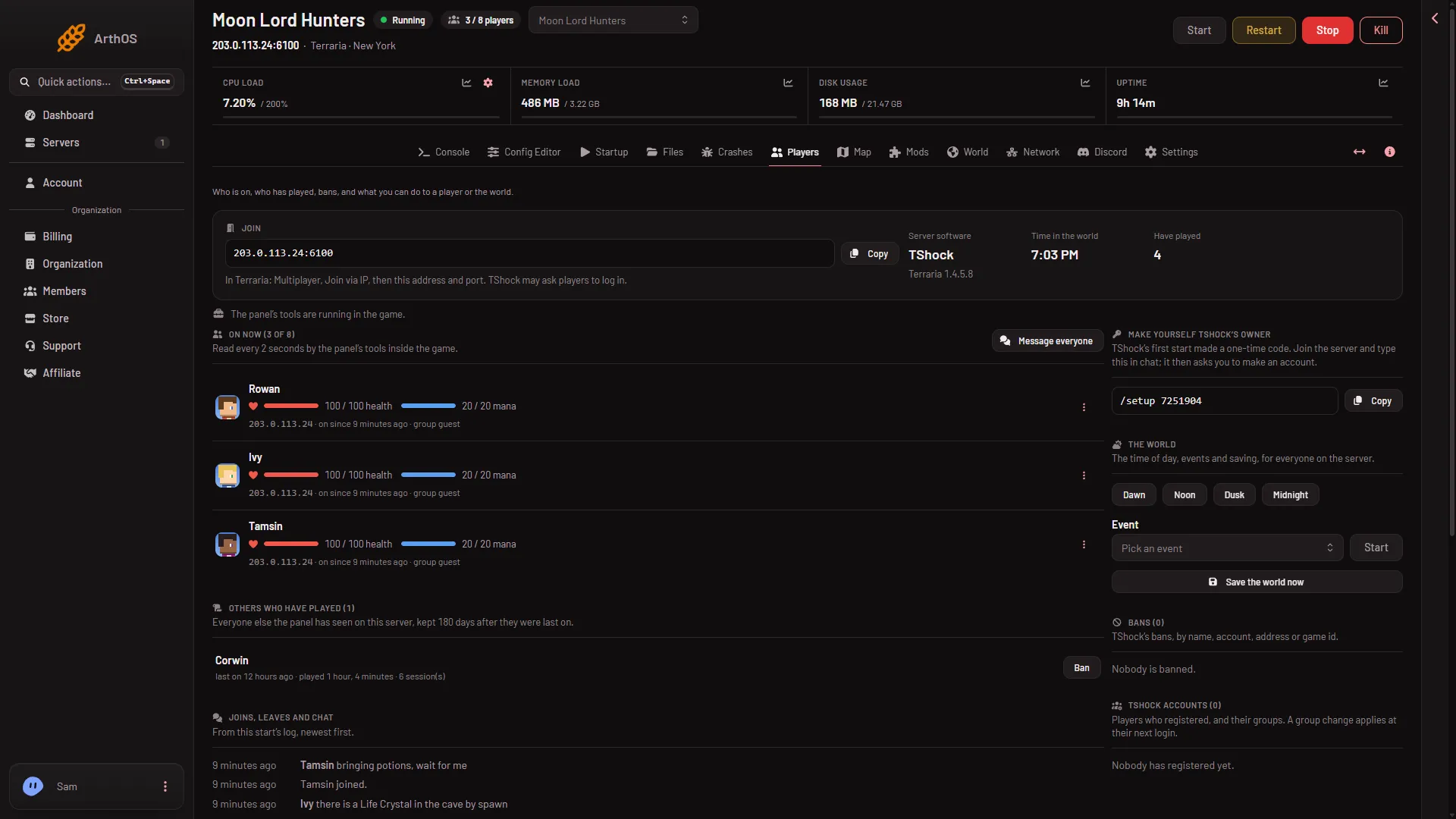
- Copy the address
- Server software
- Who is on now
- Message everyone
- Menu on a player
What you see depends on the server program and on your role. Vanilla runs none of the panel’s tools, so it has fewer actions than TShock and tModLoader. A button that is missing usually means one of those two things. See roles and permissions.
The top of the page
- Join. The address and port players type into the game, with a Copy button (1). The line under it says how to join: in Terraria choose Multiplayer, then Join via IP. On TShock it adds that TShock may ask players to log in. On tModLoader it says players need tModLoader, which downloads the server’s mods as they join.
- Server software (2). Vanilla, TShock or tModLoader, with the Terraria version the start log reported under it.
- Time in the world. The time of day in the game.
- Have played. How many players the panel has seen.
A line below says what the panel’s tools are doing. On Vanilla it tells you that kicks, bans, the time and messages work, but health, items and the live map need TShock or tModLoader. It also says when the world is paused because nobody is on.
On now
This is the list of players who are on (3), with the count out of the server’s player limit. Message everyone (4) sits beside it. Each row shows the name, how long they have been on, and, if your role allows it, their address. With the tools running it also shows health, mana, deaths this session and tags such as Dead and PvP. On TShock it shows the player’s group.
Open the menu on a row (5). The choices, in this order, are:
- What they carry. A read-only view of the player’s items. Needs the tools.
- Message, Give an item, Heal, Give a buff, Send to spawn, Send to each player, Call a boss and Kill. These need the tools, so TShock or tModLoader, and a role that allows game actions.
- Kick and Ban. These need a role that allows moderating players. The panel’s TShock ban dialog says it uses the player’s account, character and address.
Each of these has its own guide. For how the list is read, see who is online.
The world
The world block holds actions for everyone on the server: the time buttons Dawn, Noon, Dusk and Midnight, an Event list with Start, Save the world now and Message everyone. Events need the tools and someone on the server. The time, the save and the message also work on Vanilla. Not checked on 1.4.5.8 as of 13 November 2026: the Dusk button on TShock.
Others who have played
Everyone else the panel has seen on this server, with when they were last on, how long they played and how many sessions. The panel keeps them for 180 days after they were last on. On TShock, a player who is not on and not banned has a Ban button here while the server runs. Not checked on 1.4.5.8 as of 13 November 2026: whether it bans a player who is not on.
Joins, leaves and chat
The list comes from this start’s log, newest first. It shows chat, joins, leaves, players who were refused or kicked, and a new world being made. It starts again empty after a restart. For the older lines, open the log. See the Terraria logs.
Bans
The list of bans, with Lift to take one off. On Vanilla and tModLoader it is the game’s ban list: a name and the address it joined from. The panel says lifting a ban takes effect at the next start. On TShock it lists bans by name, account, address or game id.
TShock only
- Make yourself TShock’s owner. On the first start, TShock prints a one-time code. Join the server and type it in chat, and the game asks you to make an account. The code is gone once an owner exists.
- TShock accounts. Players who registered, with their groups and a Group button. A group change applies at their next login.
If it does not work
- The list says the server has not started with the panel’s launcher yet. Restart the server once.
- The page says the server is offline. Who is on shows while it runs.
- Nobody is shown while players are on. Wait a few seconds. The page reloads every 5 seconds.
- No actions in the menu. The role does not allow them, or the server runs Vanilla.
More about the game: Terraria servers.