
















Every time a Terraria server starts, it begins a new log file in the logs folder. The panel keeps about the ten newest and removes the older ones. Each line starts with the time in UTC. Open the Crashes tab to see each start read, or open the file in Files.
Where the logs are
The log files are in logs, and each one is named for the moment the server started, in UTC:
logs/terraria_20261109_122032.logThat file is the start of 9 November 2026 at 12:20:32 UTC. About the ten newest files stay; older ones are deleted when a new start begins. Copy a log you want to keep before ten more starts go by.
Every line starts with a stamp, then the message:
2026-11-09T12:20:32 Terraria Server v1.4.5.8The stamp is always UTC, whatever time zone the server is set to. Add or subtract your own offset to read it as local time.
Other programs keep logs of their own:
- TShock writes its own log in
tshock/logs. - tModLoader writes its game log of the last start to
bin/tml/tModLoader-Logs/server.log.
Read joins, leaves and chat
These lines are the same on all three programs:
2026-11-09T12:23:01 203.0.113.24:56872 is connecting...
2026-11-09T12:23:02 Mira has joined.
2026-11-09T12:23:03 <Mira> hello everyone
2026-11-09T12:23:09 Mira has left.
is connecting...shows the address a player is connecting from. It comes before the name.has joined.is the player’s name once they are in. TShock adds the address to this line, ashas joined. IP: 203.0.113.24.<name> textis a chat line. The name is in angle brackets.has left.is the player leaving.was booted:ends with the reason. A player who is kicked or refused gets this line. It names the address, not the player. For example203.0.113.24:41748 was booted: Kicked from server.Creating world - Seed:appears when the game makes a new world at the start.Server startedmeans the server is ready for players.Saving before exit...means a stop was asked for and the game is saving.
TShock’s first start also prints a line with /setup and a one-time number. It is the same number the Players page shows under Make yourself TShock’s owner.
An empty Terraria server is paused and prints almost nothing. A quiet log does not mean the server has hung. See who is online.
The Crashes tab
Open Crashes. The list on the left has one entry for each start, newest first, one for each log above. Each start is read for how far it got and how it ended. The page says Running now for the start in progress and Ran and stopped for a normal stop. The other outcomes are:
- Failed to start: “The server never got as far as letting players in.”
- Crashed: “The game stopped without being asked to.”
- Ended early: “The log ends without saying how the server stopped.”
- Stuck, restarted: “The game stopped answering, so the panel restarted it.”
The start you open shows Started, Log last written, the Game version (1), the Exit code and Out of memory.
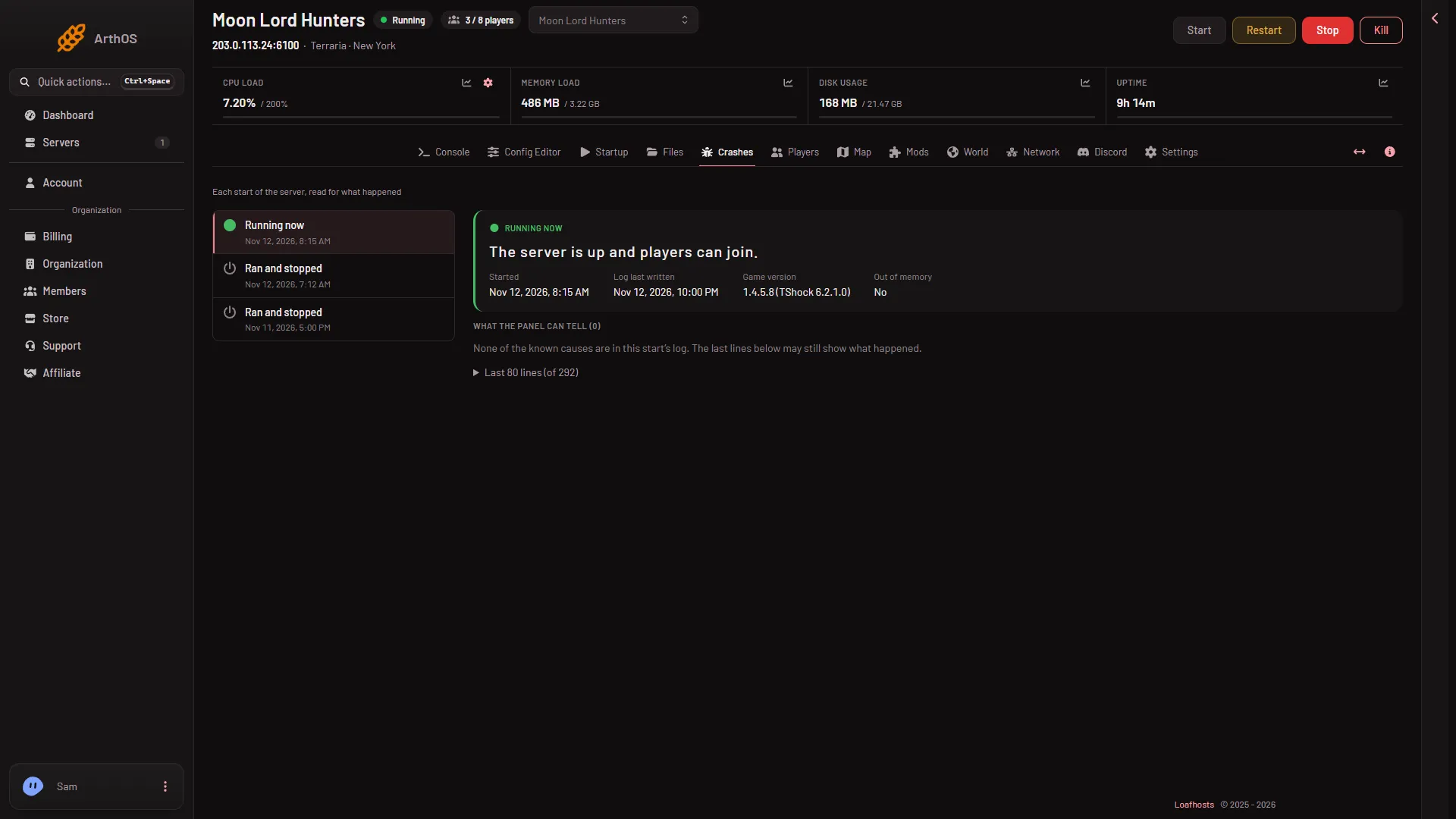
- Game version
Under What the panel can tell the panel lists the known causes it found in that start’s log and explains each one. The last lines below it show the end of the log, so you can read what happened yourself. When no known cause matches, the page says “None of the known causes are in this start’s log. The last lines below may still show what happened.” These are the causes it knows for Terraria:
- The world could not be loaded. Put a backup of the world back on the World page.
- The world is from a newer Terraria. tModLoader runs on Terraria 1.4.4 and cannot open a world 1.4.5 saved. Play it on Vanilla or TShock, or make a new world for tModLoader.
- A mod did not load. The Mods page adds what is missing or takes the mod off.
- tModLoader’s .NET could not be set up. Start again. If it keeps failing, make a panel backup, then choose Reinstall Server in the server’s settings. The worlds stay.
- The server software could not be downloaded. Start again in a few minutes, or set the version back to latest on the World page.
- The server ran out of memory, or The server used all its memory and was stopped. In the second case the machine ended the server at its plan’s memory, so its log has no line about it, and Out of memory says Yes. Take off a mod you do not need, or use a bigger plan.
- The server’s port was in use. Restart the server.
- The disk is full. Free some space. Old world backups count.
- The server crashed. Restart it. If it happens again at the same moment, take off the last mod or plugin you added.
A stop you asked for, with the console’s exit or the panel’s stop, is not a crash.
If it does not work
- There are fewer than ten logs. The server has not been started ten times yet.
- The tab says the server has not started yet. Start it once. The panel has nothing to read before that.
- The log you want is gone. Ten starts have happened since. A panel backup of the server may hold an older copy.
- The times look wrong by some hours. They are UTC. They do not change with the server’s Timezone.
More about the game: Terraria servers.