
















Stop the server, open the World page, and choose Put back on the backup you want. The world goes back to how it was then. The world as it is now is kept beside it. Not checked on 1.4.5.8 as of 13 November 2026: the file name of that copy, so look in the worlds folder in Files if you need it.
Which backups these are
Terraria keeps earlier saves of a world beside it as .bak files. The World page lists them under The game’s backups. They are not the panel’s own backups in Settings, Backups. Those copy the whole server folder. See panel backups.
The game saves the world now and then, and when the server stops with exit. It does not make a backup on every save, and it keeps only a few. The setting World backups kept in the Config Editor sets how many: 0 to 20, with 2 as the starting value. It is in the World group of the Server settings file, and a change applies at the next start. In serverconfig.txt the key is worldrollbackstokeep.
Put a backup back
- Stop the server with Stop at the top of the server page. That drops everyone who is on, so first send a note with Message everyone on the Players page. The game would save over the world you put back, so the page asks for this: “Stop the server to put a backup back: the game would save over it.”
- Open the World page.
- Under Worlds, find the world. Its The game’s backups list shows each backup as a time and a size.
- Choose Put back next to the backup you want.
- Read the dialog Put (world name) back?: “The world goes back to (time). The world as it is now is kept beside it.” Confirm.
- The page says the world is back as it was in that backup, and that the world as it was is kept beside it.
- Start the server.
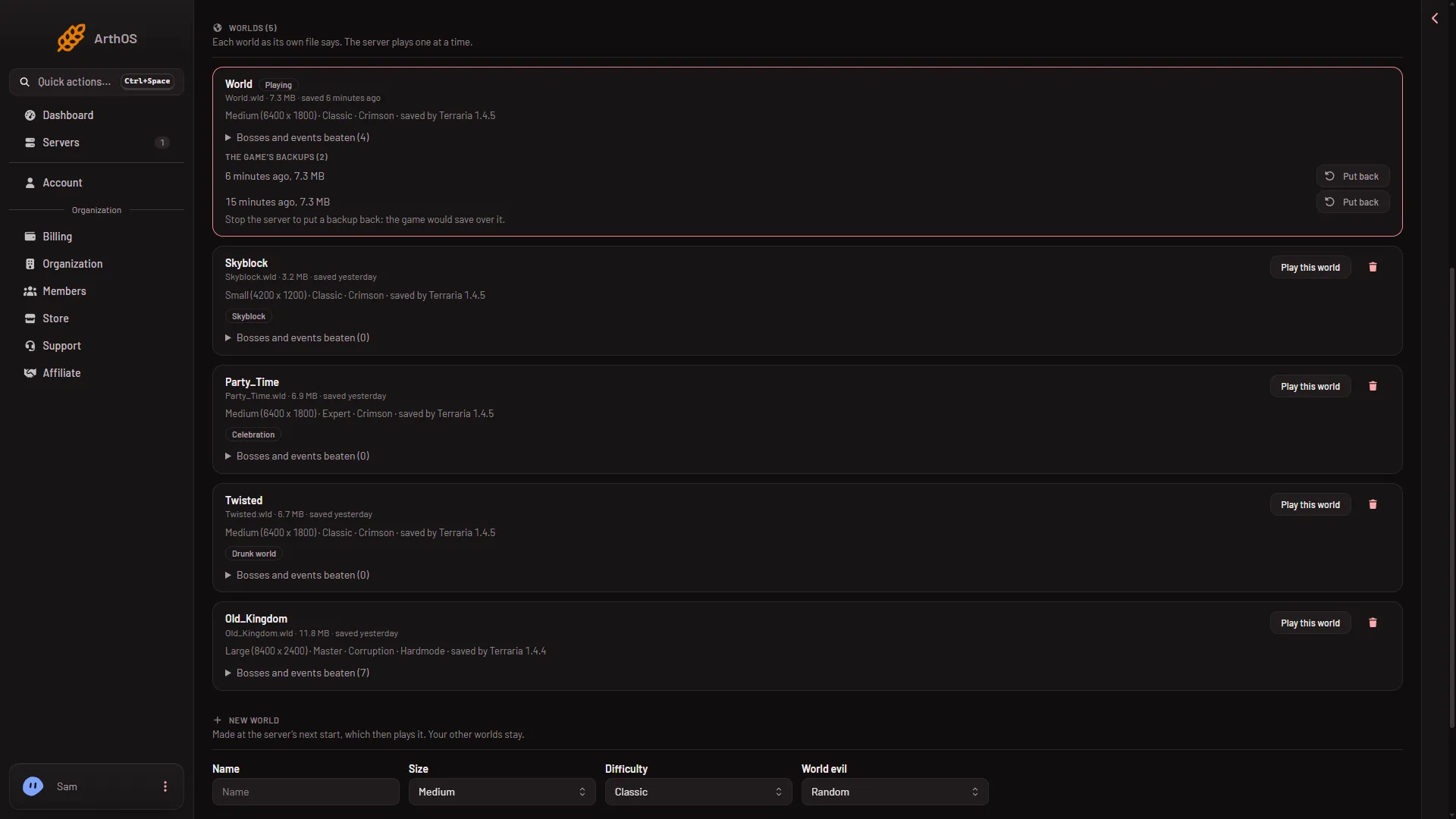
- The game's backups
- Put back
- Stop the server first
Find the list (1), read the note (3), then choose Put back (2) on the row you want. The picture was taken with the server running, which is why the note shows.
Players who joined after the backup was saved lose what they did since. Tell them.
Who can do it
Putting a backup back needs a role that allows restoring backups.
If it does not work
- Stop the server first. The panel refuses while the server runs: “stop the server first: the game would save over the world you put back”. Stop it, then try again.
- There is no such backup of that world. The list changed after you loaded the page. Reload it.
- The list is empty. The game has made no backup yet, or World backups kept is 0. Use a panel backup from Settings, Backups instead.
- You run TShock and the backup you want is not listed. TShock also makes its own backups under
tshock/backupswhen Backup every is on. The World page does not list those. You can find them in Files.
More about the game: Terraria servers.
Sources: terraria.wiki.gg: Server