
















A Terraria world that looks older than you remember is usually another world, an earlier save, or an older save that was put back. The World page shows both facts: when the world was saved, and the game’s list of backups. The newer copy is usually still on the server.
Check which world is playing
- Open the World page.
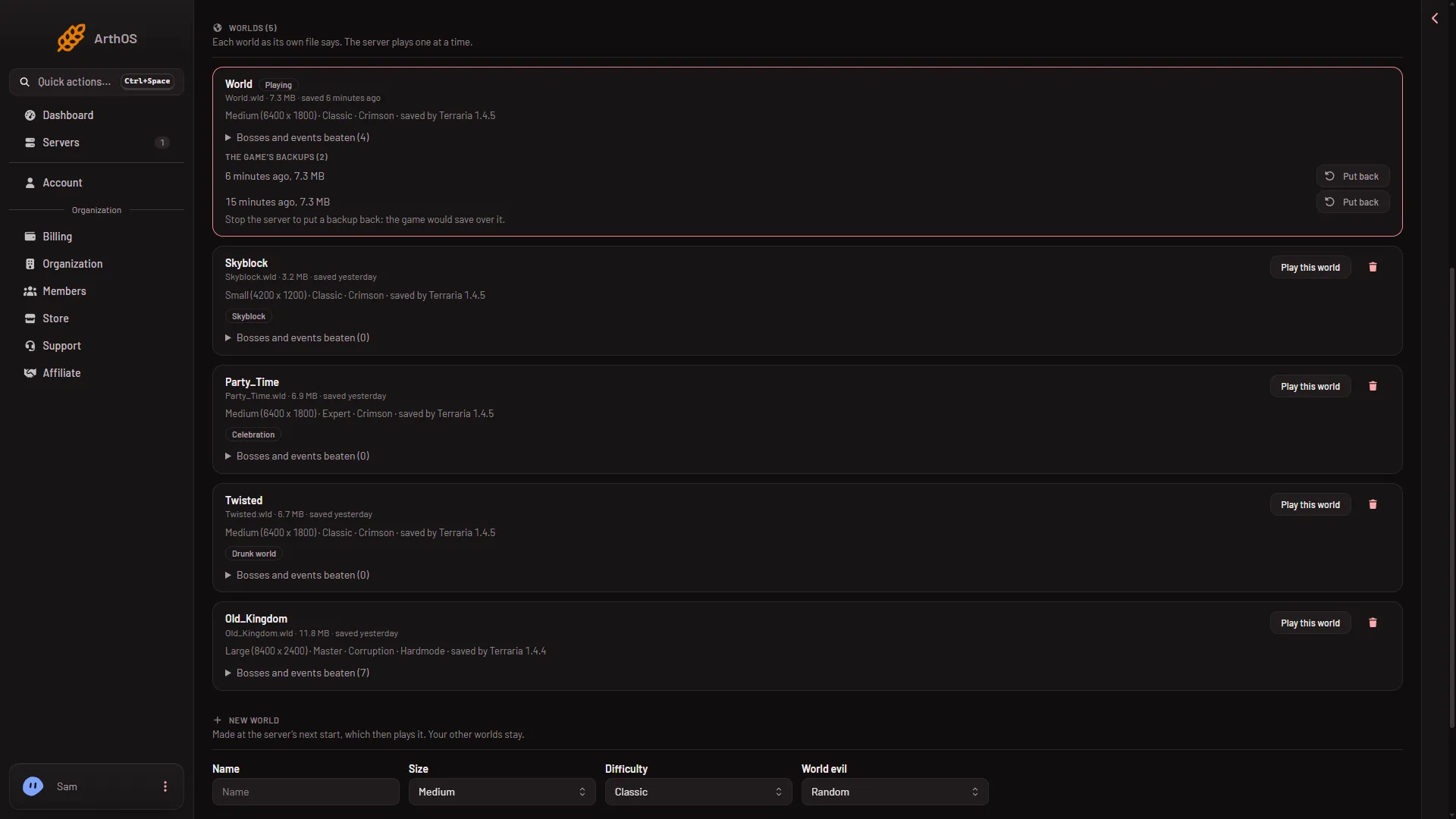
- Find the row with the Playing tag. That is the world the server loaded.
- If it is not the world you expect, choose Play this world on the right one, then restart the server.
A World name on Startup that has not been used before makes a new world at the next start: “A name not used yet makes a new world at the next start.” A new, empty world after a restart usually means the name changed.
How the game saves
The game saves the world now and then. It does not save every action. It saves when the last player leaves, and when the server stops with its exit command. The panel’s stop sends that command.
So work done between the last save and a crash is lost. The Auto-Kill card on the Settings page sets how long a stop may take before it is cut short.
The game also keeps earlier saves beside the world as backup files. The Config Editor setting World backups kept says how many, from 0 to 20. TShock also makes its own backups. Its setting is Backup every, in minutes, and 0 turns it off.
See when the world was saved
- Open the World page.
- Find your world under Worlds. Read “saved (when)”.
- Compare it with when you last played.
If it says it was saved before your last session, the game did not get to save after that. Check the Crashes page for a crash that day.
See the backups
Under The game’s backups each backup shows its time and size. Their times tell you which save you would get.
- The game's backups
- Put back
- Stop the server first
The world’s own row above the list shows “saved (when)”. The list (1) gives each backup’s age and size, Put back (2) is on each row, and the note (3) reminds you to stop the server first.
If someone put a backup back
Put back takes the world to the chosen backup. The box says: “The world goes back to (backup). The world as it is now is kept beside it.” So the newer world is not deleted. It sits beside the world on the server.
To get the newer one:
- Stop the server. The page says: “Stop the server to put a backup back: the game would save over it.”
- Open Files and go into the
worldsfolder. - Look for the copy kept beside the world, and compare the times. The file name the panel gives it is not checked on 1.4.5.8 as of 13 November 2026, so go by the times and the sizes.
If you cannot find the right file, see restore a world backup.
Put back an older world on purpose
- Stop the server.
- On the World page, choose Put back on the backup you want.
- Read the box and confirm.
- Start the server.
The panel’s own backups
The Backups tab in Settings copies the whole server folder, worlds included. It holds the world as the game last saved it. These are separate from the game’s backups above. See panel backups.
If it does not work
- Put back is refused while the server runs. Stop the server first.
- No backups are listed. World backups kept may be 0, or the game has not made any yet.
- The world is still older than any backup. Use a panel backup from the Backups tab.
More about the game: Terraria servers.
Sources: terraria.wiki.gg: Server