
















Open the Discord page of your Terraria server and link a channel. The Loafhosts bot then posts one message there and edits it about once a minute. You do not have to run anything yourself. The message shows the world, the server program, who is on, and how far the world has got.
What the message shows
- The world and the program. The world name and the program in brackets, for example
World (TShock). The program is Vanilla, TShock or tModLoader. Long world names are cut to 40 characters. - A password note. If the server has a join password, the message says it is password protected. The password itself is never sent.
- The world’s mode. Classic, expert, master or journey, and
hardmodeonce the world is in Hardmode. - Bosses beaten. A count of the bosses and events the world has beaten. It is left out while the count is zero.
- Online. The names of the players who are on now.
- Mods. On tModLoader, a button that opens the list of mods the game loads. The panel’s own tools are not in that list.
Hardmode and bosses beaten come from the world file, so they change after the game saves the world, not the moment a boss dies. The game saves now and then, and when the last player leaves.
An empty Terraria server is paused, so nothing in the world moves while nobody is on. The message still updates. It just shows nobody online. See who is online.
Link a channel
Check these first:
- The bot is on your Discord server. The page has an Add the bot button for this.
- You have linked your own Discord account with Link your account. The panel uses it to check that you run that Discord server. Staff can link any channel the bot can see.
Then:
- In Discord, right-click the channel and choose Copy Link.
- In the panel, open Discord and choose Link a channel under Status in Discord (1).
- Paste the link into Channel link or ID.
- Choose Link channel.
The panel says “Linked. The status message is posted and updates every minute.” The message appears in the channel.
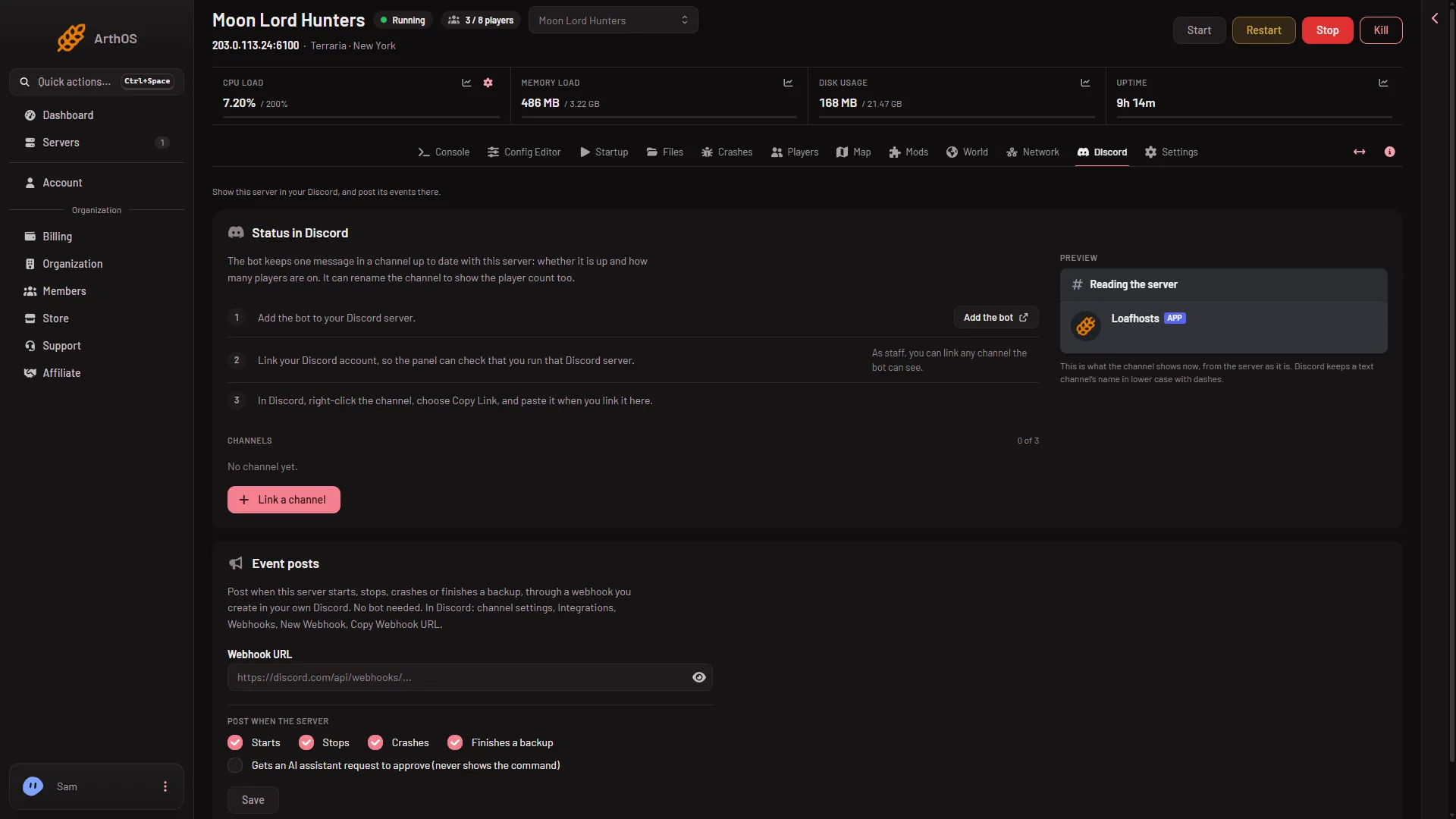
- Status in Discord
- Event posts
The Preview card on the same page shows what the channel will show, read from the server as it is now.
Options
Choose Edit on a linked channel to change these:
- Show mods button. Anyone in the channel can open the mod list, and only the person who clicks sees it. It only has something to show on tModLoader.
- Rename the channel to show the server. The bot can put the server name and player count in the channel name. Discord allows two renames in ten minutes, so the name changes at most every 11 minutes. The bot needs the Manage Channels permission in Discord.
- Show the join address. If your players join by typing the address, turn it on. Not checked on 1.4.5.8 as of 13 November 2026: whether this option is offered on a Terraria server.
Choose Update now to refresh the message at once. Choose Unlink to stop. The message is deleted from the channel and the channel name stays as it is.
Posts for starts, stops and crashes
The Event posts card (2) is separate. Tick Starts, Stops, Crashes, Finishes a backup and Gets an AI assistant request to approve. There are no posts for players who join, leave, are kicked or are banned. It uses a webhook that you make in your own Discord, so it needs no bot.
- In Discord, open the channel’s settings, then Integrations, Webhooks, New Webhook, and copy the webhook URL.
- Paste it into Webhook URL, tick what to post, and choose Save.
- Choose Send a test to check the channel.
If it does not work
- There is no Link a channel button, or the page says the panel has no Discord bot. Status channels are off until the panel’s operators set the bot up. Ask support.
- The panel cannot check who runs the Discord server. Link your own Discord account first.
- Hardmode or bosses beaten look old. They are read from the world file. Save the world on the Players page and wait for the next update.
- The mod list is empty. The server is not running tModLoader, or no mod is on the list yet.
More about the game: Terraria servers.