
















A player who cannot join a tModLoader server, or who joins without a mod, usually has one of four problems. They are not using tModLoader, the mod is not loaded on the server, the mod is for players only, or their version differs from the server’s. Check the Mods page first. It shows what the server loads, but not a player’s own copy of tModLoader or a mod.
What players need
Only tModLoader servers load mods. Vanilla and TShock servers load none. If the Mods page says Mods need tModLoader, the server is not running tModLoader. Switch it on the World page.
Players must use tModLoader, not the plain game. It is free on Steam. In tModLoader they choose Multiplayer, then Join via IP, and type the address and port from the Players page. As they join, tModLoader downloads the server’s mods for them. The Players page says the same under the join box.
tModLoader stable runs Terraria 1.4.4. A player on the plain 1.4.5 game cannot use a tModLoader server.
Find the cause
- Open Mods for the server.
- Read the notes above the list. They show which mods the server really loads.
- Compare that with the mod the player is missing.
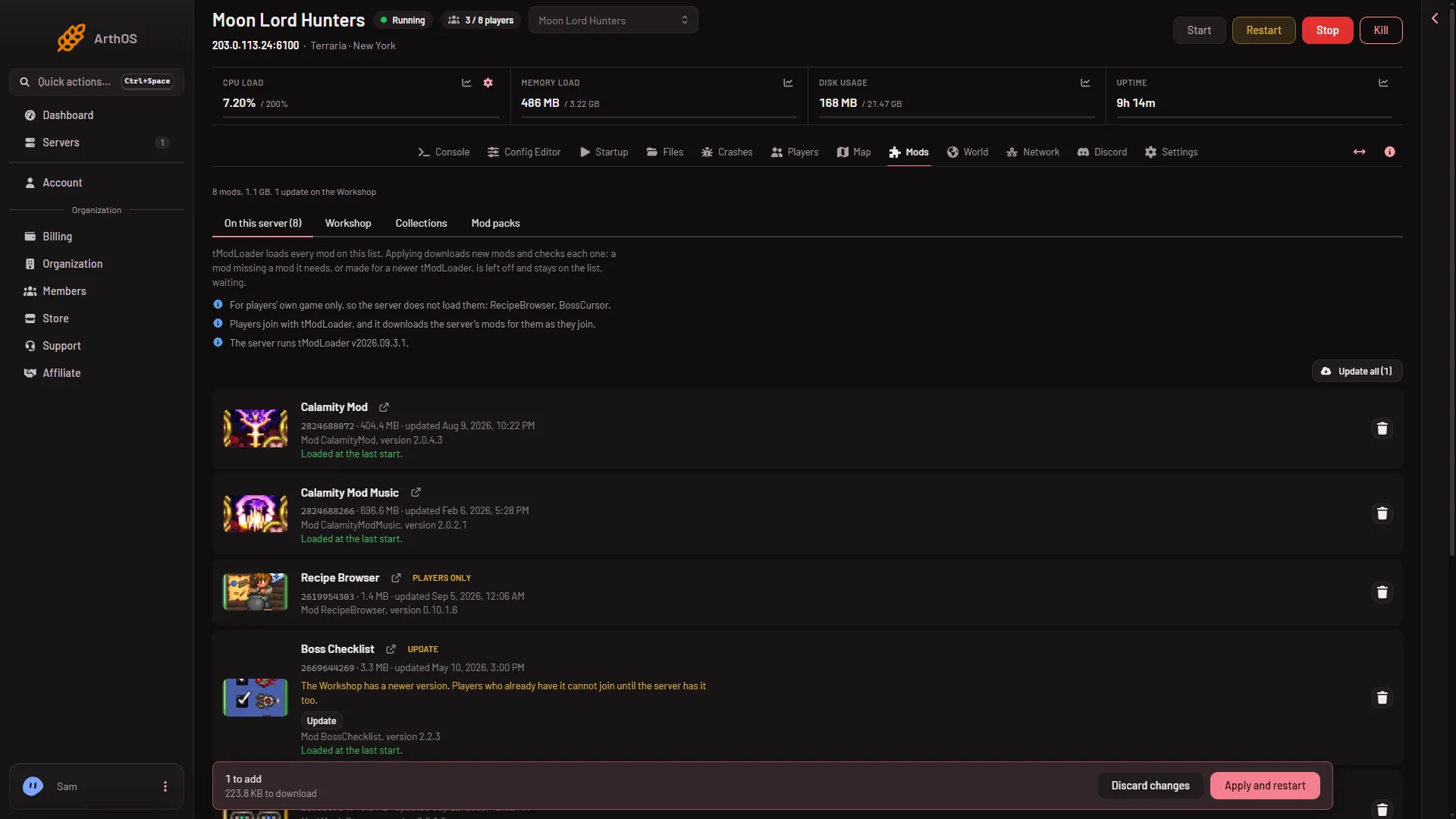
- Update on a mod row
- Apply and restart
- Mod packs tab
The notes under the tabs say which mods are for players only, that players download the server’s mods as they join, and which tModLoader the server runs. On the rows, a mod with a newer Workshop version shows the Update chip (1), then its Update button, and the bar at the bottom has Apply and restart (2).
The mod is not loaded on the server
The server loads a mod only when it can. A mod that cannot load is left off and stays on the list, waiting. The row says why. Examples the panel shows:
- A mod it needs is missing. The row says Needs (name), which is not on the list. Choose Add (name), then apply.
- The mod is newer than the server. The row says it was made for a newer tModLoader. It cannot load until the server’s tModLoader is updated.
- The game turned it off at its last start. The row gives the reason.
Changes only reach the server when you apply them. Choose Apply or Apply and restart in the bar at the bottom of the page. A running server stops, downloads and starts again.
The mod is for players only
Some mods run only in the player’s own game. The panel marks them Players only, and the note says “For players’ own game only, so the server does not load them”. The server does not load these. Players who want them add them in their own tModLoader. The toggle Who loads (mod name) switches a mod between Players too and Server only.
The server has a newer version of a mod
When the Workshop has a newer version of a mod, the row says players who already have it cannot join until the server has it too. Choose Update, then apply. Both sides must run the same version.
If a player is refused for a different version, the log can show was booted: You are not using the same version as this server.
Give players the list
To let players load the same mods before they join, use Download as a mod pack on the Mods page, under the Mod packs tab. It gives a zip. Players unzip it into their tModLoader ModPacks folder, then enable it from Mod Packs. Joining downloads the mods anyway.
If it does not work
- The server shows no mods. Nothing is applied yet. Add mods and apply them.
- A mod stays off after you apply. Read its row. It is missing a mod it needs, or it is for a newer tModLoader.
- One player is refused and others are not. Their tModLoader or their copy of a mod is out of date. Ask them to update both and rejoin.
- The player uses the plain game. They need tModLoader from Steam.
More about the game: Terraria servers.
Sources: store.steampowered.com: TModLoader