
















When a mod’s author publishes a new version, its row on the Mods page gets the chip Update. Choose Update on the row, or Update all above the list, then Apply. The server downloads the new versions and loads them at the restart.
Do this soon. The row says: “The Workshop has a newer version. Players who already have it cannot join until the server has it too.” A player whose game already holds the new version cannot join until the server has it as well.
This is for a Terraria server that runs tModLoader.
Update one mod
- Open the Mods page, tab On this server.
- Find a row with the Update chip.
- Choose Update on its row, the button below the chip. The button changes to Updates on apply and stays chosen. Choose it again to change your mind.
- In the bar at the bottom, choose Apply, or Apply and restart on a running server.
- Read the box Apply the mod changes?. Downloads lists the mods and their size. Confirm.
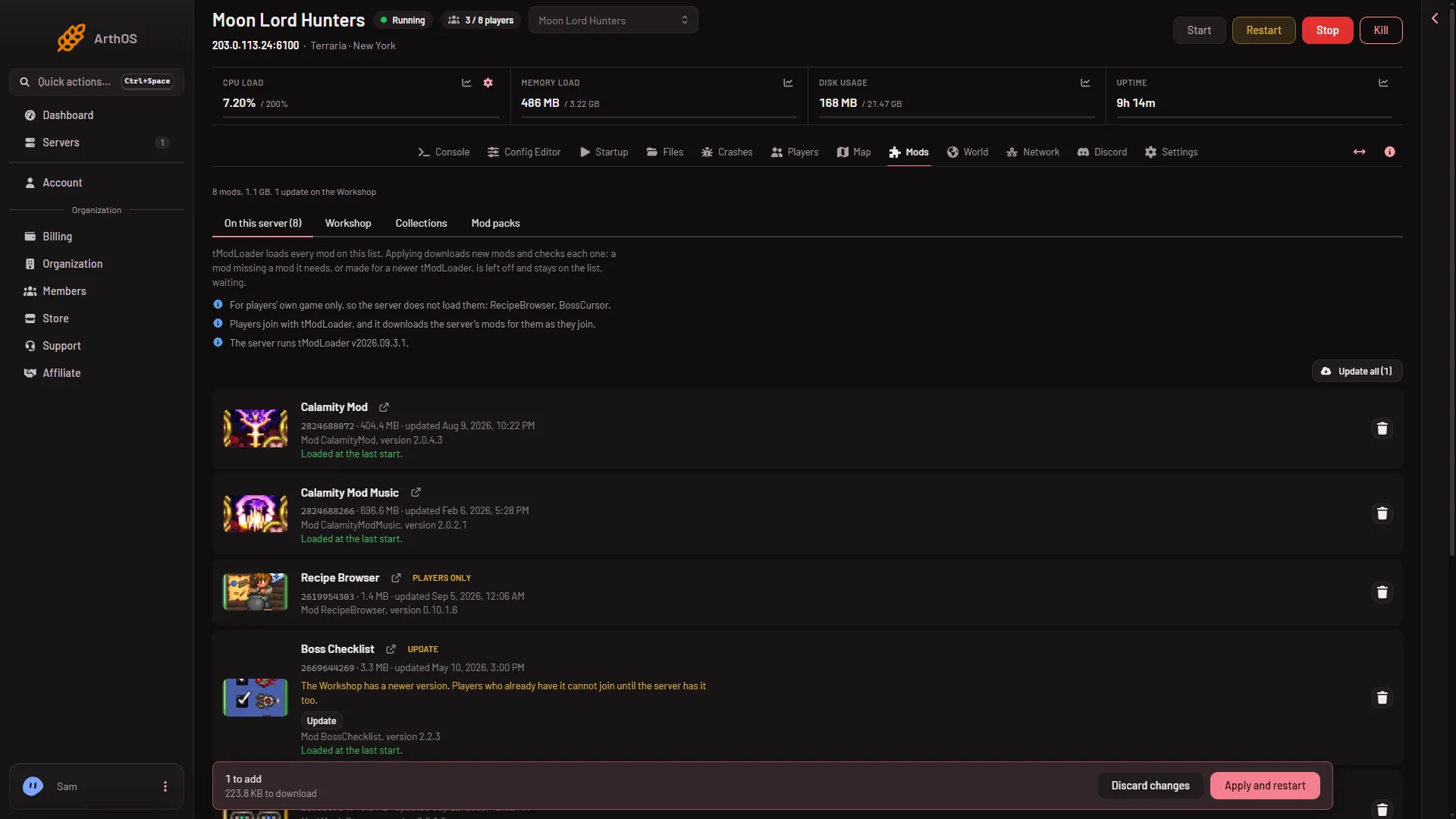
- Update all
Update every mod
Above the list, choose Update all (1) (the count of mods to update is in brackets). Every row with an update is chosen at once. The button then reads Update none: choose it to clear them all.
Then Apply, as above.
What Apply does
On a running server, Apply stops the server, downloads, and starts it again. Everyone online is disconnected, so warn them first with Message everyone on the Players page. On an offline server it downloads and stays offline.
If one download fails, the panel says “(name) could not be updated (reason). The copy the server had stays and keeps loading.” Nothing is lost. Try again later.
After the update, a mod may need a newer version of another mod. If a mod cannot load, see a mod needs another mod.
Players
Players join with tModLoader. It downloads the server’s mods as they join, so they get the new version on their next join. See players download the mods.
If it does not work
- The row says “Which version the server has is not known”. The panel did not download that copy. The button reads Download again. Choose it, then Apply.
- A player cannot join. Their copy of a mod and the server’s may differ. Check that you applied the update on the server: a row with Update still showing means it is not applied yet.
- The Update chip comes back. The author published again. Update again.
- The row says the Workshop no longer offers the mod. The copy on the server keeps loading, but it cannot be updated.