
















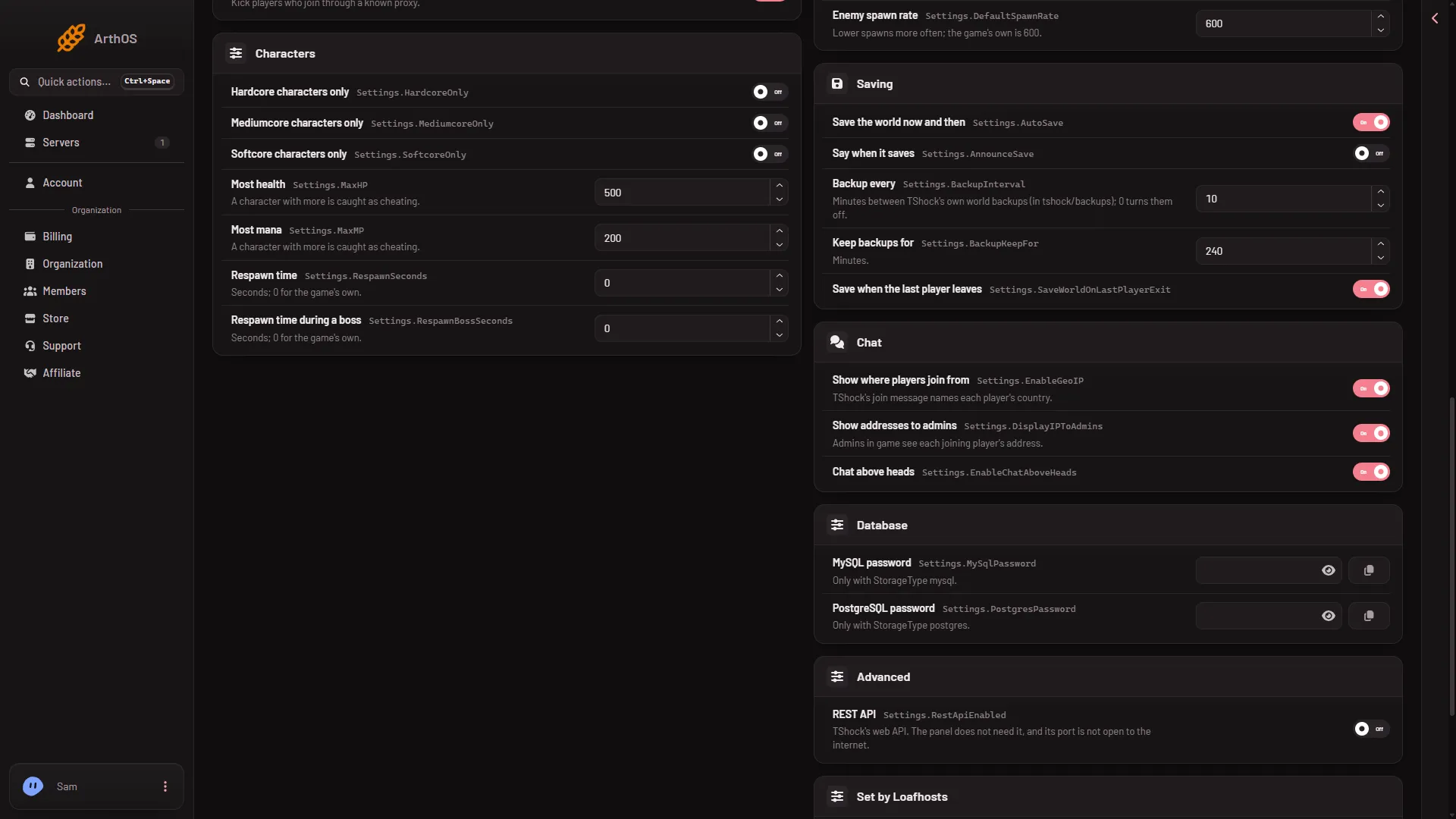
TShock keeps five saving settings in one group, Saving. They decide whether the world saves by itself, whether players are told, how often TShock copies the world into a backup, how long it keeps those copies, and whether it saves when the last player leaves. TShock’s backups go to the folder tshock/backups.
These settings exist only on TShock, the server program that adds accounts, groups and bans. A Terraria server on Vanilla or tModLoader does not show them.
The five settings
- Save the world now and then. Turns the world’s automatic saving on or off.
- Say when it saves. When on, players are told in the game’s chat when the world saves.
- Backup every. Minutes between TShock’s own world backups. The panel takes 0 to 1,440. Put 0 to turn these backups off.
- Keep backups for. How long a backup is kept, in minutes. For example, 2,880 minutes is two days. Older backups are removed.
- Save when the last player leaves. Saves the world as the last player disconnects.
Read each value before you change it, so you know where you start.
Change them in the panel
- Open the World page and check that the Server software card says TShock.
- Open the Config Editor.
- Open the file TShock.
- Find the group Saving.
- Change Save the world now and then (1), Backup every (2) and Keep backups for (3), and the others you need, then choose Save.
- Save the world now and then
- Backup every
- Keep backups for
- Restart the server. After you save, the panel says “Saved. Restart the server to apply the changes.” A restart disconnects everyone who is on, so warn them first with Message everyone on the Players page.
Where the backups are
Open Files and go to tshock/backups. Each backup is a copy of the world file.
Backups take disk space. A short Backup every with a long Keep backups for fills the disk with copies, so keep the two in proportion to your plan’s disk.
Three kinds of copy
A Terraria server can hold three kinds of copy. They are separate.
- TShock’s backups, set here, in
tshock/backups. - The game’s own earlier saves, as
.bakfiles beside the world. How many it keeps is World backups kept, in the file Server settings, group World. The World page lists them and can put one back. - The panel’s backups, in Settings, Backups. They copy the server’s files as they are, so the world is as the game last saved it. See panel backups.
To go back to an earlier world, see restore a world backup.
Save by hand, and what stops a save
The Players page has a button Save the world now in the box The world. Stopping the server from the panel saves the world, because the stop sends exit.
The panel kills a server that has not stopped after the number of seconds on the Auto-Kill card in Settings. Read Seconds until auto-kill there.
An empty server is paused. The game saves the world when the last player leaves.
By hand
The settings are in tshock/config.json:
"Settings": {
  "AutoSave": true,
  "AnnounceSave": false,
  "BackupInterval": 30,
  "BackupKeepFor": 2880,
  "SaveWorldOnLastPlayerExit": true
}
These keys sit inside the "Settings": { ... } object of the file. Those numbers are an example, not the server’s values. One more key is not in the panel: ShowBackupAutosaveMessages decides whether players see a message in chat at each backup. Stop the server, edit the file in Files, save and start the server. TShock writes this file only when it is missing, so your edit stays.
If it does not work
- The TShock file is not in the Config Editor. The server is not running TShock. Switch the software on the World page.
- No backups appear. Check that Backup every is not 0, then wait that many minutes.
- The disk is full. Lower Keep backups for, or raise Backup every. Old backups in
tshock/backupscan be deleted in Files. - Players are spammed with save messages. Switch Say when it saves off.
Not checked on TShock 6.2.1 as of 13 November 2026: the values a brand new server’s file starts with, whether backups run while the server is empty, the exact file names in tshock/backups and the exact chat texts.
Sources: github.com: TShockConfig.cs, github.com: BackupManager.cs, github.com: SaveManager.cs, terraria.wiki.gg: Server