
















The first time TShock starts, it makes a one-time code. You join the server, type /setup and the code in chat, and TShock then asks you to make an account. That account is how you become the owner. The panel shows the code on the Players page, so you never need to dig through logs.
This guide is for a Terraria server that runs TShock. If yours runs Vanilla or tModLoader, there is no code. Change the program on the World page first: see change the server software.
Find the code
- Make sure the server runs TShock. On the World page, Server software must say TShock. Changing it takes effect at the next start, and TShock downloads first. A restart disconnects everyone who is on, so use Message everyone on the Players page first.
- Start the server and wait until it is ready.
- Open Players. Look for the box Make yourself TShock’s owner. It holds the code.
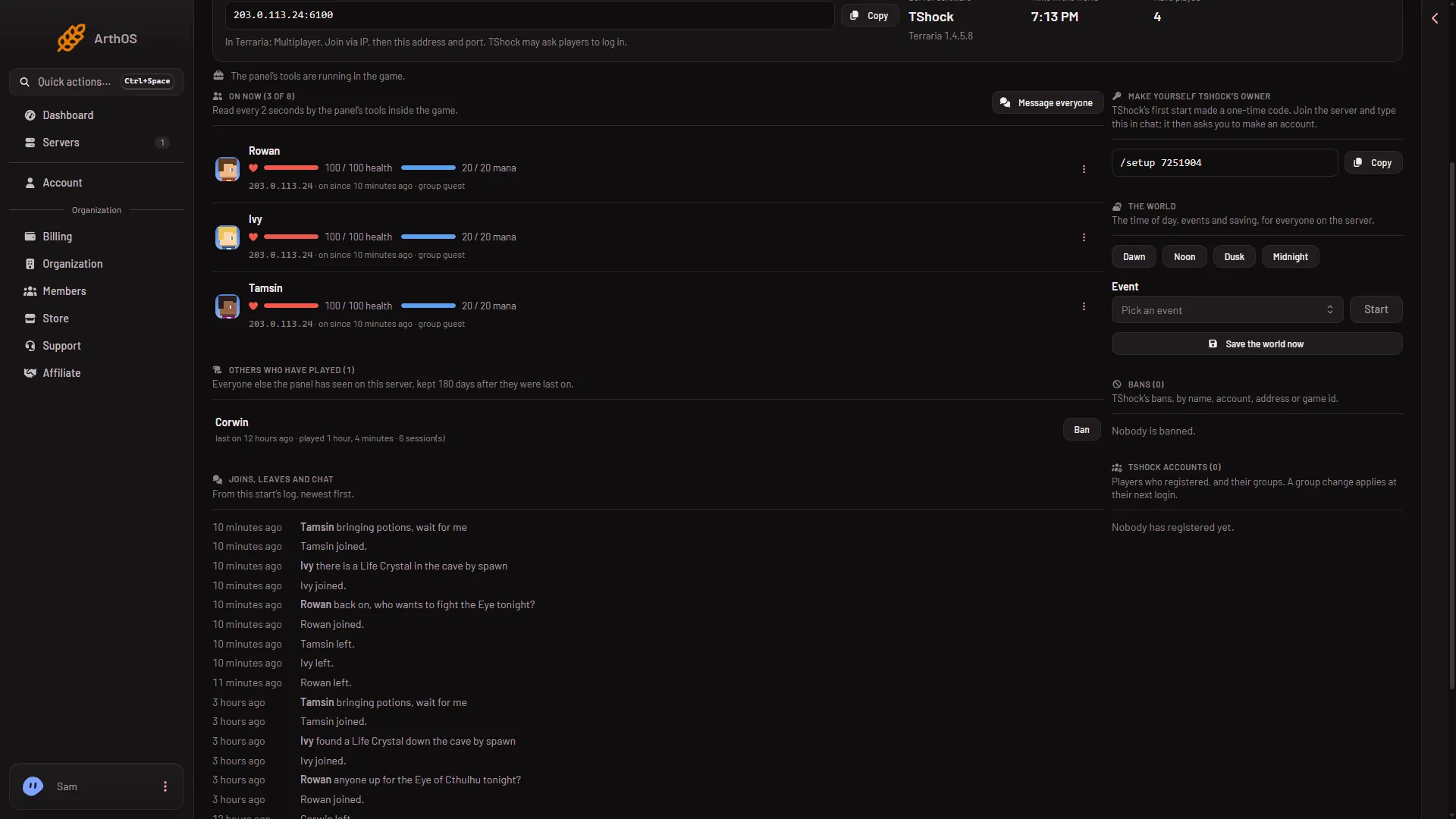
- TShock owner code
The box (1) is the heading. Under it is the code with a Copy button. In the examples below the code is 1234567. Yours is different.
Type it in the game
- In Terraria choose Multiplayer, pick a character, then choose Join via IP.
- Type the address and port from the Join box on the Players page.
- Once you are in, open chat and type
/setup 1234567with your own code. - The panel says TShock then asks you to make an account. Follow the messages in chat. Not checked on TShock 6.2.1 as of 13 November 2026: the steps TShock gives after the code.
Do this soon after the first start. The code exists only to make the first owner.
Why the box disappears
The code only exists to make the first owner. Once the code has been used, TShock’s log says that the /setup system has been disabled, and TShock stops printing the code. The panel hides the box as soon as an account in the group superadmin or owner exists.
You will not see the box if:
- The server does not run TShock.
- An owner account already exists.
- Your role does not allow it. The box is only shown to a role that may set up TShock and manage its accounts. Ask the owner of the organization to change your role.
- TShock has not started yet. Its first start comes after the download, so give it a minute.
If it does not work
- You cannot join. TShock must have a version for the game version you play. After a Terraria update, players can join with the normal game only when a new TShock version is out.
- The box is empty but nobody is an owner. Start the server and check that the Players page says the server is running. The panel reads the code from the start log.
Once you are the owner, the Players page lists every registered account under TShock accounts. See TShock accounts and groups for changing a group.
Sources: github.com: TShock