











In VEIN, a base is held together by its utility cabinet. By default a base with no fed cabinet decays, and other players can raid the cabinet. Six settings in the Config Editor change this. They apply at the next start.
What a utility cabinet is
The utility cabinet is the centre of a base. It claims an area of land that players can build on, and it holds the resources that stop the base from decaying. The game’s wiki warns that if someone gets to your cabinet, they can claim everything in your base. Build it somewhere well guarded.
The settings
All six are in the Game rules file, under Building and PvP.
- Bases decay without a utility cabinet. On by default. When it is on, a base needs a fed utility cabinet or it decays. Turn it off and bases no longer need one to stay up.
- Cabinet feeds every (hours). The default is 4. This is how often a cabinet uses up what it holds. A bigger number means players refill less often.
- Cabinets feed with nobody on. On by default. Turn it off and cabinets pause while the server is empty, so a base does not use up supplies while its owners are away.
- Utility cabinets per player. The default is 0, which means no limit.
- Raiding. On by default. When it is on, players can raid the utility cabinet of a base.
- Offline raid protection. Off by default. Turn it on and a base is safe while its owners are offline.
A setting at its default is marked Game default in the editor.
Change them
- Choose Stop at the top right of the server page. The game rewrites its settings files when it stops, over anything changed while it runs, so the editor saves only while the server is stopped.
- Open Config Editor and choose the Game rules file.
- Find the group Building and PvP.
- Change the settings you want. Switches show On and Off.
- Choose Save. The changes apply when the server starts.
- Choose Start at the top right of the server page.
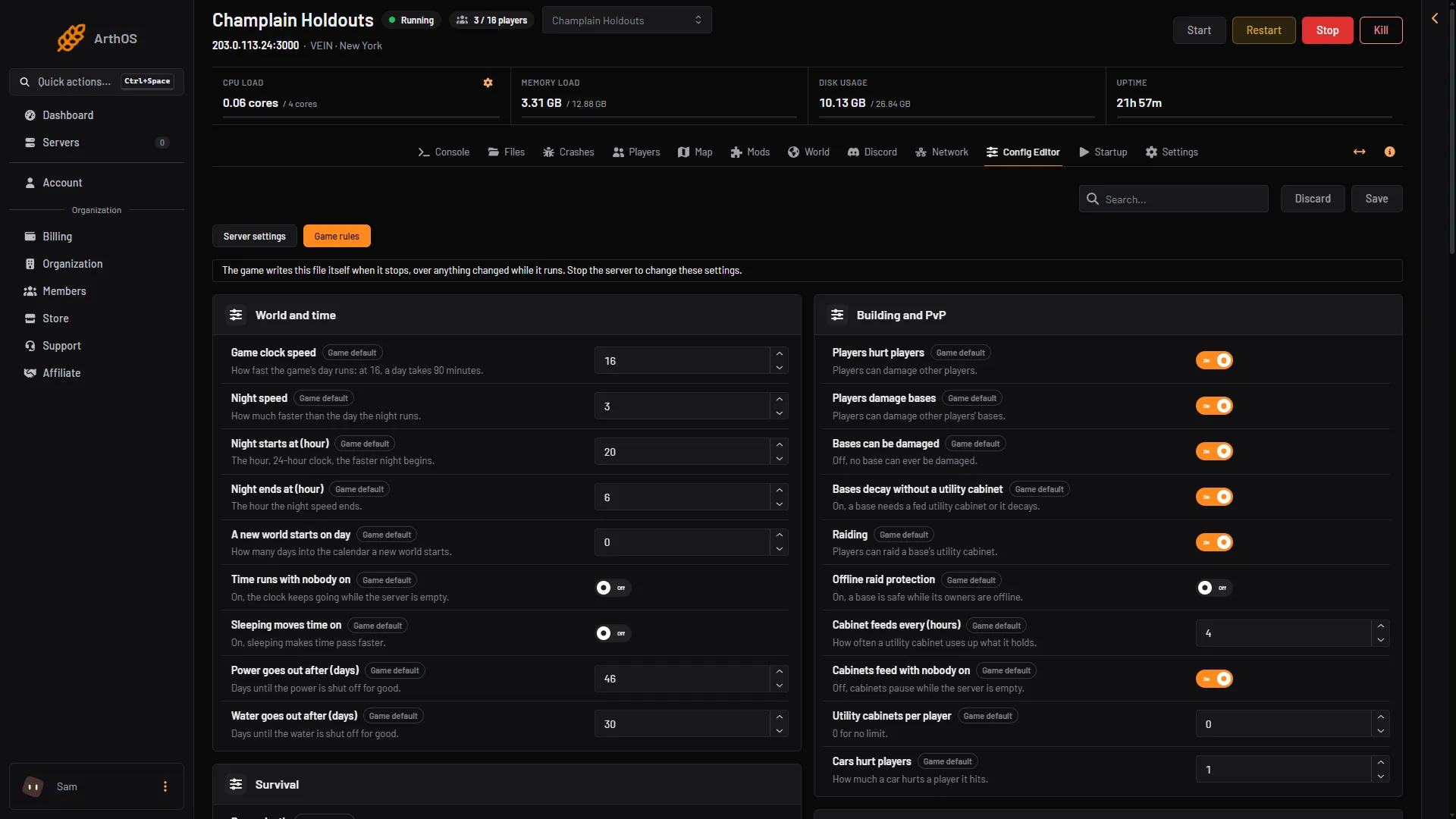
- Bases decay setting
- Raiding
- Offline raid protection
In the picture, (1) is Bases decay without a utility cabinet, (2) is Raiding and (3) is Offline raid protection.
Common choices
- A relaxed server: turn off Bases decay without a utility cabinet. Nobody has to keep feeding a cabinet.
- A safer server for players who log off: turn on Offline raid protection, and turn off Cabinets feed with nobody on so supplies last.
- A server without PvP: turn off Raiding as well as Players hurt players and Players damage bases. Not checked on 0.025 as of 27 October 2026: whether turning off Players damage bases alone also stops raids.
- A hard server: leave everything at its default.
To stop players hurting each other and bases altogether, see PvP settings. More about the game: VEIN servers.
By hand
Edit Vein/Saved/Config/LinuxServer/Engine.ini in Files, only while the server is stopped. Put the keys under [ConsoleVariables]. A line equal to the default may be missing from the file. A Windows server’s folder: Not checked on 0.025 as of 27 October 2026.
[ConsoleVariables]
vein.BuildObjectDecay=0
vein.UtilityCabinet.AllowRaiding=0
vein.OfflineRaidProtection=1
The other keys are vein.UtilityCabinet.Interval (hours), vein.UtilityCabinet.ContinueWithNoPlayers and vein.Placement.MaxUtilityCabinets.
If it does not work
- Save is greyed out. The server is running. Stop it first.
- Nothing changed in the game. Settings are read when the server starts. Choose Start at the top right of the server page after saving.
- A setting is missing. Open the Game rules file, not Server settings.
Not checked on 0.025 Hotfix 3 as of 27 October 2026: the exact amount a cabinet holds, and what decay does to a base.
Sources: vein.wiki.gg: Utility Cabinet