











Game rules is the Config Editor file for Engine.ini. It holds the rules of the world as game console variables (settings the game reads when it starts), in a section called [ConsoleVariables]. This guide shows what each group can change, the default, and the key to type if you edit the file by hand. For the steps, see the Config Editor.
Stop the server before you change anything. The game reads the file when it starts, so a change applies at the next start. A setting at its default is not written in the file, so an empty file means every default.
World and time
- Game clock speed (
vein.Time.TimeMultiplier): default 16. The panel’s help says that at 16, a day takes 90 minutes. See day length. - Night speed (
vein.Time.NightTimeMultiplier): default 3. The night passes faster than the day. Not checked on 0.025 as of 27 October 2026: how Night speed changes the length of a whole day and night. - Night starts at (hour) and Night ends at (hour) (
vein.Time.NightTimeMultiplierStart,vein.Time.NightTimeMultiplierEnd): defaults 20 and 6. - Time runs with nobody on (
vein.Time.ContinueWithNoPlayers): default off. The clock stops when the server is empty. - Power goes out after (days) and Water goes out after (days) (
vein.Calendar.ElectricalShutoffTimeDays,vein.Calendar.WaterShutoffTimeDays): defaults 46 and 30. See power and water.
Survival
- Permadeath (
vein.Permadeath): default off. See permadeath. - Keep items on death (
vein.RetainItemsOnDeath): default off. See keep items on death. - Infection chance per bite (
vein.ZombieInfectionChance): default 0.01, which is 1 in 100. - Skill XP (
vein.Stats.XPMultiplier): default 1. Raise it to level skills faster.
Loot
- Loot scarcity (
vein.Scarcity.Difficulty): default Standard. The choices are None, More loot, Standard, Less loot and Impossible. See loot settings. - Containers refill every (seconds) (
vein.ContainersRespawn.Interval): default 10800, which is 3 hours. - Loose items come back every (seconds) (
vein.ItemActorSpawner.RespawnInterval): default 3600. - Car keys near cars (
vein.Vehicles.NearbyKeySpawnChance): default 0.8.
Zombies and AI
- Zombie numbers (
vein.AISpawner.SpawnCapMultiplierZombie): default 1, the game’s normal amount. - Zombie health (
vein.Zombies.Health): default 40. - Zombie speed (
vein.Zombies.SpeedMultiplier) and Zombie damage (vein.Zombies.DamageMultiplier): default 1. - Hordes (
vein.AISpawner.Hordes.Enabled): default on. Hordes a minute (vein.AISpawner.Hordes.ChancePerMinute) is 0.05 and A horde lasts (seconds) (vein.AISpawner.Hordes.Duration) is 120. - Headshots only (
vein.Zombies.HeadshotOnly): default off.
Building and PvP
- Players hurt players (
vein.PvP), Players damage bases (vein.BuildObjectPvP), Bases can be damaged (vein.BaseDamage) and Raiding (vein.UtilityCabinet.AllowRaiding): all on by default. Offline raid protection (vein.OfflineRaidProtection) is off. See PvP settings and raiding and decay. - Cabinet feeds every (hours) (
vein.UtilityCabinet.Interval): default 4.
Movement
- Walking speed 250, Running speed added 350, Crouching speed 200, Swimming speed 300. The numbers are in the game’s own units. The keys are
vein.Movement.WalkSpeed,vein.Movement.RunExtraSpeed,vein.Movement.CrouchWalkSpeedandvein.Movement.SwimSpeed.
Saves
- Autosave (
vein.Autosave.Enabled): default on. Autosave every (seconds) (vein.Autosave.Interval): default 300. - Autosaves kept (
vein.Autosave.MaxQuantity): default 10. This is the game’s own setting. On the server onlyServer.vnsis there, so do not look for older autosave files. - Compress saves (
vein.Saves.Compress): default off. Saves take less room on the disk and are a little slower to write and read.
Players and the server
- Players on other versions (
vein.Multiplayer.AllowDifferentVersions): default off. The panel’s help says the game’s makers warn that a player on another build will probably crash. Use it only for a short time after a hotfix.
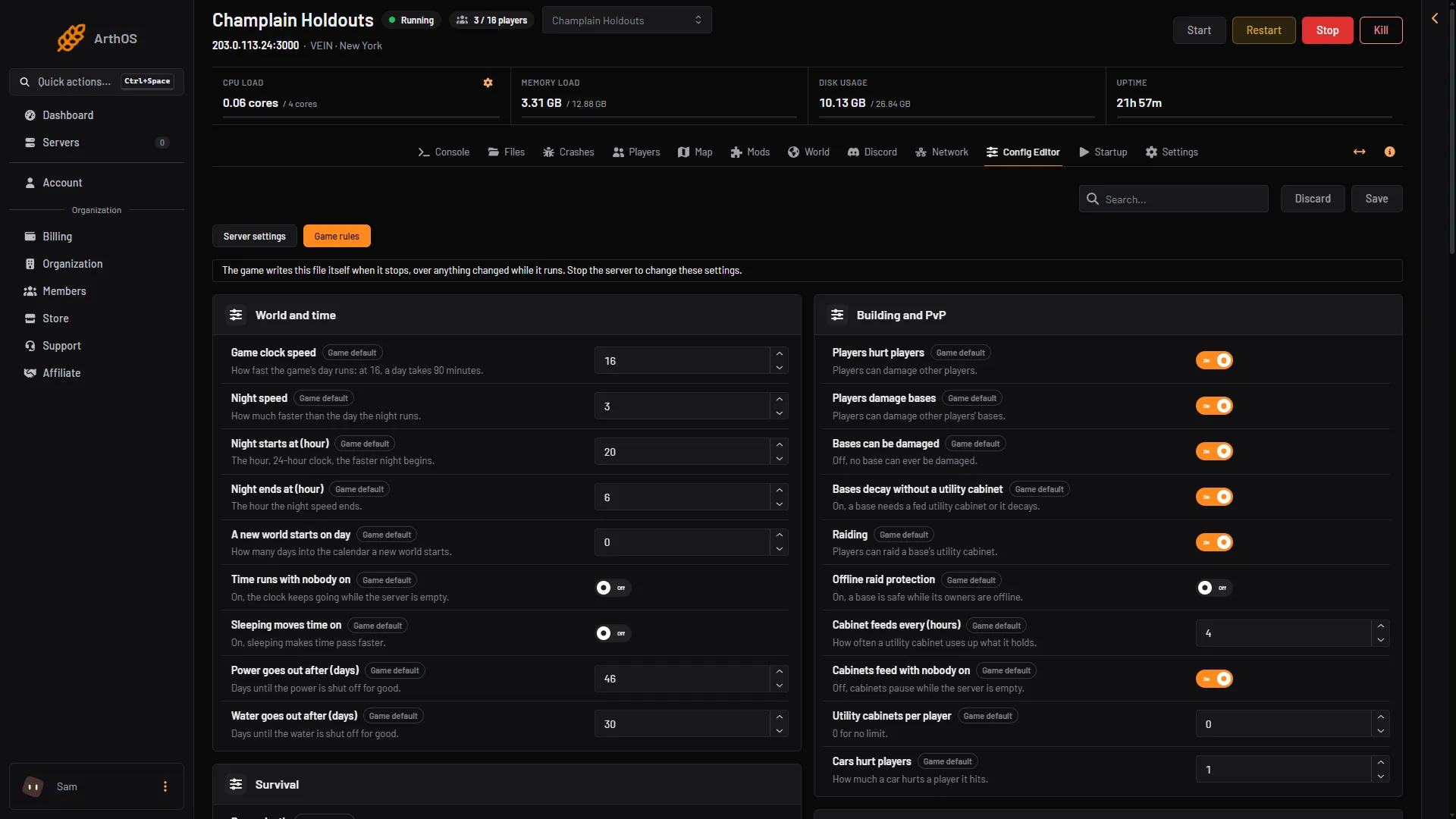
- Game rules
- Game clock speed
- Players hurt players
- Power goes out after (days)
By hand
Open Files and go to Vein/Saved/Config/LinuxServer/Engine.ini, with the server stopped. Put each key under [ConsoleVariables], one per line. A valid example:
[ConsoleVariables]
vein.Time.TimeMultiplier=8
vein.PvP=0
If it does not work
- A setting is not in the file. It is at its default. The Config Editor still shows it.
- The server ignored my change. It was changed while the server ran, and the game wrote its own copy over it when it stopped.
- A value is refused. Each setting has a range, and a number outside it is refused. Use a value close to the default.
More about the game: VEIN servers.
Sources: ramjet.notion.site