











A VEIN server can post to Discord in two ways, both on the Discord page. Event posts tell a channel when players join, leave or die, and when the game version changes. The game’s own posts send VEIN’s global chat and players’ reports to admins. Both work with a webhook, a link you make in Discord. No bot is needed.
The top card of the page, Status in Discord (button Link a channel), is a different feature: a message the Loafhosts bot keeps up to date in a channel. You do not need it for the posts below.
Make a webhook in Discord
You need a webhook link for each channel you want to post in.
- In Discord, open the settings of the channel.
- Open Integrations, then Webhooks, then New Webhook.
- Choose Copy Webhook URL.
The link starts with https://discord.com/api/webhooks/. Treat it like a password: anyone who has it can post in your channel.
Event posts
These are posts the panel makes about the server.
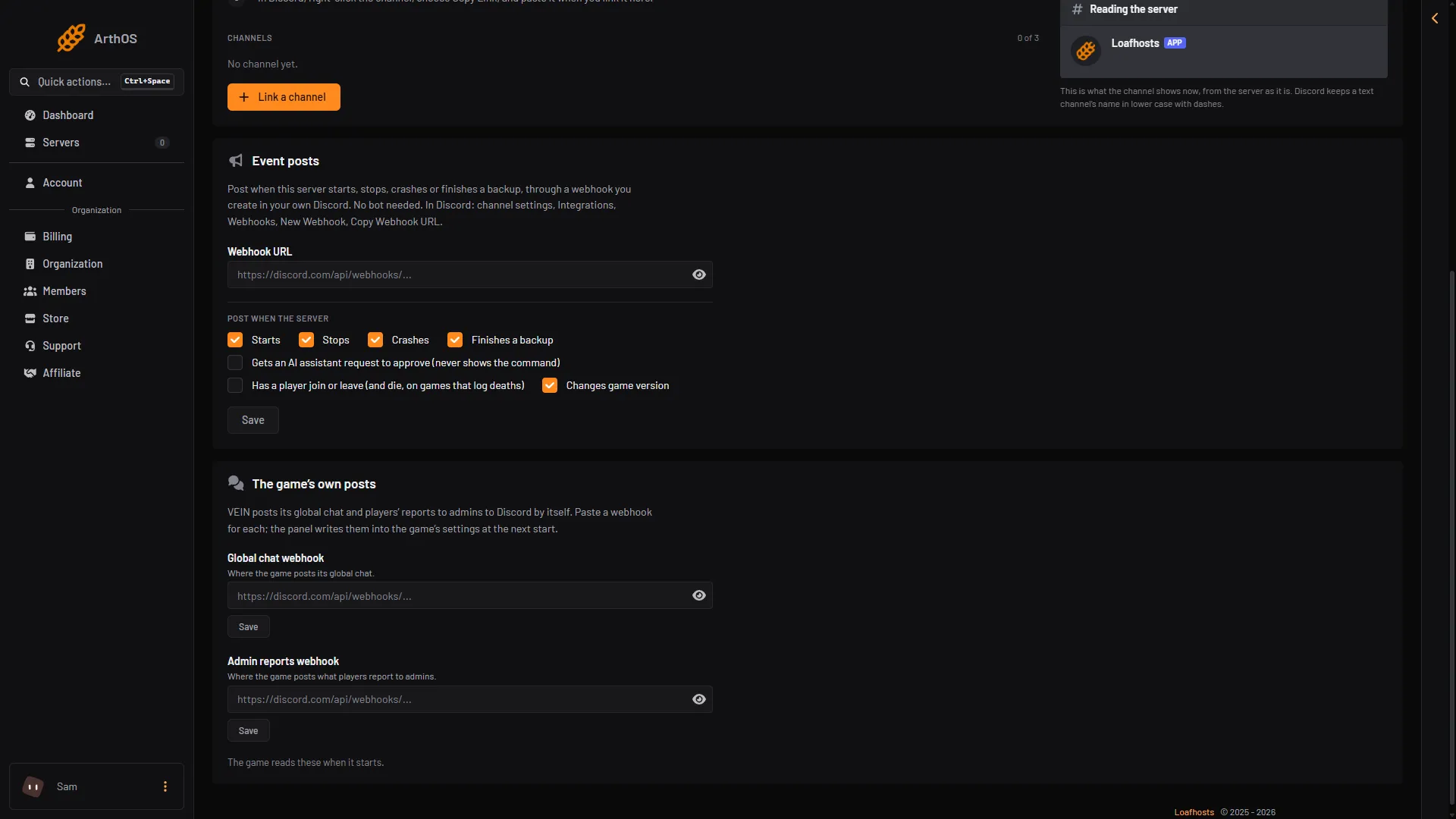
- Open the Discord page of the server and find the card Event posts.
- Paste the link into Webhook URL.
- Under Post when the server, tick what you want to see:
- Starts, Stops, Crashes and Finishes a backup.
- Has a player join or leave (and die, on games that log deaths). VEIN logs deaths, so this one posts “Player joined”, “Player left” and “Player died”. A death names the killer when the game does.
- Changes game version. It posts when the server is moved to another version on the World page.
- Choose Save.
- Choose Send a test to see a post in the channel.
- Paste the webhook link
- Joins, leaves and deaths
- Changes game version
A new webhook starts with the player option off, so tick it if you want joins and leaves. Events are posted within 20 seconds. The panel posts at most ten player events at a time, so a busy server does not flood the channel. Player names are cleaned so they cannot ping anyone.
The link is never shown again after you save it. The page shows only which webhook is in use. To change it, paste a new link into New webhook URL. Leave the field empty to keep the old one while you change the ticks. Remove stops all posts. The webhook itself stays in your Discord until you delete it there.
If Discord refuses the link, the card says “Posting stopped” and why. Save a working link to start again.
The game’s own posts
VEIN can post two things by itself. This is separate from event posts, and chat is only posted this way.
- On the same Discord page, find the card The game’s own posts.
- Paste a link into Global chat webhook for the game’s global chat.
- Paste a link into Admin reports webhook for what players report to admins.
- Choose Save under each one you filled in.
- Choose Restart at the top right of the server page.
The message “Saved. It applies when the server starts.” tells you this: the panel writes the links into the game’s settings at the next start. Nothing is posted until then.
These links are never shown again either. Once one is set the card says “A webhook is set. Paste a new one to replace it.” Use Replace to change it, or Stop to turn that post off. Use a different channel for each if you like. Admin reports are best in a channel only your admins can read.
If it does not work
- Nothing is posted after Save. For event posts, wait up to 20 seconds. For the game’s own posts, restart the server first.
- The link is refused. It must start with
https://discord.com/api/webhooks/. - Joins are missing. Check that the player option is ticked. It is off for a new webhook.
- The page is read only. Your role on the panel may not allow changing Discord settings.
More about the game: VEIN servers. Not checked on 0.025 as of 27 October 2026: the exact wording of the game’s chat posts.