











The experimental branch is a separate test version of VEIN that Ramjet Studios publishes on Steam next to the current one. To put your server on it, open the World page, pick it under Game version, and choose Use this version. The server changes version at its next start. Players must be on the same branch, or they cannot join. You need to switch your own game too before you can test.
A test version can have bugs the current one does not. Use it only if you want to try new things early.
Before you start
- The panel makes a copy of your save and keeps it before it switches. You do not need to do this yourself, but you can also press Save now on the same page first.
- Everyone who plays on the server must switch their own game to the same branch, or the server must allow other versions (see below).
- You can switch back at any time, but a world saved on one build may not load on another. Keep the copy the panel makes.
- Keep Update when the server starts switched on. When it is off, the panel does not fetch new files at a start, even for a different branch, and the switch does nothing.
Switch the server to experimental
- Open the World page.
- Find the card Game version. Set to shows what the server is on now. It reads The current version until you change it.
- In Version, choose experimental. The list shows each branch with the date it was last updated.
- Choose Use this version.
- A box asks “Switch to experimental?” and says a copy of the save is made first and the server changes version at its next start. Choose Switch.
- A message says “Saved. It applies at the next start.” Choose Restart at the top right of the server page. If players are on, use Restart with a warning on the Players page instead.
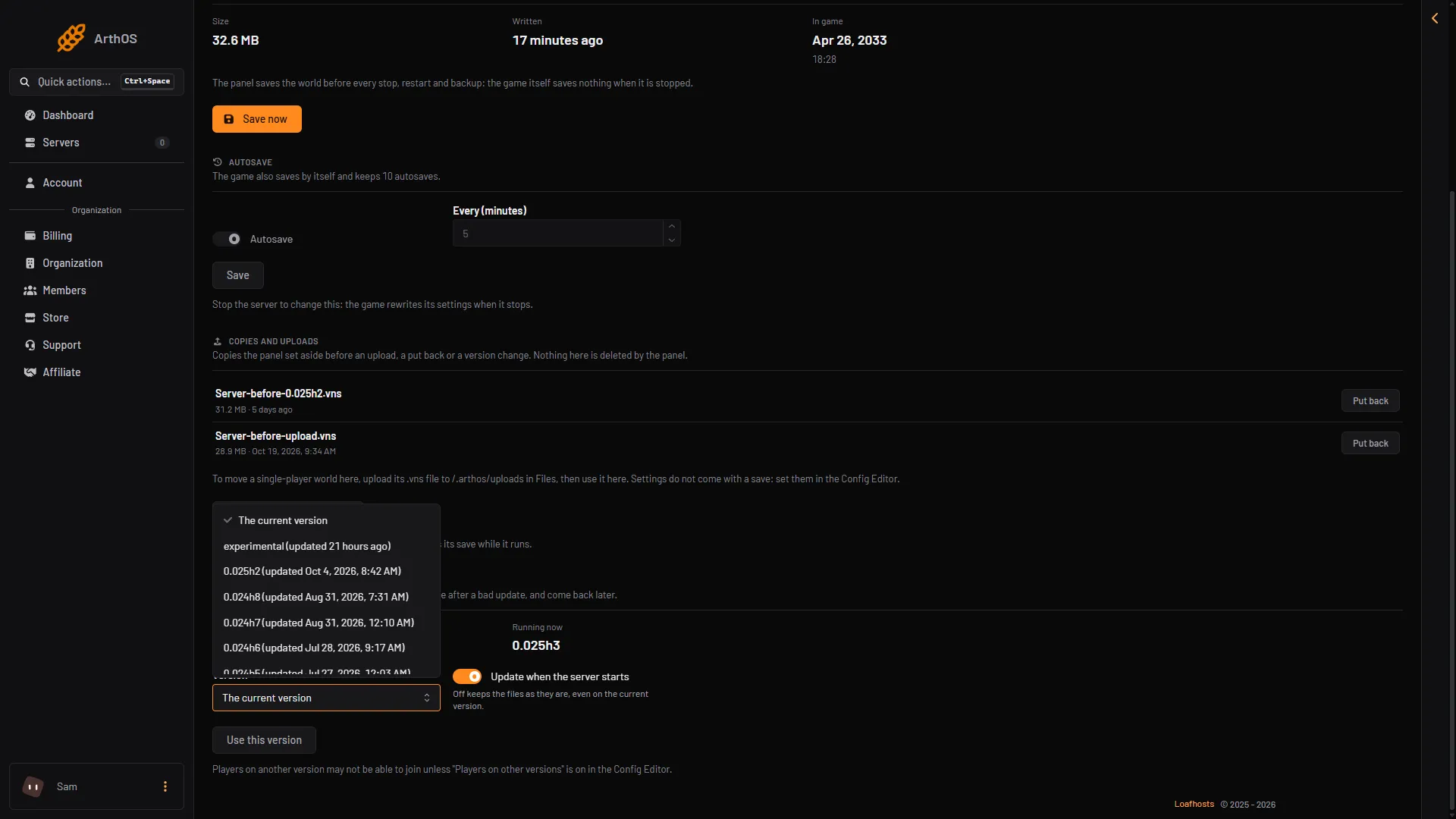
- The Version field
After the restart, Running now shows the version the server is really running.
The same setting is the Game version field on the Startup page. Use the World page instead: it makes the copy of the save for you.
Let your players join
Each player does this in Steam on their own PC:
- In Steam, right-click VEIN in the library and choose Properties.
- Open Betas.
- Choose the same branch as the server, here
experimental. - Wait for Steam to download the update, then start VEIN.
Not checked on 0.025 as of 27 October 2026: the branch names in the game’s Betas list.
A player on a different build cannot join. The Config Editor has the setting Players on other versions. It is off by default. Ramjet warns that letting other builds in will probably crash them, so it is only useful for a short time right after a hotfix, which is a small update that fixes problems.
Go back to the current version
- Open the World page.
- In Version, choose The current version.
- Choose Use this version, then Switch.
- Restart the server.
Players switch their Steam setting back to the default branch too.
If a world made on experimental does not load on the current version, open Copies and uploads on the same page and use Put back on the copy the panel made before the switch. Put back means the copy becomes the live save again. Stop the server first. The panel makes a copy of the save as it is now and keeps it, so nothing is lost.
If it does not work
- Players cannot join after the switch. Their game is on a different branch. Check their Steam Betas setting.
- The server did not change. The change applies at the next start. Restart it, then read Running now. Also check that Update when the server starts is on.
- experimental is not in the list. The panel reads the list of branches from Steam and keeps it for an hour. Come back later.
- The world will not load. Put back the copy from before the switch. See VEIN version mismatch.
More about the game: VEIN servers. Not checked on 0.025 as of 27 October 2026: what an experimental build changes compared with the current one.
Sources: store.steampowered.com: VEIN