











A VEIN server on Loafhosts uses three ports. The game port is the one players connect to. The Steam query port is the next number up, and the server browser uses it. The third port is used only by the panel. Players never use the second or third.
UDP and TCP are two ways data travels. You do not need to know more: the panel sets both.
The three ports
| Port | Protocol | What it is for |
|---|---|---|
| Game port | UDP | Players join here. |
| Steam query port | UDP | The next port after the game port. Steam’s server list asks the server here. |
| Panel gate port | TCP | Only the panel uses it. |
The Network page lists the server’s ports under Allocations. The game port is the primary one. The other two are the next numbers up: the query port, then the panel gate port. The Startup page shows Steam query port too, set by the panel. It cannot be edited.
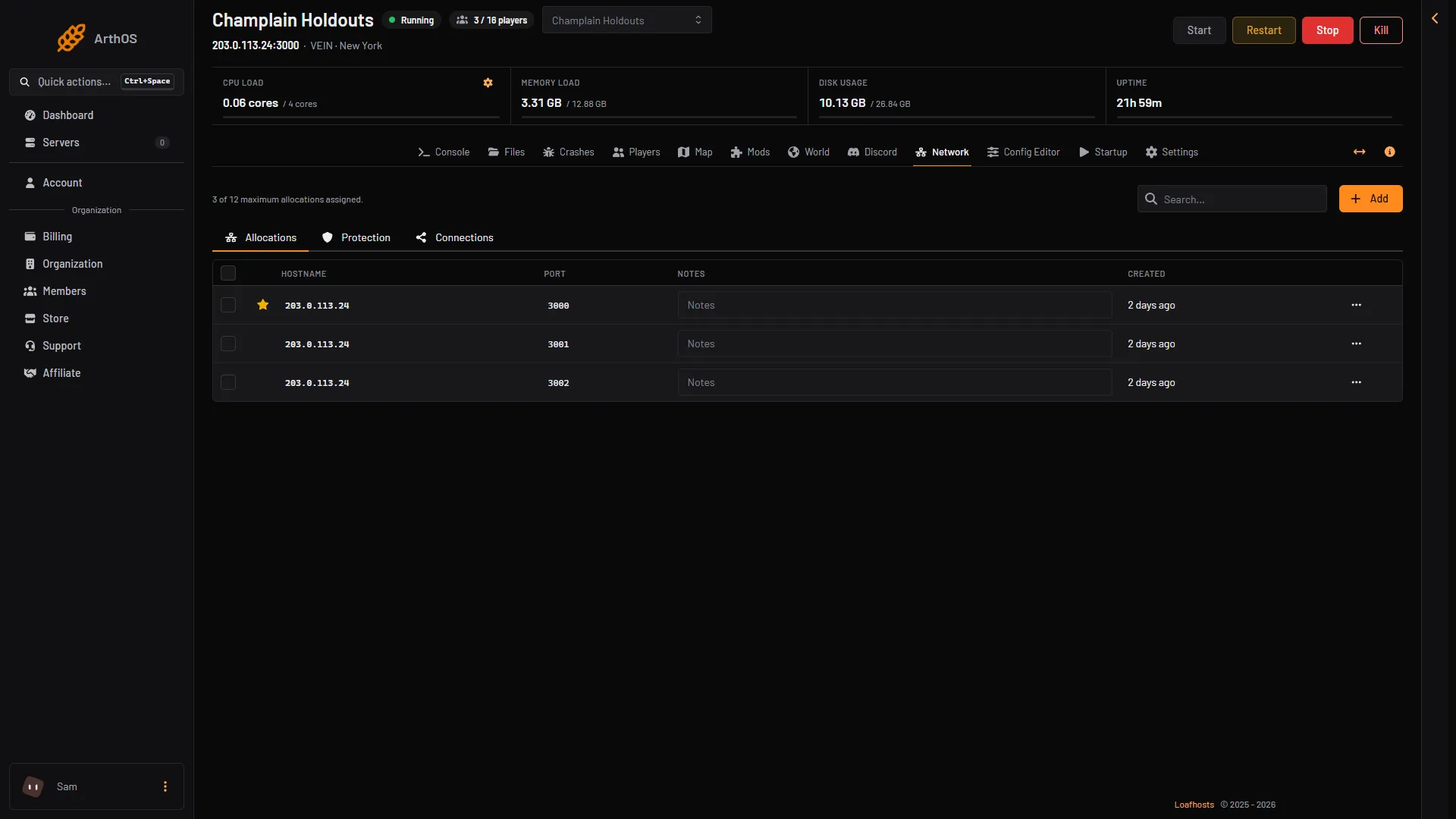
- Game port (3000)
- Steam query port (3001)
- Panel gate (3002)
Here the game port is 3000, the query port 3001 and the panel gate 3002. Your numbers may differ.
What players use
The normal way in is the game’s server browser. Players find the server by its name and type the join password when asked. See connect to a VEIN server. The Players page shows the server’s address and game port under Copy the address.
Not checked on 0.025 as of 27 October 2026: which port Steam’s favourites box needs, the game port or the query port.
No port forwarding
Ramjet’s manual tells people who host at home to forward the game and query ports on their router. On Loafhosts you do not. The server runs on Loafhosts’ own network, so you do not have a router to set up.
The game’s own API
VEIN has a small web API of its own. It has no password, so it must never be open to the internet. On Loafhosts it is not: only the panel reaches it, through the third port. Do not share that port. A player has no reason to use it.
VEIN has no RCON (remote console), and its console runs no commands. The wiki lists an optional RCON on TCP 7777, but the 0.025 server was measured on 27 October 2026 and has none.
Changing the ports
You cannot change them in the panel. The panel sets the ports itself, and they are written again at every start. If a port must change, contact support.
By hand
If you run VEIN yourself, the wiki gives the ports and start flags below. The game’s own page names other default ports for a home setup (game 7777, query 7778); the numbers on the Network page are what Loafhosts sets.
VeinServer-Linux-Test -Port=7777 -QueryPort=7778 -multihome=0.0.0.0 -logThe wiki says the query port cannot be between 27020 and 27050 when you run it locally, because Steam uses those ports.
If it does not work
- Players cannot connect. Check the server name and join password they used. See VEIN cannot connect.
- The server is not in the browser. A new start shows in the browser about 30 seconds after the server is ready. See VEIN server not showing.
- The Network page shows more than one port. That is normal: it lists all three.
More about the game: VEIN servers. Not checked on 0.025 as of 27 October 2026: the exact port numbers a new server is given.