











You change VEIN’s zombies in the Game rules file of the Config Editor. Most settings are multipliers. A multiplier of 1 is the game’s normal. 2 is double, and 0.5 is half. Every change applies at the next start of the server.
How many zombies
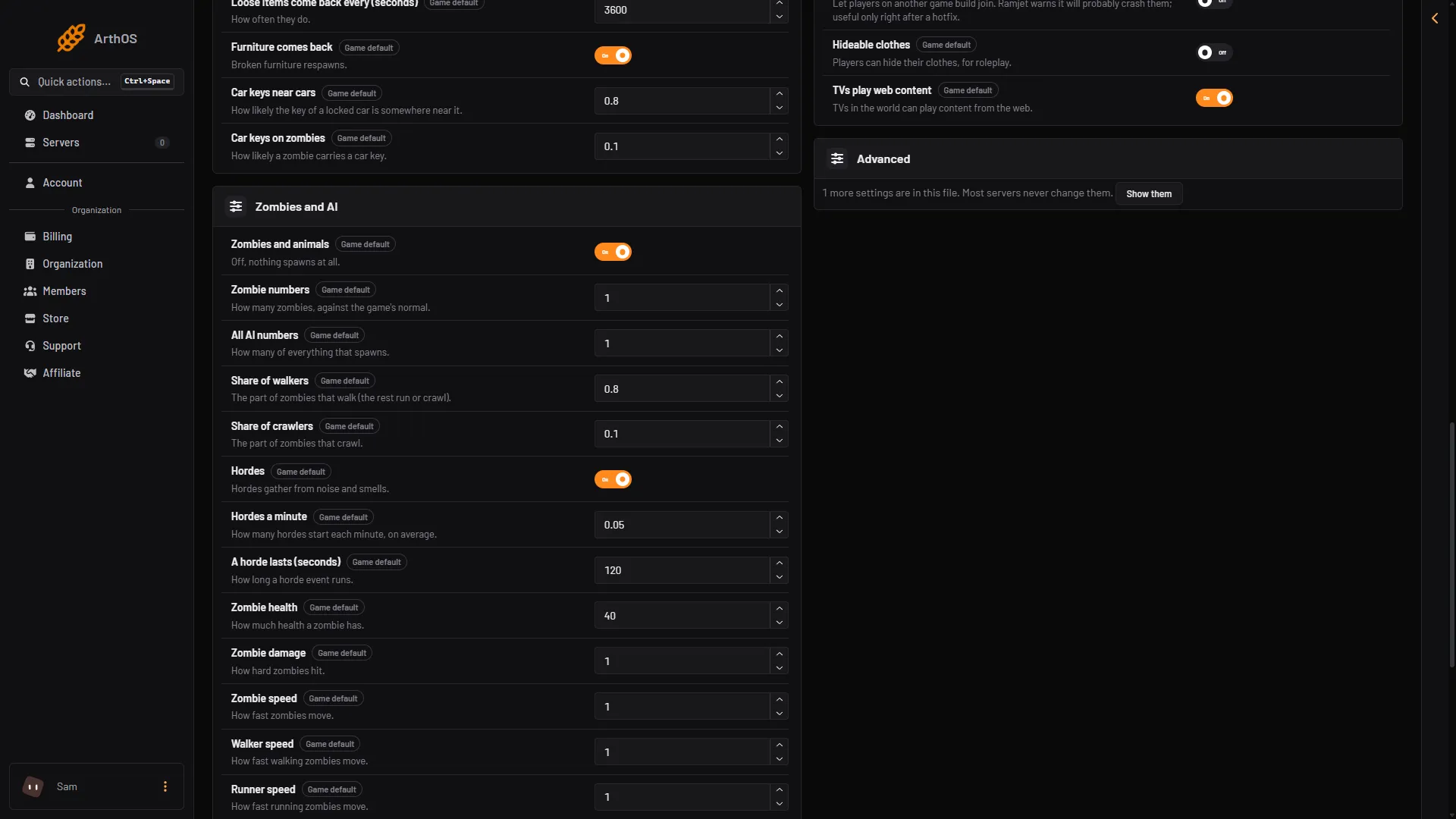
These are in the group Zombies and AI.
- Zombies and animals is on by default. Turn it off and nothing spawns at all, not even animals.
- Zombie numbers is how many zombies there are, compared with the game’s normal. The default is 1.
- All AI numbers is the same for everything that spawns. The default is 1.
The game has three kinds of zombie: walkers, crawlers and runners. You can set how many of each kind there are.
- Share of walkers is the part of the zombies that walk. The default is 0.8, so 8 in 10.
- Share of crawlers is the part that crawl. The default is 0.1, so 1 in 10.
The zombies left over run.
How tough they are
- Zombie health is how much health a zombie has. The default is 40.
- Zombie damage is how hard zombies hit. The default is 1.
- Zombie speed is how fast zombies move. The default is 1. Walker speed, Runner speed and Crawler speed do the same for one kind. They also default to 1.
- Zombie hearing and Zombie sight are how well zombies hear and see. Both default to 1.
- Zombies climb is on by default. Turn it off and zombies cannot climb over things.
Headshots
- Headshots only is off by default. Turn it on and zombies take damage only from headshots.
- Headshot damage is how much more a headshot does. The default is 2.
Infection
Infection chance per bite is in the group Survival. It is how likely a zombie attack infects a player. The default is 0.01, which is 1 in 100. Use a number from 0 to 1. 0.5 means every second attack.
Change them
- Choose Stop at the top right of the server page. The Config Editor saves only while the server is stopped.
- Open the Config Editor page and the Game rules tab.
- Change the settings, such as Zombie numbers (2) or Zombie health (3), then save.
- Choose Start at the top right of the server page.
- Zombies and animals
- Zombie numbers
- Zombie health
A setting at its default is not written to the file. The game leaves out every line equal to its default.
If it does not work
- Nothing changed. The server was running when you saved, or you did not restart it. Stop it, change the setting, save, and start it again.
- The setting is back at its old value. The game rewrote the file when it stopped. Change it again with the server stopped.
- Players find it too hard. Lower Zombie damage or Zombie numbers a little at a time. One change at a time shows what helped.
- The three kinds do not add up. Walkers plus crawlers must not be more than 1.
By hand
The file is Vein/Saved/Config/LinuxServer/Engine.ini, in Files. Edit it only while the server is stopped. Not checked on 0.025 as of 27 October 2026: the folder on a Windows server. The keys are in the section [ConsoleVariables]:
[ConsoleVariables]
vein.AISpawner.SpawnCapMultiplierZombie=2
vein.Zombies.Health=60
The others are vein.AISpawner.Enabled, vein.AISpawner.SpawnCapMultiplier, vein.AISpawner.ZombieWalkerPercentage, vein.AISpawner.ZombieCrawlerPercentage, vein.Zombies.DamageMultiplier, vein.Zombies.SpeedMultiplier, vein.Zombies.HearingMultiplier, vein.Zombies.SightMultiplier, vein.Zombies.CanClimb, vein.Zombies.HeadshotOnly, vein.HeadshotDamageMultiplier and vein.ZombieInfectionChance.
For hordes, see VEIN hordes. More about the game: VEIN servers.
Sources: ramjet.notion.site, vein.wiki.gg: Zombies