
















To become the admin of an Arma 3 server, join it, press the / key to open the chat, and type #login and then the Admin Password, then press Enter. The Admin Password is kept under Passwords in the Config Editor on the panel.
What you need
- A running server that you have joined as a player. Players still need Arma 3 to join.
- The Admin Password. A server ordered from the Loafhosts store starts with a random one, so read it in the panel first.
- A role on the panel that lets you open the Config Editor and see passwords. If you cannot see the values, ask the server’s owner.
Find the Admin Password
- Open the server in the panel and choose Config Editor.
- In the list of settings files, choose Passwords.
- Find Admin Password. It is a secret field, so the panel may hide its value until you ask to see it. Values reach only people who may change them.
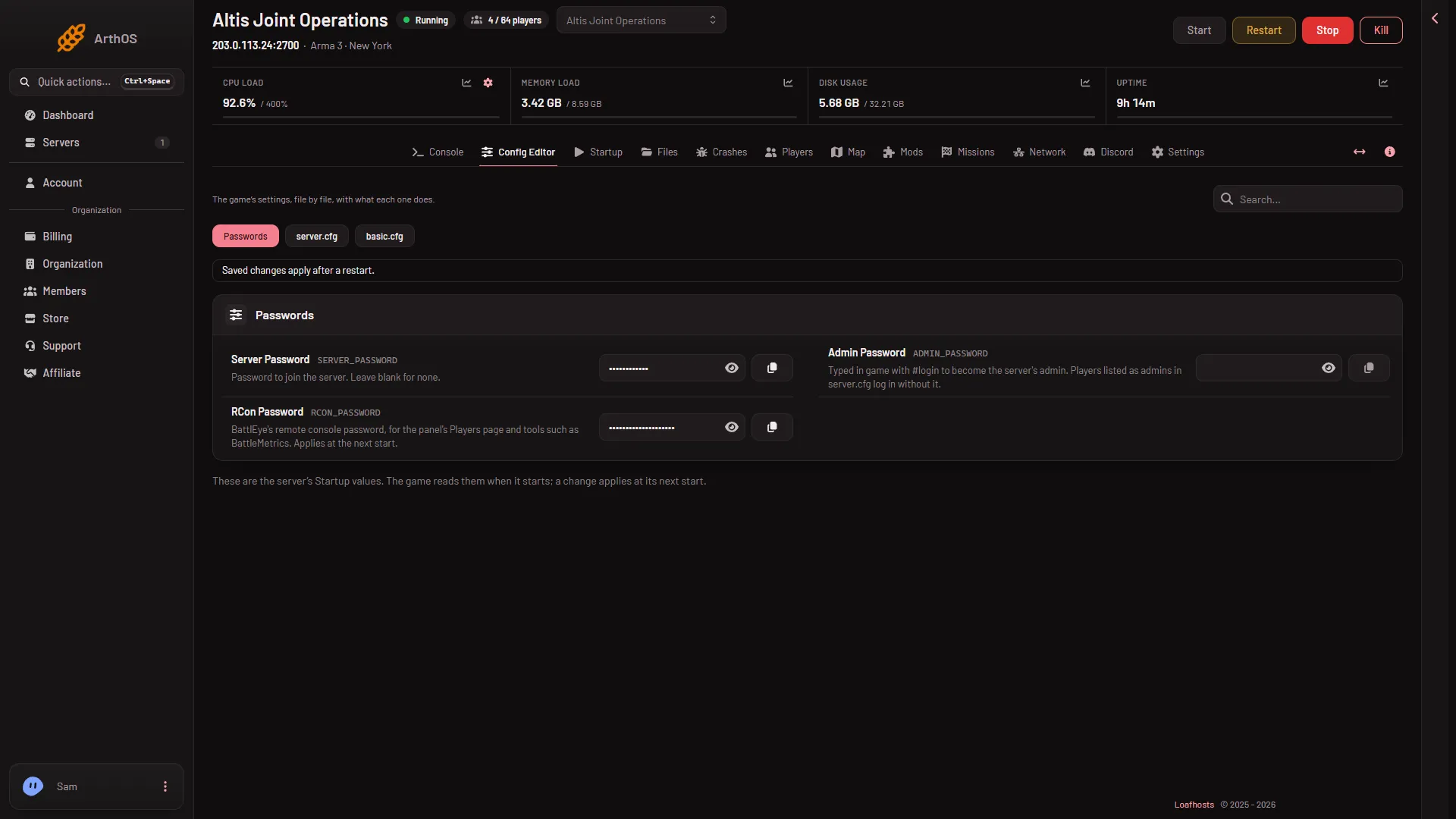
- Passwords
- Admin Password
Choose Passwords (1), then read Admin Password (2).
The Startup page does not hold passwords. It only points to this page, with a link named Open Passwords on the Config Editor.
Log in in game
- Start Arma 3 and join your server. See how to join your server.
- Press the
/key to open the chat window (on a German keyboard: Shift and 7). - Type
#loginand a space, then the Admin Password. Example shape:#login yourpassword. - Press Enter.
The game’s own manual says that once you are logged in you are shown a mission list, and you choose one of the missions to start. If the server already plays a mission, you are simply logged in as admin. Admin chat commands are then available to you in the chat.
Log in without typing a password
You can also list Steam IDs that log in with #login alone. They do not need the password. See admins without the password.
Change the password
Change it under Passwords and restart (a restart drops everyone who is on). The panel writes the new value into server.cfg at every start, so it takes effect at the next start. See change the admin password.
If it does not work
- Nothing happens after you type it. Check that you pressed
/first and typed#login, with the hash sign, then a space. - The password is refused. If you changed it under Passwords a moment ago, the running server still uses the earlier one. A new password applies at the next start. Restart the server.
- You cannot see the value in the panel. Your role may not allow changing passwords. Passwords reach only people who may change them.
- The field is empty. Set one under Passwords, save, and restart.
More about the game: Arma 3 servers.
Sources: Bohemia wiki: Dedicated Server