
















The switch Keep running when everyone leaves is on the Missions page. When it is on, the mission does not end when the last player goes. In the game’s own server.cfg the setting is called persistent. The game’s own note says: with it at 1, “missions will continue to run after all players have disconnected”.
Turn it on or off
- Open the Missions page.
- Under the rotation (the list of missions the server plays, in order), find the three switches. Turn Keep running when everyone leaves on or off.
- Choose Save in the bar that appears.
- Restart the server with Restart at the top of the page. A saved change is read at the next start. The page says so: “Saved. The server plays this rotation from its next restart.” A restart drops everyone who is on, so warn them first with A message to everyone on the Players page.
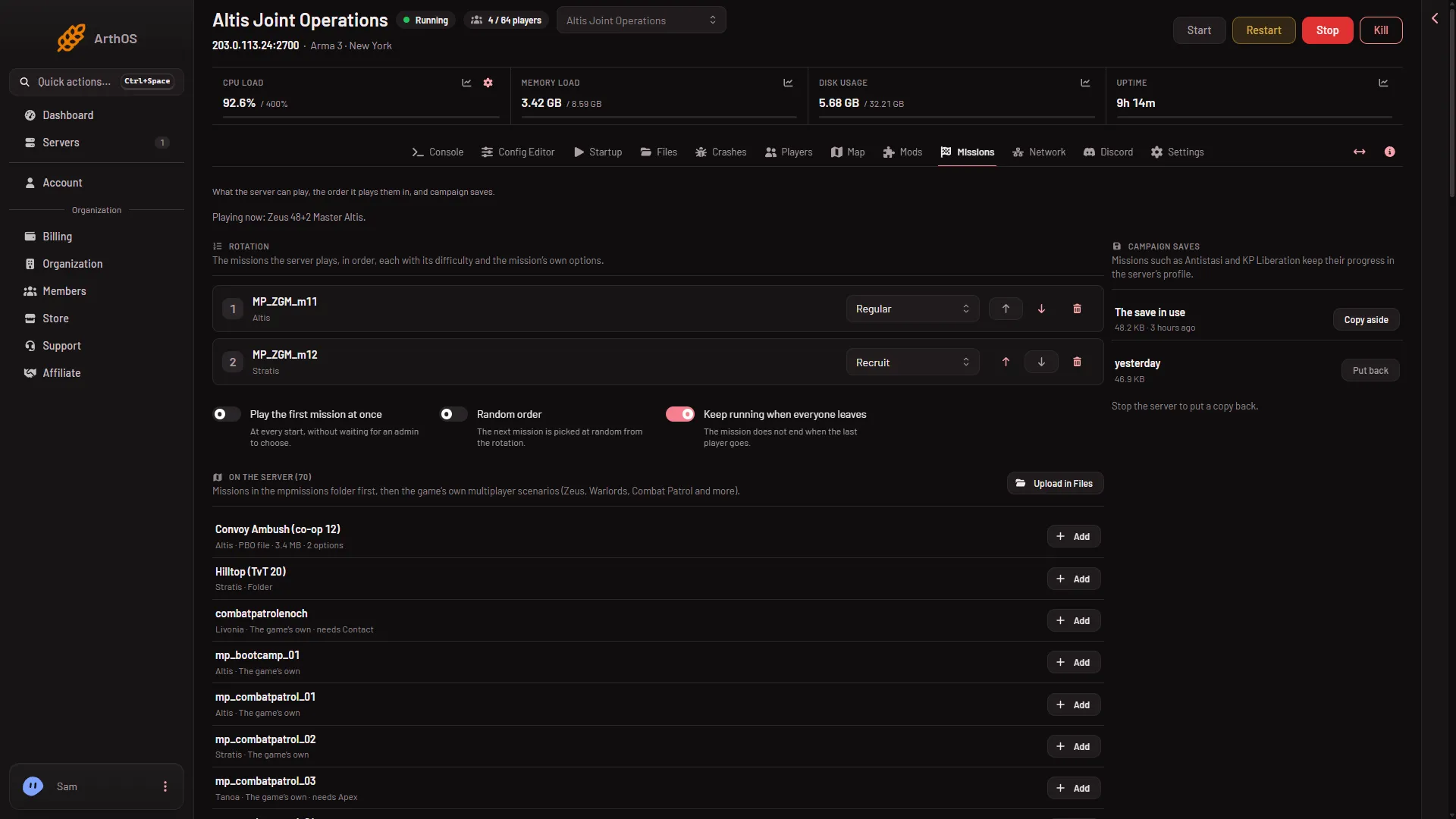
- Keep running when everyone leaves
- Play the first mission at once
The switch is box 1 here; box 2 is the separate switch described below.
The same setting shows in the Config Editor as Keep the mission running when everyone leaves. It is locked there, because the Missions page keeps it. Change it on the Missions page.
A new server made from the store starts with it on.
What it does
With the switch on, the mission keeps running after all players have disconnected. The panel’s help text for it reads: “The mission does not end when the last player goes.”
A running mission keeps using the server while nobody is in it. If you would rather the server stopped itself when nobody plays, see standby and wake link.
It is needed for -autoInit
The start option -autoInit makes the server start a mission by itself, as the first player normally would. The game’s own page says server.cfg must contain Persistent = 1 (its sample config writes persistent = 1), “otherwise the autoInit parameter is skipped”. So if you use -autoInit, keep this switch on.
-autoInit also breaks mission parameters (the choices a mission’s author built into it). The game’s own page says only default values are returned for them. If you use it, the Missions page warns you. Take it out of Extra Start Parameters on Startup to use mission parameters. See autoInit ignores mission parameters.
A related switch
Play the first mission at once (“At every start, without waiting for an admin to choose.”) is a separate switch beside it.
More about the game on Loafhosts: Arma 3 servers.
If it does not work
- The switch is missing or cannot be changed. Your role may not allow changing startup settings. Ask the owner of the server to change your role on the organization page (Settings, Access, Manage roles).
- Save is refused. The
server.cfgchanged since you loaded the page, or has a broken line. Reload the page, or fix the file in the Config Editor. - Nothing changed. Restart the server. The game reads
server.cfgonce, at the start.
Not checked on 2.22.154089 as of 13 November 2026: how a mission’s own respawn settings behave when this switch is on.
Sources: Bohemia wiki: Dedicated Server, Bohemia wiki: Startup Parameters