
















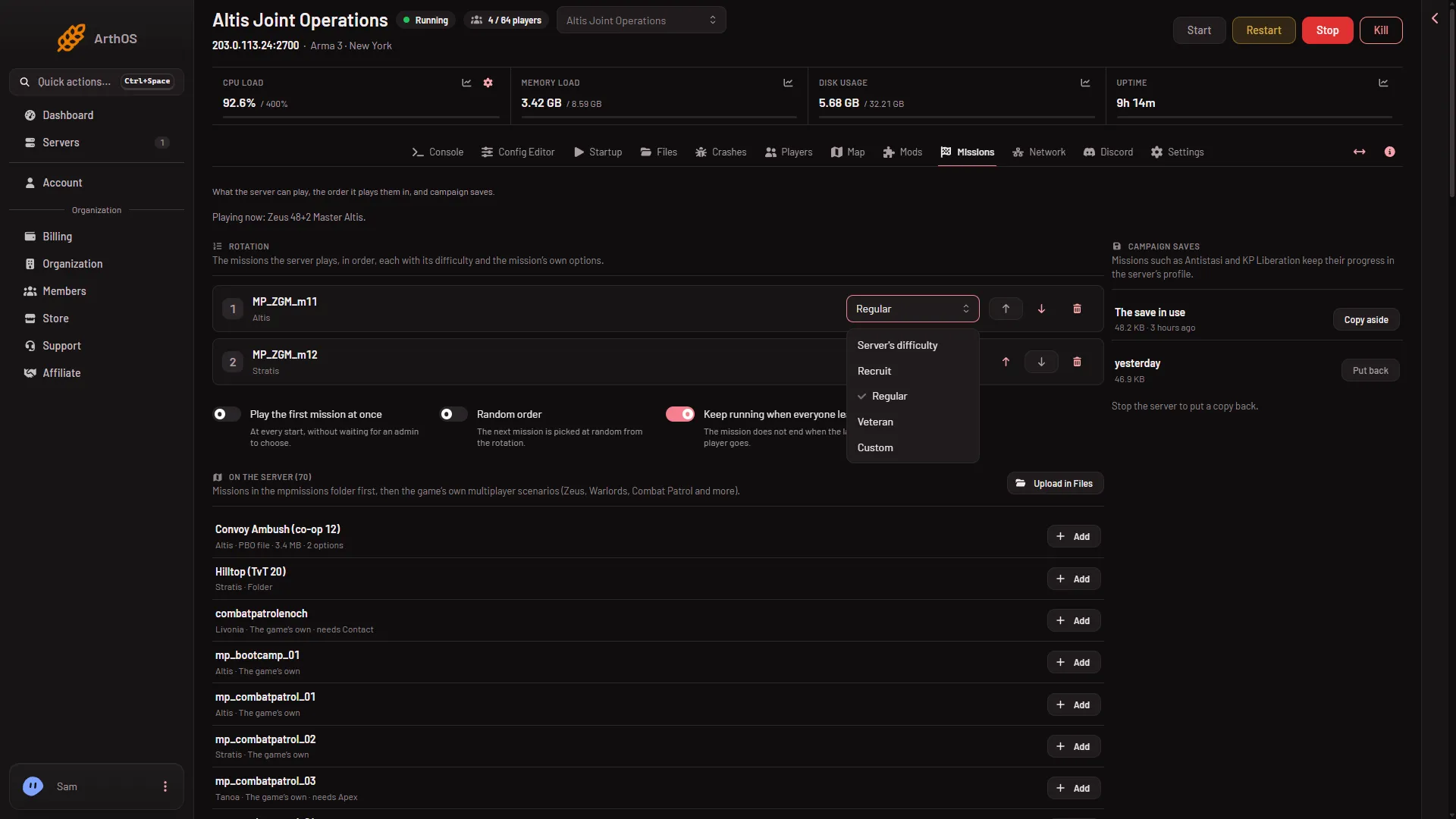
Arma 3 has four difficulty choices: Recruit, Regular, Veteran and Custom. You can set one for each mission in the rotation (the list of missions the server plays, in order), or one for every mission. A server made from the store starts with Difficulty for every mission on Regular.
What the four mean
- Recruit, Regular and Veteran are the game’s three ready-made levels.
- Custom uses the settings stored in the server’s own profile. The panel does not edit them. On a Loafhosts server the profile is in
serverprofile/home/Playerin Files. Bohemia Interactive says the-profilesoption does not work on Linux and the profile then goes to~/.local/share/Arma 3 - Other Profiles, so on a server you run yourself, look there.
One difficulty for one mission
- Open the Missions page.
- In Rotation, find the mission.
- In Difficulty for (mission name), choose Recruit, Regular, Veteran or Custom.
- Choose Server’s difficulty to give the mission no difficulty of its own.
- Choose Save.
- Recruit
- Custom
The list starts with Server’s difficulty, then Recruit (1), Regular and Veteran, and ends with Custom (2).
The page says: “Saved. The server plays this rotation from its next start.” On a running server it says “next restart”. The mission playing now does not change.
One difficulty for every mission
- Open the Config Editor.
- Open
server.cfgand find the Game card. - Set Difficulty for every mission to one of the four choices.
- Choose Save in the bar that reads “Unsaved changes”. On a running server the page then says “Saved. Restart the server to apply the changes.” On a stopped one: “Saved. The changes apply when the server starts.”
The game calls this setting forcedDifficulty. Its help in the Config Editor says “Custom takes the profile’s own settings.”
Which one wins when a mission has its own difficulty and the whole server has a forced one: not checked on 2.22.154089 as of 13 November 2026. Set only one of the two if the result matters. A server made from the store has both: the forced level on Regular, and two sample missions in the rotation, one at Regular and one at Recruit.
By hand
In the game’s own server.cfg, the server-wide level is one line, and a mission’s own level is inside its entry in class Missions:
forcedDifficulty = "Regular";

class Missions
{
    class Mission1
    {
        template = MyMission.Altis;
        difficulty = "Veteran";
        class Params {};
    };
};
On Loafhosts, use the pages above: the Missions page keeps the class Missions block.
Change the difficulty of the mission playing now
- Open the Players page.
- In Mission, choose Play another mission.
- Pick the mission. It can be the one already playing.
- In Difficulty, choose a level. The server’s own leaves it as the server has it.
- Choose Play it now.
If it does not work
- The level is not what you expected. A mission can have its own level and the server can have a forced one. Which wins is not checked (see above). Set only one.
- Mission options still do nothing. The server may start with
-autoInitin Extra Start Parameters. That makes the game ignore mission parameters, the choices a mission’s author built in. See the -autoInit notice. - The change is not there after Save. Restart the server with Restart at the top of the page. A saved rotation is used from the next start. A restart drops everyone who is on.
- You cannot find the server-wide level on the Missions page. It is not there. The Missions page keeps the rotation. Use the Config Editor for the server-wide level.
More about the game: Arma 3 servers.
Sources: Bohemia wiki: Server Config File, Bohemia wiki: Startup Parameters