
















If a mission you uploaded does not show on the Missions page, the cause is almost always its name or its place. The panel lists a mission only when it is a .pbo file or a folder directly inside mpmissions, and its name has the form name.world with plain characters.
How the panel lists missions
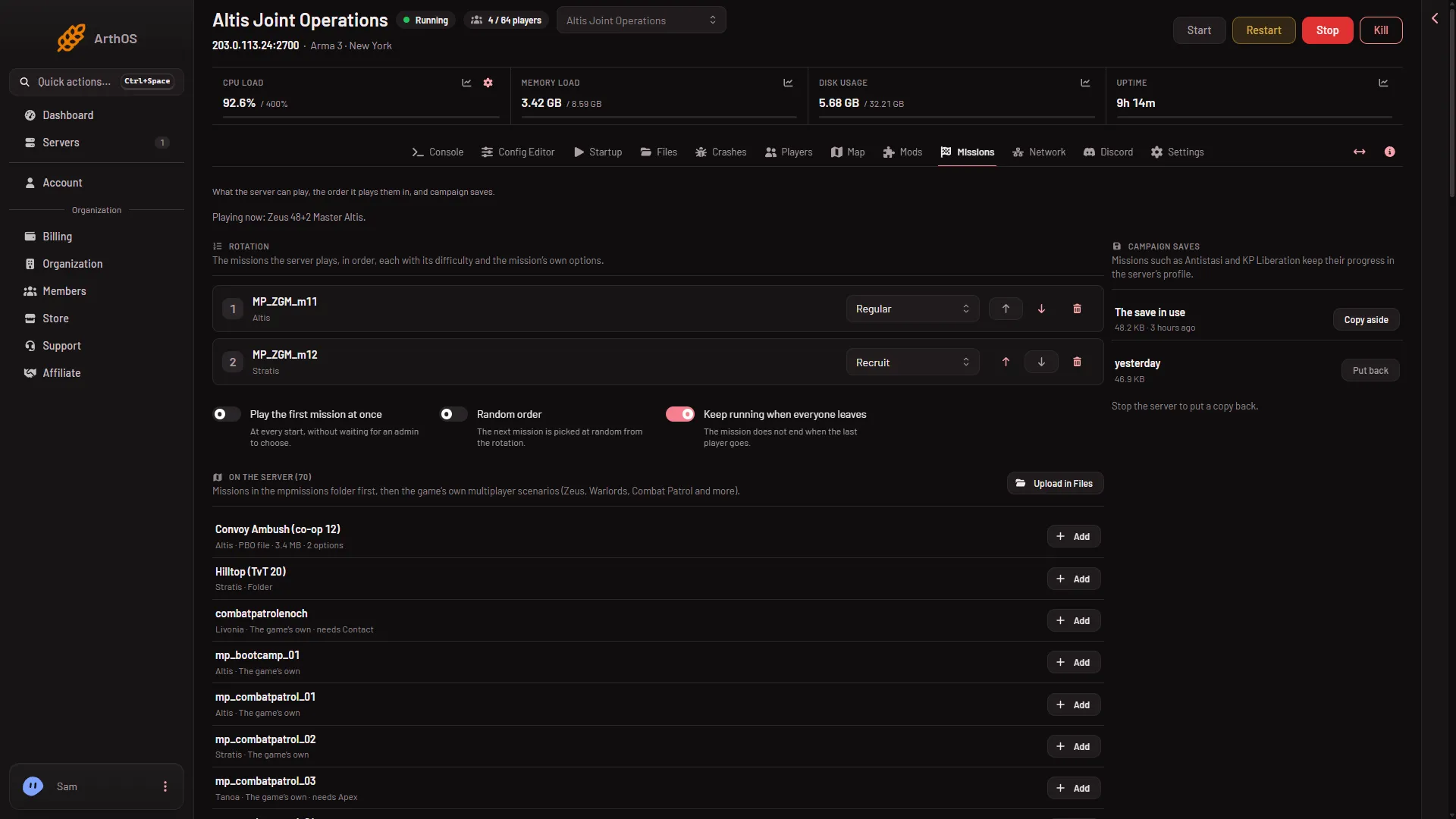
Open Missions and read the list On the server. The panel shows:
- Missions in the
mpmissionsfolder first. - Then the game’s own multiplayer scenarios, such as Zeus, Warlords and Combat Patrol, marked The game’s own.
A mission from mpmissions has a chip that says PBO file or Folder.
- A PBO file
- A mission folder
- Upload in Files
The list On the server shows the file type under each name: a PBO file (1) and a folder (2). Upload in Files (3) takes you to the folder to upload into.
Check the name
A mission’s name is name.world. The world is the map the mission is built for. The panel reads the world from the text after the last dot, and it reads it as the world’s class name, not as the name you see in the game. These are the ones the panel knows:
altis,stratis,tanoa,maldenenoch(Livonia)vr(Virtual Reality)stozec(Bohemian Forest)gm_weferlingen_summer,gm_weferlingen_winter,cam_lao_nam,vn_khe_sanh,vn_the_bra,sefrouramal,spe_normandy,spe_mortain,tem_anizay,lingor3
Never use the display name (for example Livonia or Virtual Reality) as the ending. For which map a mission needs, see which world to play.
The panel skips a name that does not follow these rules, and says nothing about it:
- It has a dot, and the dot is not the first character.
- It has only letters, digits,
_,-,.and@. - It has no spaces, no brackets and no
... - It is at most 120 characters long.
Some examples:
antistasi_plus.tanoais listed.My Mission.altisis not listed. It has a space.coop_escapeis not listed. It has no world.escape (1).altis.pbois not listed. It has a space and brackets. Browsers add things like(1)when you download the same file twice.
For a PBO (a packed mission file), the name is the file name without .pbo. Rename the file in Files so it follows the rules, for example coop_escape.altis.pbo. Use the world the mission was made for. If you are not sure, see which world to play.
Not checked on 2.22.154089 as of 13 November 2026: whether the game on Linux needs lower case mission names. The panel matches names without regard to case.
The rules above are the panel’s own. What the game itself needs from a mission file on a server you run by hand is not checked here.
Check the place
- Open Files.
- Open the folder
mpmissions. - Check that the PBO or the mission folder is directly inside it. A mission in a subfolder, such as
mpmissions/pack/coop_escape.Altis.pbo, is not seen. - A mission folder must be named
name.worldas well, and it should hold the mission’s files, such asmission.sqm.
The panel only lists files that end in .pbo and folders. A .zip or .rar file is ignored. Unpack it first, then upload the PBO or the folder.
If the list is empty, the panel says “No missions found. Upload a .pbo or a mission folder into mpmissions.” and gives a link, Upload in Files.
A busy folder
The panel reads the first 200 entries of mpmissions. If the folder holds more than that, the missions past it are not read. Remove the missions you do not use.
The mission is there, but its options are missing
The panel reads a mission’s title and options from its description.ext. A mission can be listed and still have no options. When you add it to the rotation (the list of missions the server plays, in order), a note under it may say:
- “its parameters could not be read: it is not a mission file the panel can read”. The PBO may be damaged, or its header is bigger than 2 MB.
- “its parameters are made by macros the panel cannot read; edit them in server.cfg”.
Neither note removes the mission from the list. See add a mission to the rotation.
Wait a moment
The page checks the folder again every 20 seconds while the server is running. After an upload, wait a little or reload the page.
If it does not work
- Still not listed after the name is right: check that the file is directly in
mpmissionsand that the upload finished. - The Missions tab is missing: your role on the panel may not allow reading the startup settings.
- The mission is listed but players cannot play it: look at the note “needs …” on its row. The world may need a DLC. See a mission that needs a DLC.
More about the game: Arma 3 servers.