
















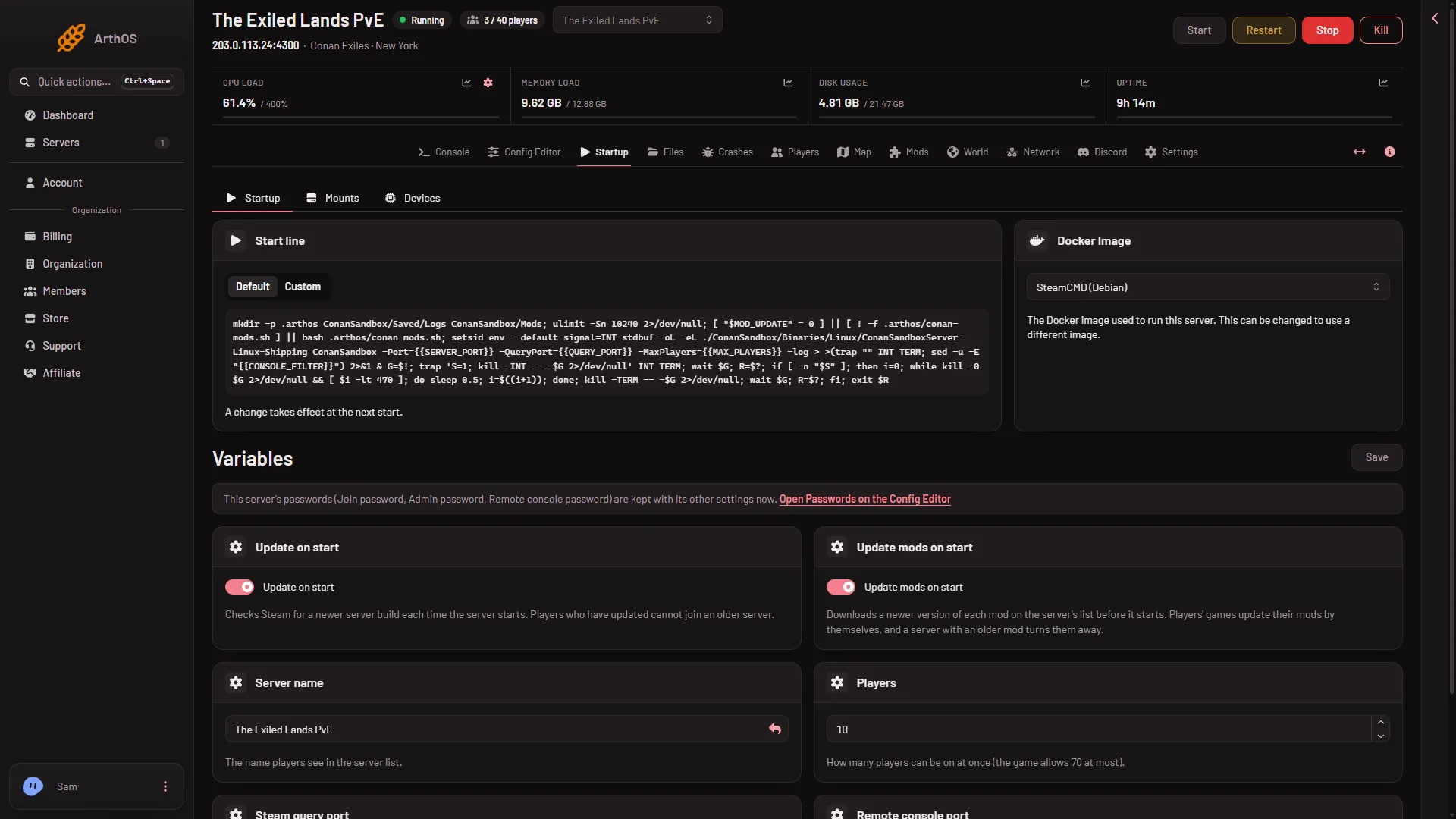
The Startup page holds how the server is launched. It has a Start line card, a Docker image card and Variables with a Save button. Most changes here apply at the next start. Above the cards, the page also has the sub-tabs Mounts and Devices. This guide does not cover them.
- Update on start
- Server name
- Passwords are on the Config Editor
- Save
The numbers below are used in the sections that follow: Update on start (1), Server name (2), the note about passwords (3) and Save (4).
Start line
The Start line card shows the command that starts the game. It has two choices, Default and Custom. Keep Default. A Custom line replaces the one the panel builds, so it can drop the ports, the player limit and the mod update step the panel puts in the default line. Use the default puts the panel’s line back. The card says: “The line runs inside this server’s container, with its plan’s memory, CPU and disk, and cannot raise them.”
The default line:
- makes the folders the server needs,
- lets the game open many files at once,
- updates mods first, unless Update mods on start is off,
- then starts the game with its game port, query port, player limit and the
-logoption.
A change to the line takes effect at the next start. Undo changes and Use the default put it back.
The line carries no password.
Docker image
The Docker image card offers one choice for Conan Exiles, SteamCMD (Debian). It is the ready-made environment the game runs in. There is nothing to change.
Variables
Press Save under Variables (or Ctrl+S). The panel shows “Variables updated.”
- Update on start. On by default. It checks Steam for a newer server build at each start. Players who have updated cannot join an older server. See update the server on start.
- Update mods on start. On by default. It downloads a newer version of each mod on the list before the game starts.
- Server name. The name in the server list, up to 60 characters. Rename Server on Settings is a different thing: it changes only the name the panel shows. See change the server name.
- Players. This variable sets how many players can be on at once, 1 to 70. It is not the Players page. See change the player limit.
- Steam query port and Remote console port. Shown, not editable. The help text says “Set by the panel.”
Some variables are hidden because customers never change them.
Where the passwords went
The page does not list the passwords. It says they are kept with the server’s other settings, and offers Open Passwords on the Config Editor. The join password, admin password and remote console password are all on the Passwords tab there. See the join password.
When changes apply
A changed player limit and the ports are on the start line, so they apply at the next start. The server name is written into the game’s files at every start. Restart after a change with Restart at the top of the page. A restart drops everyone who is on, so warn them first with Restart with a warning on the Players page, as long as the game answers the panel.
If it does not work
- Save is refused. A value broke its rule. A name over 60 characters or a player limit outside 1 to 70 is refused.
- A value is greyed out. The panel sets the ports itself.
- Nothing changed in the game. The server has not been restarted since you saved.
More about the game: Conan Exiles servers.