
















If the world will not load after you put a backup back or uploaded a world, or the server starts with an empty world, the world file is the cause. The server plays one file, ConanSandbox/Saved/game_0.db. The name must be exactly that, in lower case. When you use Put back or Start a new world, your old world is not lost: the panel sets it aside first. If you upload a world by hand, rename the old file first (see the last steps below).
How the game finds its world
The whole world is one database file. The game reads game_0.db in ConanSandbox/Saved. On a Linux server the name must be all lower case. Funcom says to make sure the file name is all lower case.
Next to the file the game can keep two more: game_0.db-wal and game_0.db-shm. They hold recent writes and go away after a clean stop. They belong to one database, so the panel moves them together with it when it sets a world aside. Do not leave them beside a different database.
See what the panel says
Open the Crashes page and open the newest start. If the game could not use the file, you see the finding The world file could not be read or written. Its fix reads: “The world is one database file. Put back one of the game’s backups from the World page (it makes one every few minutes), then start again.”
The panel looks for lines such as “database disk image is malformed”, “unable to open database” and “disk i/o error”.
Put back an earlier world
- Stop the server. The game keeps its world open while it runs. If you try while it runs, the panel says to stop the server first.
- Open the World page.
- Under Backups, choose Put back next to a backup.
- Confirm. The panel says “The world from (name) is played from the next start. The world now is set aside first, so it can be put back too.”
- Start the server.
The panel moves the world you had, with its -wal and -shm files, to a name like game_0_panel-before-put-back- followed by a time stamp and .db. Then it copies the backup over game_0.db. The game’s own backup stays where it was.
If the first backup does not load, stop the server and try an older one. Each Put back sets the current file aside, so nothing is overwritten for good.
Get a world back from the set-aside list
Below the backups, the card Set aside by the panel (1) holds every world the panel moved. Each row has Put back and Delete (2).
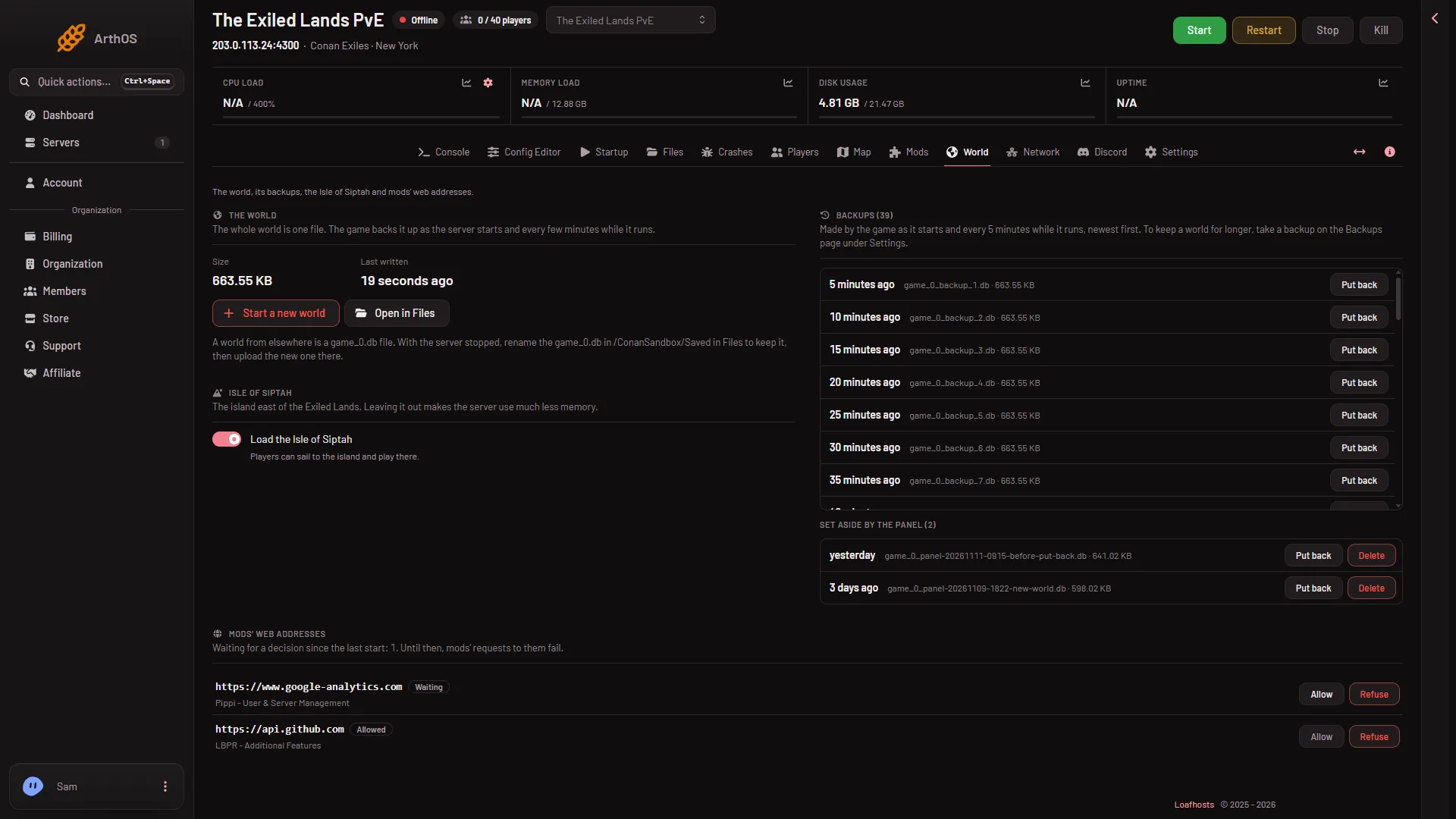
- Set aside by the panel
- Delete
To return to the world from before your last change, stop the server, choose Put back on the newest set-aside row, and start.
If the disk is the problem, see Conan Exiles server disk is full.
If you uploaded a world yourself
The World card says: “A world from elsewhere is a game_0.db file. With the server stopped, rename the game_0.db in (folder) in Files to keep it, then upload the new one there.”
- Stop the server.
- Choose Open in Files on the World page.
- Rename the current
game_0.dbto keep it. Rename its-waland-shmfiles too, with the same new name, if they are there. - Upload the new world with New, then File from Upload.
- Check the name is exactly
game_0.db, in lower case. Rename it if the file came asGame_0.DBor similar. With a wrong name the game may start with a new world instead of yours. Not checked on Enhanced, server build 25792439 as of 13 November 2026. - Start the server.
Using Start a new world instead sets the world aside and lets the game make a fresh one at the next start. A new world’s first stop can take up to 3 minutes 43 seconds.
If it does not work
- The panel will not let you act. Stop the server first. You also need a role that allows changing files.
- The finding returns after a Put back. Try an older backup, or a set-aside world.
- “that backup is not on the server any more”. The file is gone from the server. Reload the World page.
- Nothing is left to put back. The game makes a backup at every start. The list may be empty on a server that never ran.
More about the game: Conan Exiles servers.
Sources: exiles-enhanced.inflexion.io: Linux