
















To run an autosave, open the World page, find the autosave in Saves, and choose Run this from the next start. Then restart the server. The server loads that autosave. Your current world stays on the server as a save, so you can go back to it.
What an autosave is
The game writes its own autosaves while it runs. They are files named like _autosave1.zip in the saves folder. A new Loafhosts server autosaves every 10 minutes and keeps 5 of them. When all five are used, the game writes over the oldest. So an autosave is a recent copy, not a long history. Both numbers are in the Config Editor, in the group Saving: Autosave every (minutes) and Autosaves kept. See saves and autosaves.
Run an autosave
Before you start: if the world is running and you want to keep it as it is now, use Save a copy now on the World page first. It saves the running world under a name you choose.
- Open the World page.
- In Saves, find the row with the tag Autosave. Autosaves are the rows whose names start with
_autosave. - Open the menu More for (name) on that row.
- Choose Run this from the next start.
- Restart the server. A restart drops everyone who is on, so warn them first with Message everyone on the Players page.
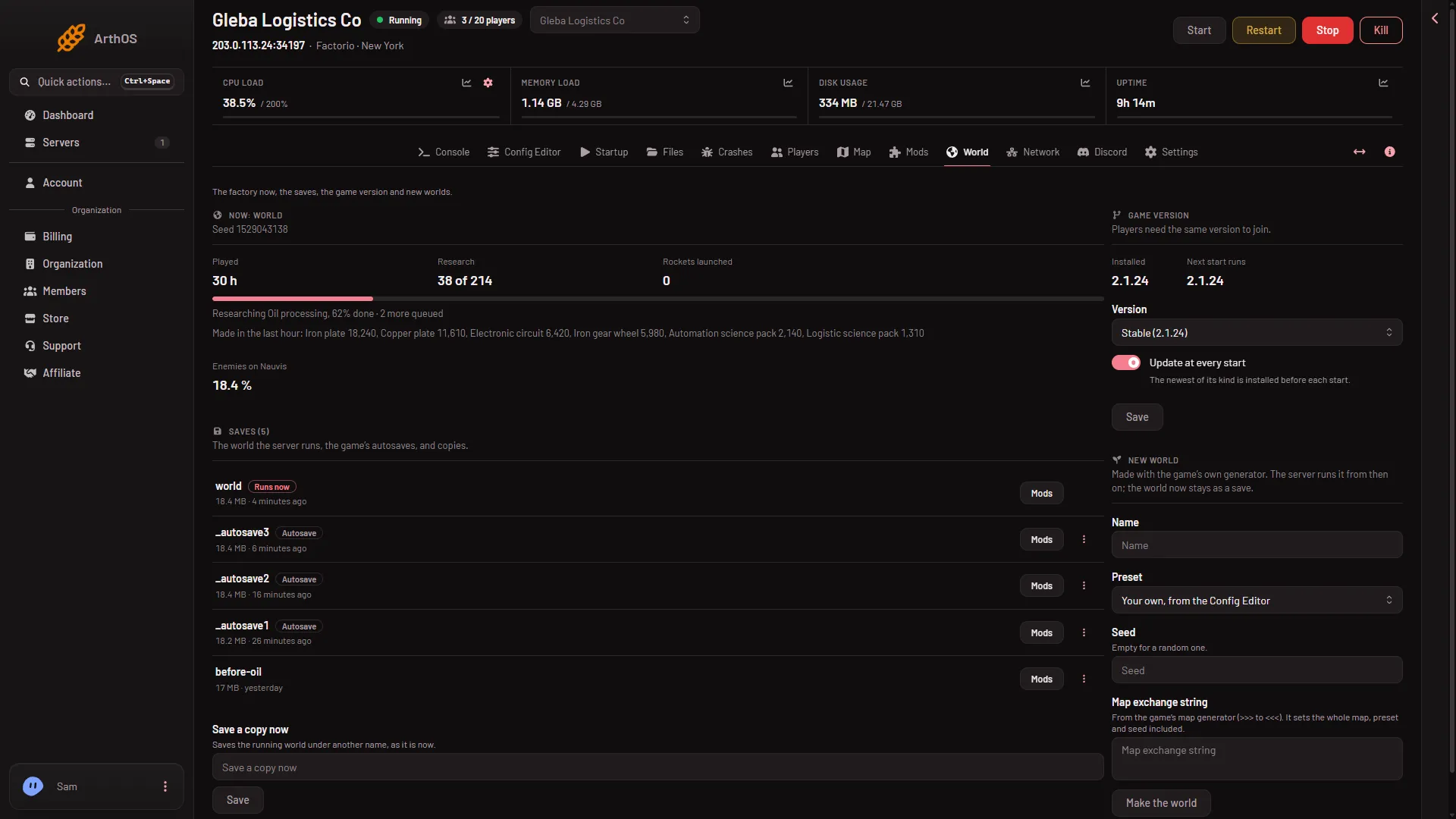
- The Autosave tag
- The save that runs now
The autosave row (1) shows the tag Autosave; its menu is the dots at the right end of the row. The save that runs now (2) is the one with the tag Runs now.
The panel sets World to the autosave’s name. The change takes effect at the next start, not at once. Until you restart, the server keeps running the world it has now.
Check that it loaded
After the restart, open the World page again. The autosave row now has the tag Runs now. The Console shows the game loading the map, and the server is ready when it prints “Starting RCON interface”.
Go back to the old world
Do the same thing on the row of your old save, usually world, and restart. Nothing was deleted by switching. Use Delete on a save only when you want it gone. The running save cannot be deleted.
By hand
The world the server runs is the World value on the Startup page. It is the save’s file name without .zip. For _autosave3.zip the value is _autosave3. Change it and restart. The game’s own command line takes a save path the same way: --start-server saves/_autosave3.zip (see the command line page).
If it does not work
- The menu has no Run this from the next start. Your role may not allow changing the server’s startup settings.
- The server started a new empty world. The name in World has no save with that name. Fix the name, or pick a save from the list. A name with no save makes a new world at the next start.
- The world did not change after you chose it. It loads only at the next start. Restart the server.
- The server does not start. The autosave may have been made with mods or a newer version. See save not loading.
More about the game: Factorio servers.